45
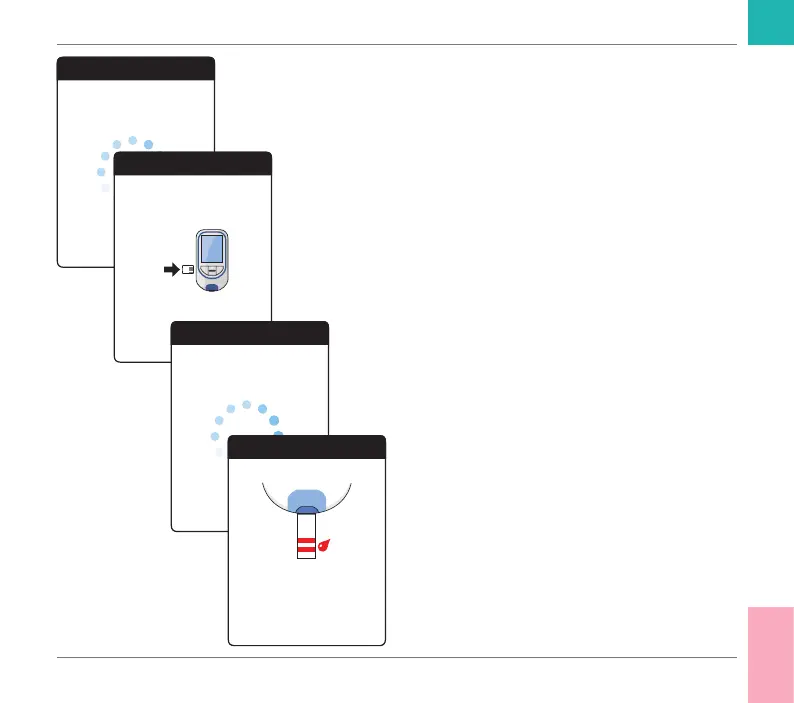
• The meter reads the strip information (pro-
vided by the barcode on the test strip) and
checks if it matches code chip information
already stored in the meter.
• If you haven’t inserted the code chip yet
or in case of a mismatch, you will be
prompted to insert the correct code chip.
• When the test strip check has been com-
pleted successfully, the meter indicates
that the test strip is warming up.
• Once the warming-up process is complete,
the meter displays the test strip and blood
drop symbols. These symbols and a beep
tone indicate that the meter is ready to
perform the test and is waiting for you to
apply blood.
At the same time, a 180-second countdown
begins. You must apply the drop of blood
to the test strip within this time, otherwise
you will receive an error message.
Test
Reading strip...
Test
Insert code chip...
330
Test
Test strip warming up...
Test
Apply blood
seconds remaining...
30
Testing a Capillary Blood Sample
CoaguChek INRange User’s Manual



 To Next Page