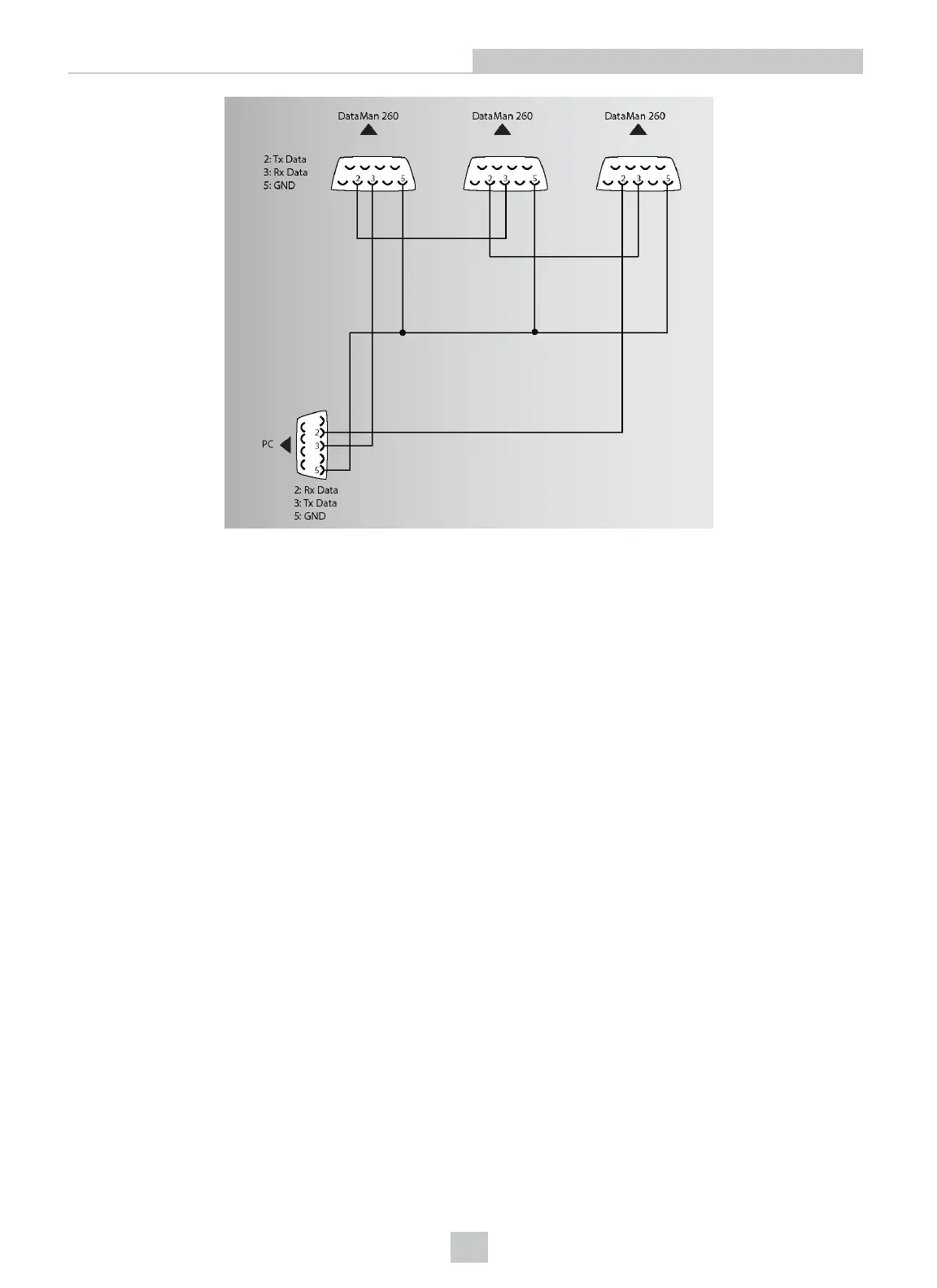
You must connect each DataMan 260 to DataMan Setup Tool using a USB connection and set the DataMan for multi-
port operation. To configure a DataMan 260 for multi-port operation, click on the Enable Multi-Port (RS-232 Sharing)
check box in Communication Settings.
There is no guaranteed delivery order when multiple readers transmit data using a multi-port connection; read results
may arrive at the PC in any order. You can configure each DataMan 260 reader in a multi-port connection to add
identifying data to each read result. Your PC application can then determine which reader produced a specific read
result.
To do this, check the Standard Formatting Enabled box (for each symbology that you are using) in Data Formatting,
and enter text in the Leading Text field. (You can also add trailing text by entering text in the Trailing Text field.)
You can obtain the best results when using multi-port connections by keeping the following usage guidelines in mind as
you design your system:
l The maximum cable length between any two DataMan 260 readers or between the PC and any DataMan reader
should be no greater than 15 meters.
l There is no fixed limit to the number of DataMan 260 readers that you can connect to a single PC. Each reader
introduces a delay of about 100 ms when it retransmits received serial data. If you have 5 readers, this means
that there will be a 400 ms delay between the time the first reader in the chain transmits data and the PC receives
it.
l Each DataMan 260 reader must receive a hardware trigger signal on its Input 0 line. You can wire the input ports
to a common trigger signal or you can provide individual triggers for each reader.
l Each DataMan 260 reader must be individually configured for multi-port operation, and you must perform this
configuration using a USB connection.
l If any reader in the multi-port chain loses power or becomes disconnected, then no data from any other reader
will be transmitted.
45
Setting Up Your DataMan 260
Artisan Technology Group - Quality Instrumentation ... Guaranteed | (888) 88-SOURCE | www.artisantg.com








 To Next Page