FUNCTIONS
18
CONTENTS
OTHER, ROLLER BLINDS,
LIGHTS, IRRIGATION,
AUTOMATION
10/04 16:35
Press to access the relative sections.
0/5
2/2
1/2
3/4
OFF
Oce 1
Oce 2
Conference room
Relax room
OFF
OFF ON
ON
ON
ON
OFF
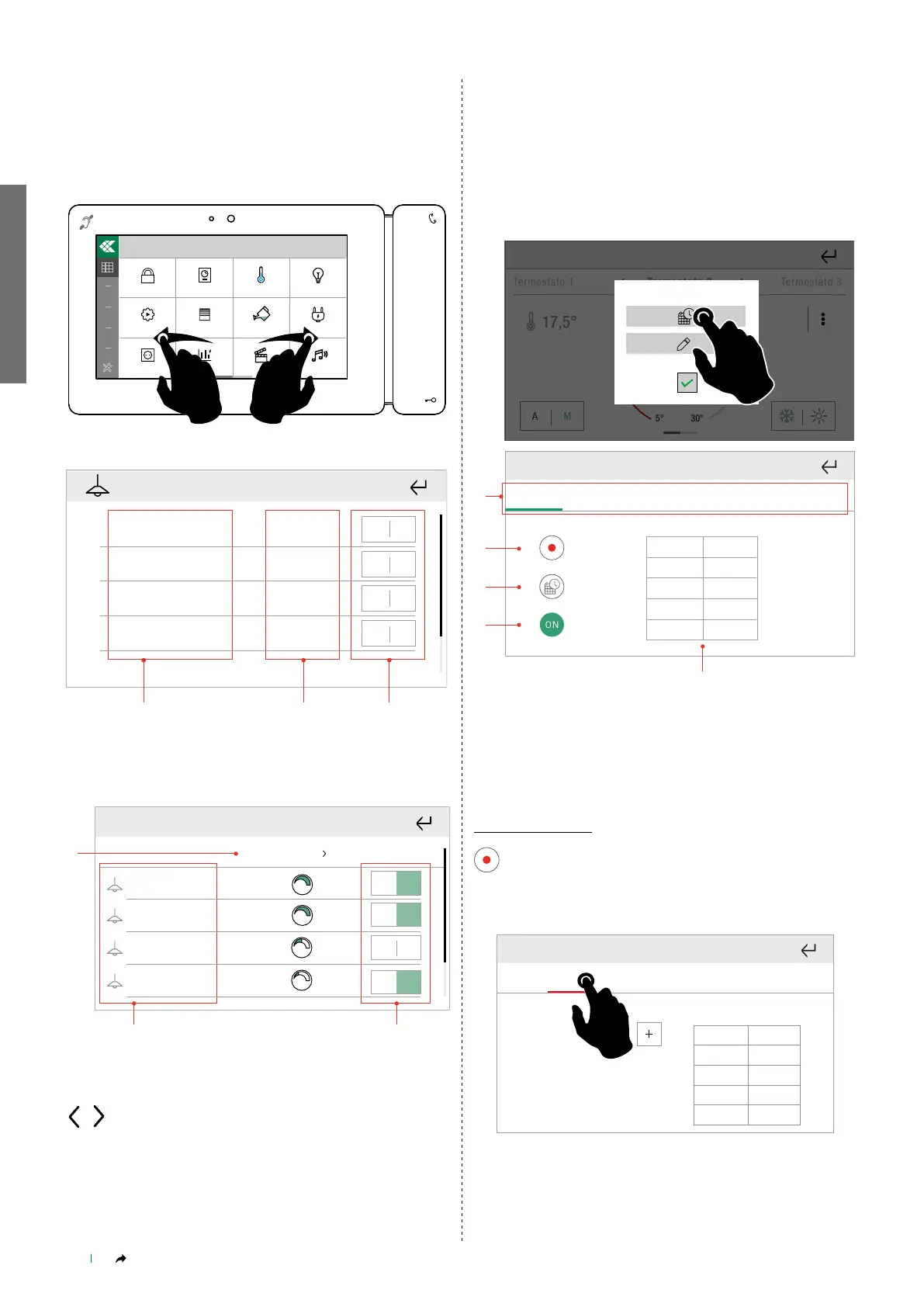
5. List of rooms
6. Number of outputs active in relation to the total within a specified
room
7. General command for all outputs in a room
1
OFF ON
Oce 1 Oce 2
2
3
4
OFF ON
OFF ON
OFF ON
40%
20%
100%
100%
1. Selected room
2. Outputs corresponding to the selected room
3. Commands relating to individual outputs in the room
Use the arrows to navigate between available rooms.
OFF ON
1. 2. 3.
OFF ON
OFF ON
OFF ON
40%
20%
100%
100%
OFF ON
1. 2. 3.
OFF ON
OFF ON
OFF ON
40%
20%
100%
100%
FUNCTION SCHEDULING
You can set automatic execution, on a daily basis, of the commands
relating to the room or to an individual output.
Press and hold the desired room or output to access the advanced
functions.
Select "Scheduling".
Termostato 2
Termostato 3Termostato 1
17,5°
5° 30°
A M
20°
Mon
Tue Wed Thu
Fri
Sat
Sun
Prog
Time
Status
ON19:00
5.
1. Days of the week bar
2. Enter programming mode
3. Copy schedule
4. Enable/disable schedule
5. View previously set schedule
New scheduling
Enter programming mode
2.
1.
3.
4.
6. 7.
From To °T
24:00 18°
5.
00:00
Mon
Tue Wed Thu
Fri
Sat
Sun
Select the day of the week for which to program the schedule
» The day being programmed is highlighted in red.
Wed Thu
Fri
Sat
Sun
Mon
Tue
Time Status
Press + to add a new schedule
» The cell being programmed is highlighted in blue.



 To Next Page