ALARM
9
CONTENTS
______________________________________________________________
BURGLAR ALARM
√ Alarm in progress
1.
2.
3.
4.
5.
25/01/2020 17:49:41
Allarme zone furto
Area: Cantina
Zona: Porta ingresso
ID: 3
Disins.
Burglar zone alarm
Area: Cellar
Zone: Entrance door
Deactiv.
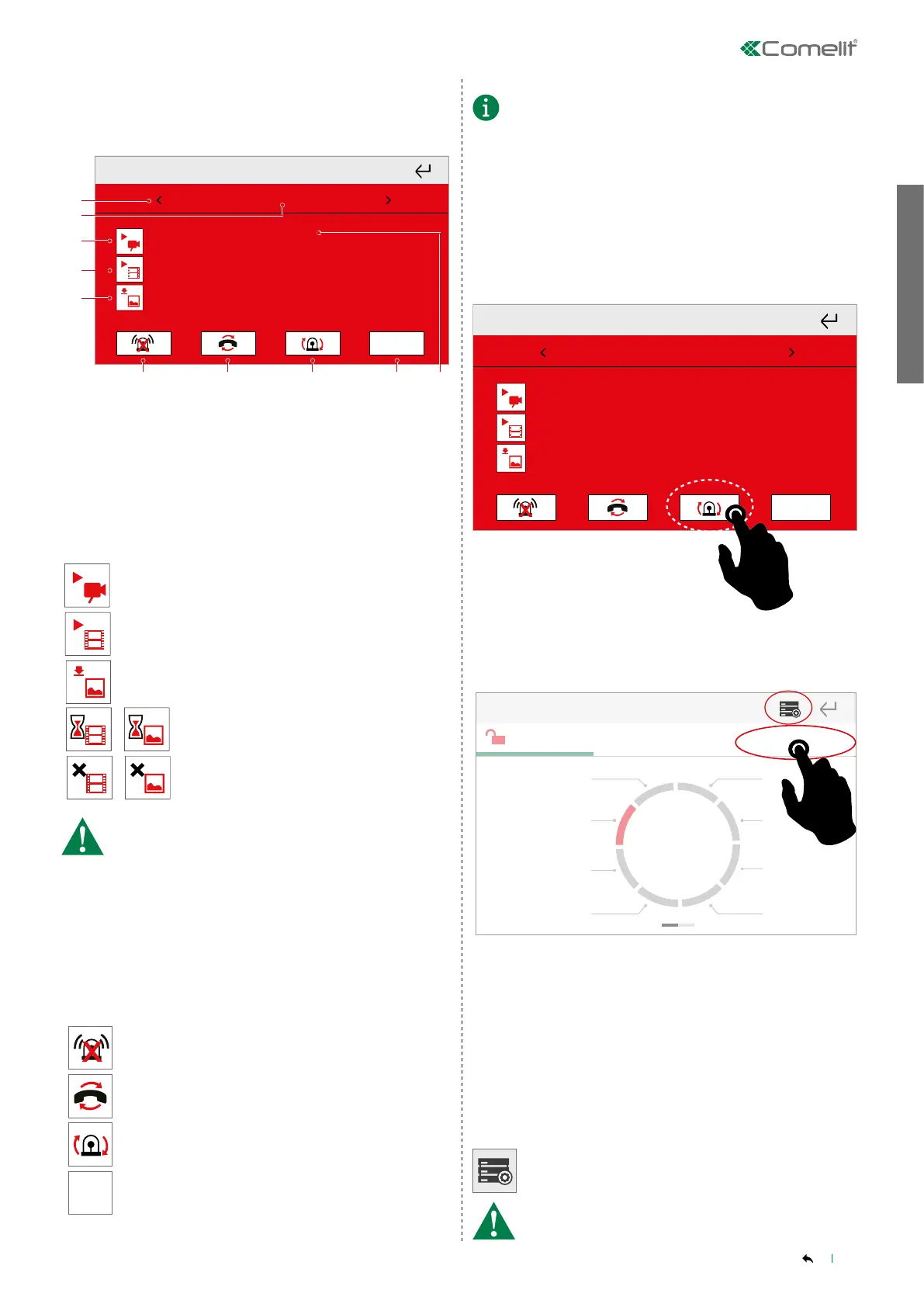
1. Scroll through events
2. Date and time of selected event
3. View images in real time
4. View recorded video
5. View recorded images
6. Stop alarms
7. Reset telephone calls
8. Reset alarm
9. Deactivate alarms
10. Event details
Press the icon to view real-time images from the
camera connected to the alarm zone.
Press the icon to view the video recorded when the
alarm was triggered.
Press the icon to view the images captured in pre-
alarm* and alarm mode.
Video / Images loading
Video / Images not available
• To view images and videos, at least one camera must
be connected and associated with an area of the alarm
system.
• The functions can be configured and activated via Safe
Manager.
• *The pre-alarm images will only be captured if the "pre-
alarm" function has been assigned to the camera. The
number of images captured during the pre-alarm phase
will depend on the pre-alarm time; with a pre-alarm time
of zero, images will only be captured in alarm mode.
DESCRIPTION OF ALARM CONTROLS
Press to
stop
the selected alarm (the system remains
armed).
Press to
clear
the emergency telephone calls log.
Press to
reset
the alarms memory.
Disins.
Press to disarm the alarm system.
The Alarms memory menu keeps track of the alarm in
progress.
Paragraph Alarm-Settings-Event log
______________________________________________________________
RESET ALARMS
The alarm system can be reset in any of the following 3 ways:
1. Press the Reset alarms icon on the alarm screen.
» Reset completed
25/01/2020 17:49:41
Allarme zone furto
Area: Cantina
Zona: Porta ingresso
ID: 3
Disins.
Deactiv.
Burglar zone alarm
Area: Cellar
Zone: Entrance door
2. Access Quick commands
from the main screen (if set previously)
or
from the
Alarm Menu and press the Reset alarm icon.
» Reset completed
Disarmed
Activation control
Front garden
Garage 1
Garage 2
Basement
room
Cellar
Back garden
Day zone
Night zone
Full
activation
Quick commands
3. Perform an ACTIVATION (even partial) of the areas in alarm.
______________________________________________________________
ALARM MENU
Each time an ALARM function parameter is changed, it will be relayed
to the control panel.
Press the icon to access the menu.
Inserimento
totale
OFF
5.
7.
6.
8.
1. 2. 3. 4.
The procedure requires the user password for the alarm
control panel!



 To Next Page