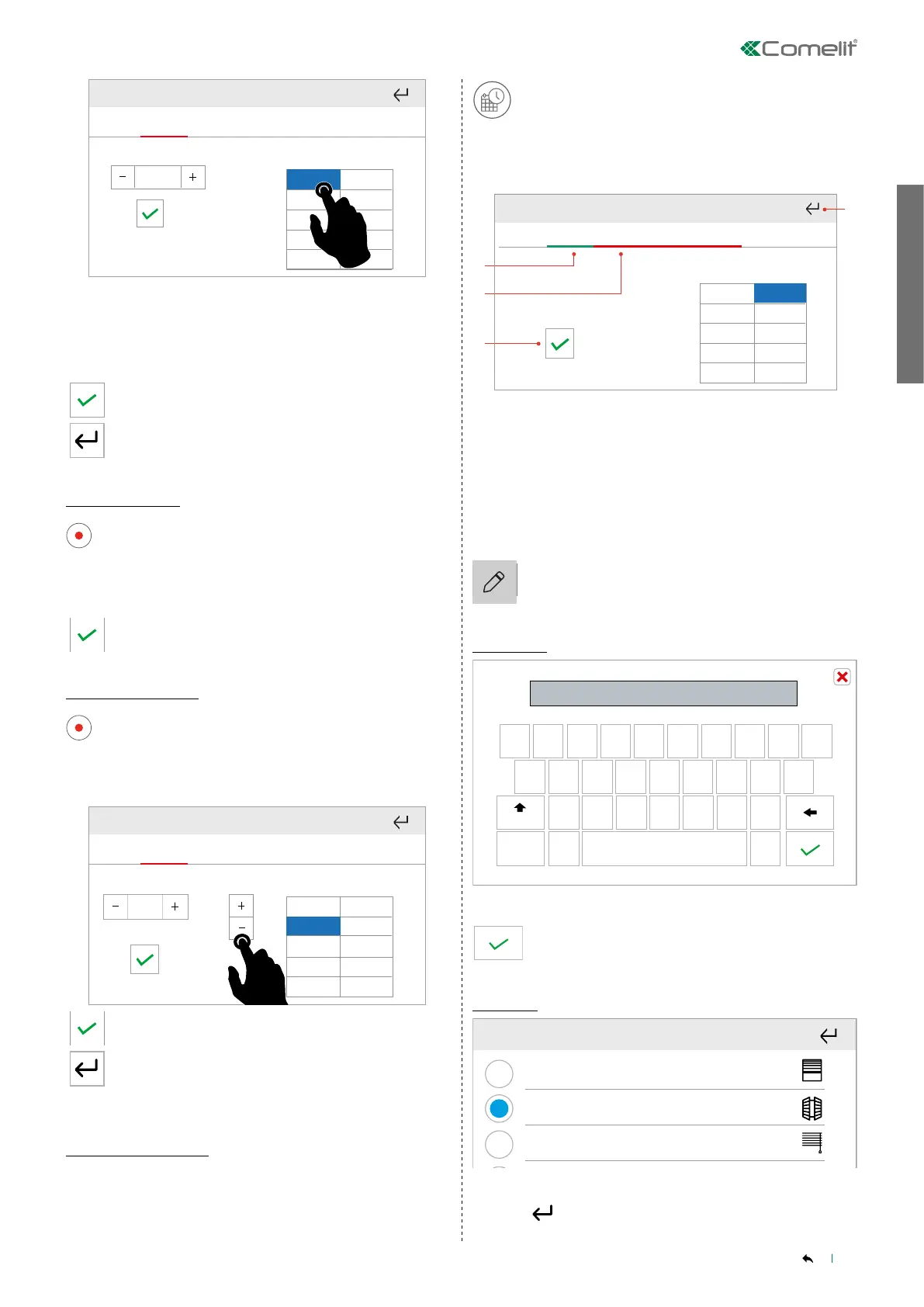
SCHEDULING
19
CONTENTS
Time Status
00:00
OFF
00:00
Wed Thu
Fri
Sat
Sun
Mon
Tue
Set the command send time using - and +
Proceed with the next field, selecting the “Status” cell
» The cell being programmed will be highlighted in blue.
Set the output status using - and +
Confirm
Or exit to cancel
Edit scheduling
Enter programming mode
2.
1.
3.
4.
6. 7.
From To °T
24:00 18°
5.
00:00
Mon
Tue Wed Thu
Fri
Sat
Sun
Select the cell to be edited
» The cell being programmed will be highlighted in blue.
Proceed with the changes
Confirm
Delete scheduling
Enter programming mode
2.
1.
3.
4.
6. 7.
From To °T
24:00 18°
5.
00:00
Mon
Tue Wed Thu
Fri
Sat
Sun
Select a cell in the row you want to delete
» The cell being programmed will be highlighted in blue.
Press - to delete
21:00
ON
OFF
Time Status
Wed Thu
Fri
Sat
Sun
Mon
Tue
23:15
23:15
Confirm
Or exit to cancel
Copy programming
The "Copy program" function allows quick scheduling for the other
days of the week using previously saved schedules.
1. Find the day you want to copy and press the “Copy
schedule” icon
2. Select the days to which you want to apply the
programming
» The days being programmed are highlighted in red.
3. Confirm
2.
1.
3.
4.
6. 7.
From To °T
24:00 18°
5.
00:00
Mon
Tue Wed Thu
Fri
Sat
Sun
Time Status
21:00
ON
1.
2.
3.
Wed Thu
Fri
Sat
Sun
Mon
Tue
CHANGE NAME AND ICONS
The name assigned to rooms and outputs can be changed, and in the
latter case, an icon can be chosen to represent it.
Press and hold the desired room or output to access the advanced
functions.
Termostato 2
Termostato 3Termostato 1
17,5°
5° 30°
A M
20°
Press the icon to access the edit menu.
Edit name
q w e r t y u i o p
a s d f
g
h
j
k
l
z
x c v b
n
m
123
Aa
Persiana 2|
-=\<
Enter the new name
q w e r t y u i o p
a s d f
g
h
j
k
l
z
x c v b
n
m
123
Aa
Persiana 2|
-=\<
Confirm
Edit icon
Select the desired icon
Press to exit



 To Next Page