ADVANCED FUNCTIONS
20
CONTENTS
DIMMABLE LIGHTS
OFF ON
OFF ON
OFF ON
OFF ON
40%
20%
100%
100%
Ceiling light
Mirror light
Right bedside lamp
Left bedside lamp
room 1 room 2 room 3
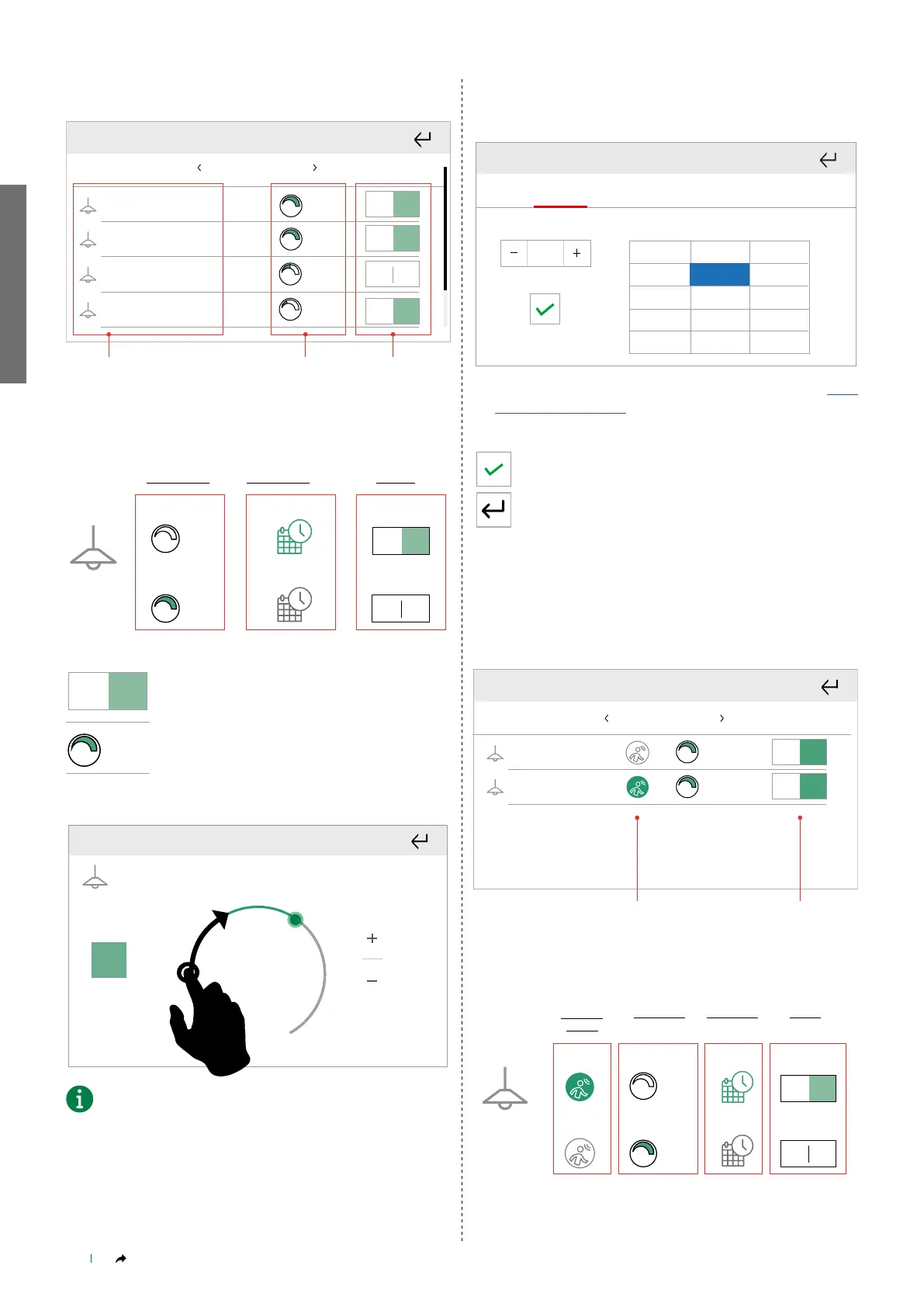
4. List of lights available in the selected room
5. Current brightness percentage setting
6. Switch lights on/off
LEGEND
OFF ON
OFF ON
0%
100%
Minima intensità
LUMINOSITÀ
SCHEDULAZIONE USCITA
DisattivaDisattivata
Attivata Attiva
Massima intensità
BRIGHTNESS SCHEDULING OUTPUT
Minimum
brightness
Maximum
brightness
Activated
Deactivated
Active
Inactive
Press to switch the corresponding output on or
off.
OFF ON
1. 2. 3.
OFF ON
OFF ON
OFF ON
40%
20%
100%
100%
Briefly press the percentage to access the
advanced brightness control screen and edit
using the cursor or the + and - keys, then return
to the previous screen.
OFF ON
1. 2. 3.
OFF ON
OFF ON
OFF ON
40%
20%
100%
1
65%
OFF
You can also press and hold on a point of the arc to move the
cursor to the required point.
Scheduling
You can set automatic execution, on a daily basis, of the commands
relating to the room or to an individual output.
Press and hold the desired room or output to access the advanced
functions.
Select "Scheduling".
Time Status Level
ON
70%
70%
21:00
23:30
23:30 OFF
Mon
Tue
Wed Thu
Fri Sat
Sun
Complete the fields, proceeding as described in paragraph “New
scheduling" on page 18
Specify the desired brightness percentage (LEVEL)
Confirm
Or exit to cancel
______________________________________________________________
PRESENCE SENSOR
The presence sensor makes it possible to set a courtesy brightness
percentage using SimpleProg software; this light level will be activated
when presence is detected for the specified time period.
OFF ON
room 3room 2 room 4
OFF ON
1. 2.
100%
100%
1. Presence sensor status indicator
2. Switch output on/off
LEGEND
OFF ON
OFF ON
0%
100%
Minima intensità
LUMINOSITÀ
SCHEDULAZIONE USCITA
DisattivaDisattivata
Attivata Attiva
Massima intensità
SENSORE
PRESENZA
Disattivato
Attivato
Minimum
brightness
BRIGHTNESS
PRESENCE
SENSOR
SCHEDULING OUTPUT
Maximum
brightness
ActivatedActivated
Deactivated
Deactivated
Active
Inactive



 To Next Page