ADVANCED FUNCTIONS
21
CONTENTS
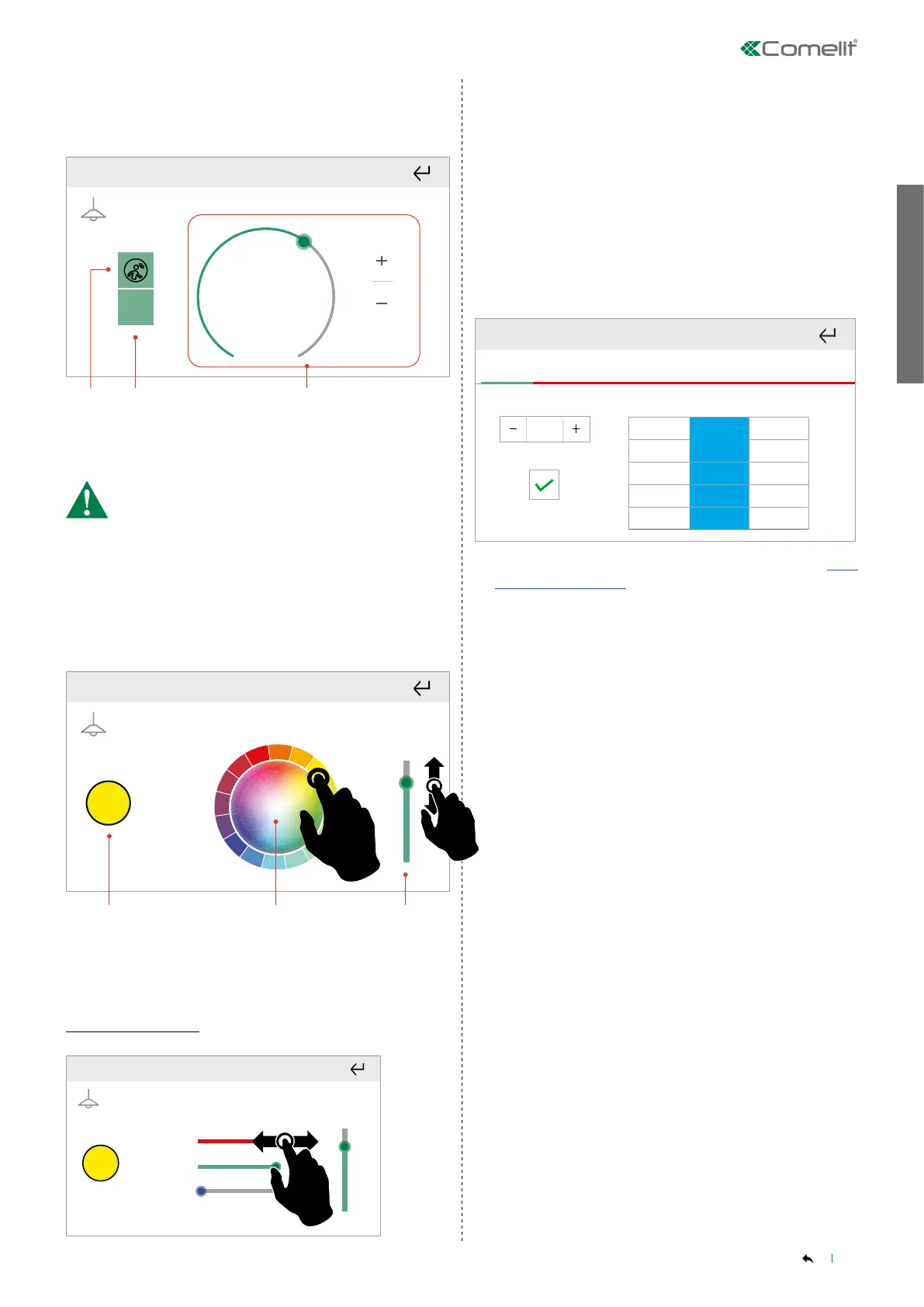
Light control with presence sensor
Briefly press the desired output to view the menu.
1
1. 2. 3.
65%
ON
1. Enable/disable presence sensor
2. Output status
3. Light brightness percentage control
When the presence sensor is activated the OFF key and
brightness percentage adjustment are disabled!
______________________________________________________________
RGB LIGHTS
Dimmable colour changing lights.
Select the desired colour.
RGB1
1. 2. 3.
1. Selected colour
Press to open the advanced setting menu.
2. Colour dial
3. Light intensity adjuster
Advanced setting
RGB1
The screen shows the R-G-B component composition of the
selected colour.
Scheduling
You can set automatic execution, on a daily basis, of the commands
relating to the room or to an individual output.
Press and hold the desired room or output to access the advanced
functions.
Select "Scheduling".
Time Colour Level
70%
60%
50%
40%
20%
20:30
23:30
20:45
21:00
21:15
21:30
Mon
Tue Wed Thu
Fri Sat
Sun
Complete the fields, proceeding as described in paragraph “New
scheduling" on page 18
Specify the tone of the light (COLOUR) and the desired intensity
(LEVEL) using the same entry methods.



 To Next Page