27
AUDIO BROADCAST
CONTENTS
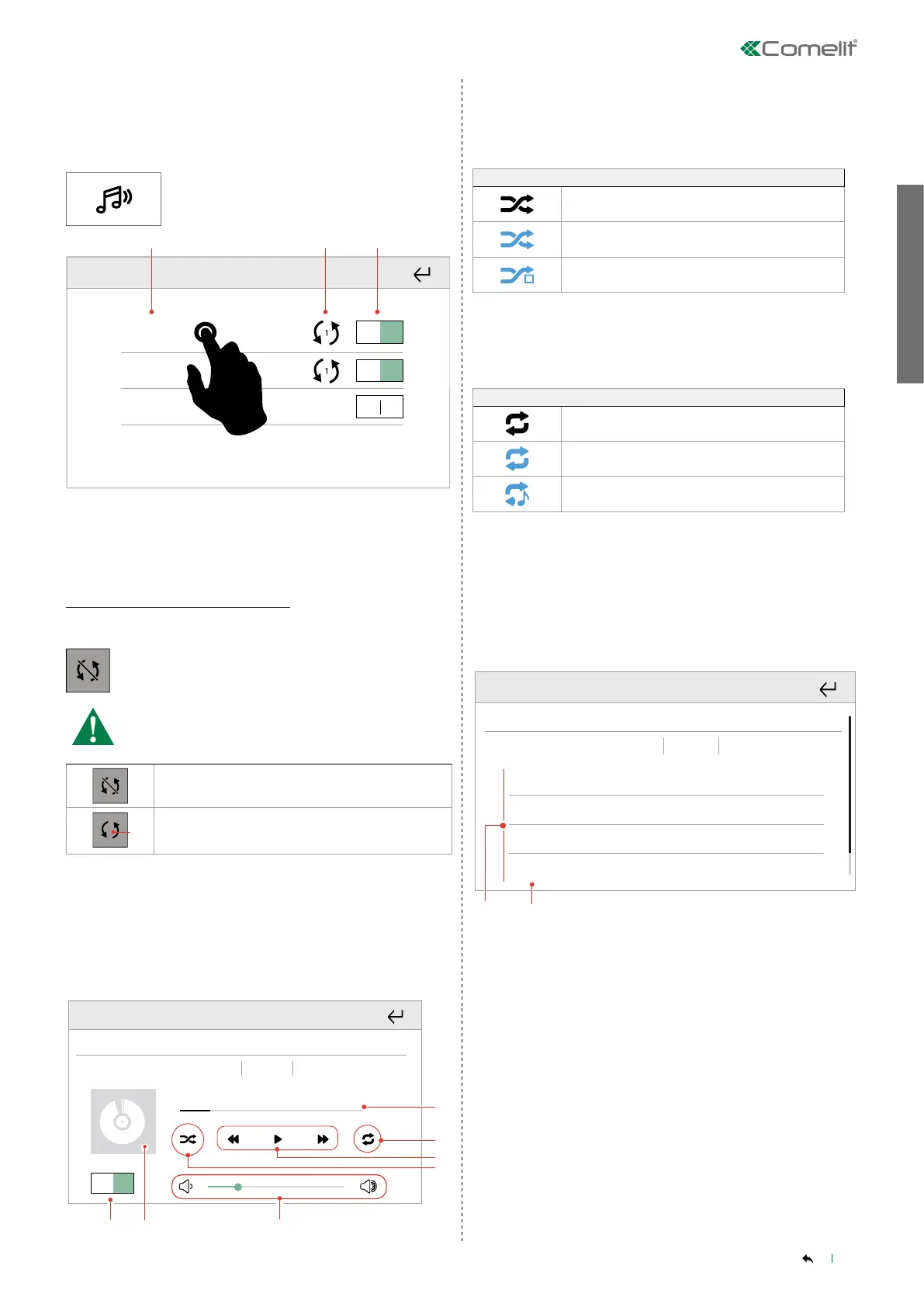
1. Switch player off/on
2. Album cover
3. Audio volume adjustment
4. Shuffle play
» Each key corresponds to a different function status.
SHUFFLE PLAY
Standard order (as per playlist)
Random shuffle by song
Random shuffle by album
5. Previous song/Play-stop song/Next song
6. Repeat song/playlist
» Each key corresponds to a different function status.
REPEAT MODE
No repeat active
Repeat current playlist
Repeat current song
7. Song progress bar
______________________________________________________________
Songs
Briefly press on a song to start playback.
1 - Track
Artist - Album
2 - Track
Artist - Album
3 - Track
Artist - Album
4 - Track
Artist - Album
Player_1
In riproduzione Brani Libreria
2.1.
03:48
03:01
02:22
04:11
Playback LibrarySongs
1.
List of available songs
2. Song playing
______________________________________________________________
Library
AUDIO
The Audio function allows you to play music and audio files in the
various rooms connected to the home automation manager.
Press the icon to access the menu.
1. Player_1
1. Song #1
2. Player_2
10. Song #10
3. Player_3
22. Song #22
OFF ON
OFF ON
OFF ON
1. List of available audio modules (Players)
2. Synchronisation active status icon
3. Switch player off/on
Audio module synchronisation
Press and hold a player.
Press the icon to synchronise the player with another
player.
Press the icon repeatedly until the number of the master
player with which you want to synchronise is shown and
confirm.
Player NOT SYNCHRONISED
1
N
Player SYNCHRONISED with the master player
indicated by the number N
______________________________________________________________
Playback
Briefly press a player to open the control page.
Player_1
1. Song_1
Artist - Album
OFF ON
In riproduzione Brani Libreria
5.
6.
4.
Playback LibrarySongs



 To Next Page