INSTALLER SETUP
39
CONTENTS
SETUP
Press the icon to access the menu.
10/04 07:55
07:55:59
Venerdì
1.
3.
4.
2.
6.
5.
INSTALLER SETUP MENU
User setup menu
Installer setup menu
Enter the INSTALLER password (Default 1961).
______________________________
Directories
Intercoms
Setup_Installer setup menu_Directories_Intercoms
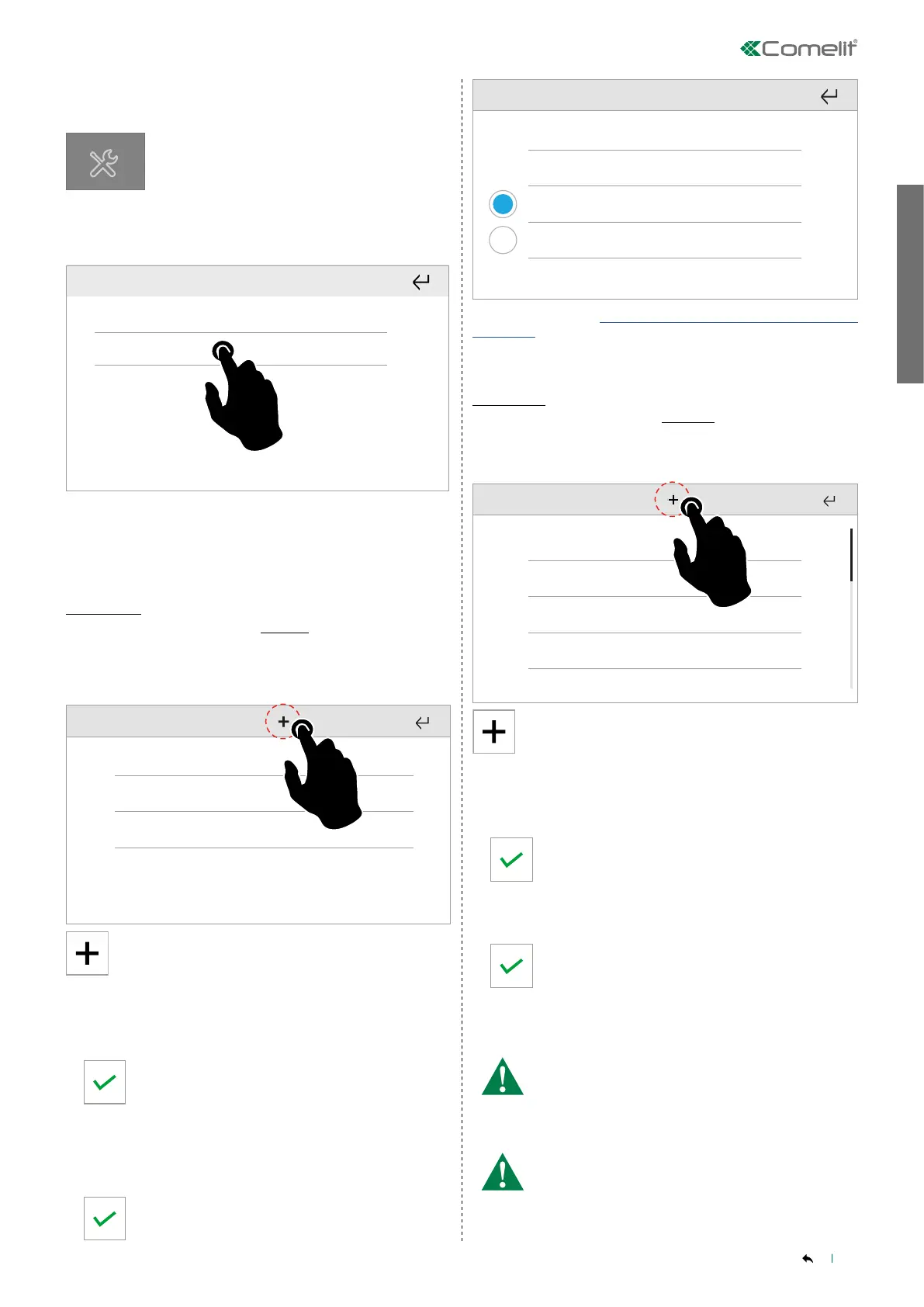
This menu allows you to add and manage addresses for the intercom
calls connected to the ViP system.
Intercom 1
Intercom 2
Intercom 3
Press + to add a new element to the directory
Choose between general call and single call
• GENERAL CALL (MULTI-FAMILY)
Intercom call to all door entry system devices in another apartment.
Enter the ViP address for the apartment you want to
call
Enter a short description, then confirm.
• SINGLE CALL (SINGLE-FAMILY)
Intercom call to a specific door entry system device in the
apartment.
Specify the number of the slave device you want to call
by pressing +/-
Enter a short description, then confirm.
Description
ViP address
Door entry monitor
Switchboard
To edit, see paragraph “Delete/edit an element saved in the directory"
on page 40
Actuators
Setup_Installer setup menu_Directories_Actuators
This function allows you to add and manage actuators connected to
the ViP system.
Act 1
Act 2
Act 3
Press + to add a new element to the directory
• CONFIGURE NAME
Allows you to enter or edit the name of the device to be added to
the list.
Enter the desired name, then confirm.
• CONFIGURE VIP ADDRESS
Allows you to enter or edit the ViP address of the device to which
you want to connect.
Enter the desired value, then confirm.
• MODULE
Enter the code of the desired relay module / interface.
Code 255 = Art. 1443 with 1 relay + 1 open collector output
If the interface module SK9071 is used (equipped with 10 relays), it
will be necessary to enter the code of the module itself.
• OUTPUT
enter the code of the output, chosen from those available.
With 1443 you can select 1 for on-board relay or 2 for open
collector output.
With the SK9071 module you can select one of its 10 relay
contacts.



 To Next Page