ALARM
8
CONTENTS
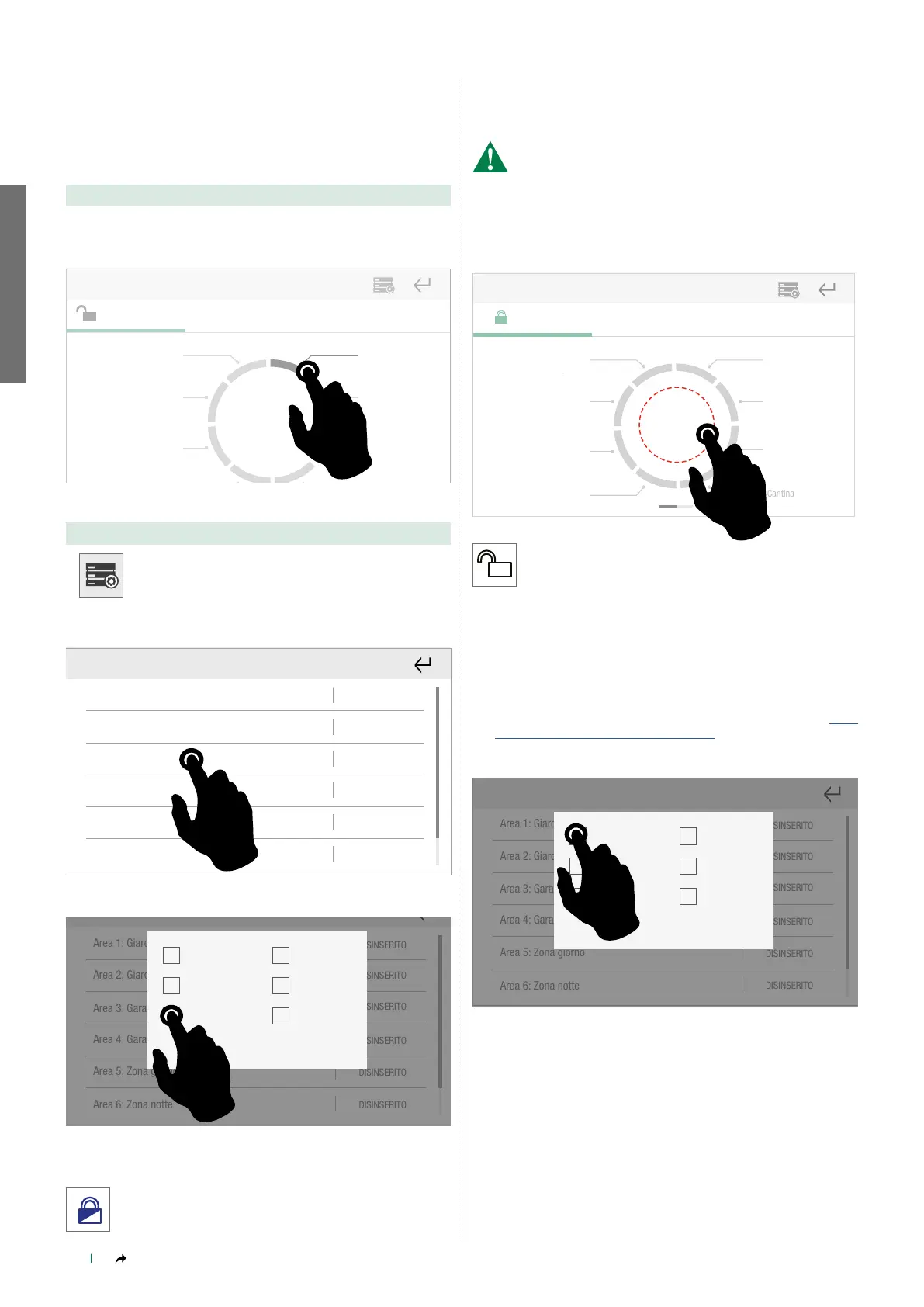
Part activation in individual areas
Part activation is used to activate the alarm system in several zones
within the desired area.
______________________________________________________________
OPTION A
On the main screen, select the alarm area for which you want to
arm the burglar alarm.
Disarmed Activation control
Front garden Garage 1
Garage 2
Basement
room
Back garden
Day zone
Quick commands
Full
activation
______________________________________________________________
OPTION B
Press the icon on the main screen.
Inserimento
totale
OFF
5.
7.
6.
8.
1. 2. 3. 4.
Select “Customised activation”
Select the relevant area.
Area 1: Front garden
Area 2: Back garden
Area 3: Garage 1
Area 4: Garage 2
Area 5: Day zone
Area 6: Night zone
DISARMED
DISARMED
DISARMED
DISARMED
DISARMED
DISARMED
______________________________________________________________
Area 1: Giardino ingresso
DISINSERITO
DISINSERITO
DISINSERITO
DISINSERITO
DISINSERITO
DISINSERITO
Area 2: Giardino retro
Area 3: Garage 1
Area 4: Garage 2
Area 5: Zona giorno
Area 6: Zona notte
Dis. totale
Ins. totale
P1
Immediato
Annulla Conferma
P1+P2
P2
Full disarm
Full arm
P1
Instant
P1+P2
P2
Cancel Confirm
Select P1 / P2 / P1+P2
Confirm the procedure.
» The Alarm icon has changed.
» The area is highlighted in BLUE/WHITE.
______________________________________________________________
DEACTIVATING THE
BURGLAR ALARM
The procedure requires the user password for the alarm
control panel!
Full deactivation
Press Full deactivation to fully deactivate the entire alarm system.
Giardino
ingresso
Giardino
retro
Garage 1
Zona giorno
Zona notte
Taverna
Cantina
Garage 2
Comandi rapidiInserito Comando inserimenti
Disinserimento
totale
Armed
Activation control Quick commands
Front garden
Garage 1
Garage 2
Basement
room
Back garden
Day zone
Night zone
» The Alarm icon has changed.
» The area is highlighted in GREY.
Full deactivation in individual areas
Partial deactivation in individual areas
Proceed as shown in "Option A" or Option B", in paragraph “Part
activation in individual areas" on page 8
Select the desired command.
Area 1: Giardino ingresso
DISINSERITO
DISINSERITO
DISINSERITO
DISINSERITO
DISINSERITO
DISINSERITO
Area 2: Giardino retro
Area 3: Garage 1
Area 4: Garage 2
Area 5: Zona giorno
Area 6: Zona notte
Dis. totale
Ins. totale
P1
Immediato
Annulla Conferma
P1+P2
P2
Full disarm
Full arm
P1
Instant
P1+P2
P2
Cancel Confirm
Confirm the procedure.



 To Next Page