23
CLIMATE
CONTENTS CONTENTS
______________________________________________________________
MANUAL MODE
M
20°
Thermostat 2
Thermostat 3Thermostat 1
1. 2. 3.
In this mode the current settings remain active until the next
time they are changed manually by the user.
17,5°
5° 30°
A M
20°
Thermostat 2
Thermostat 3Thermostat 1
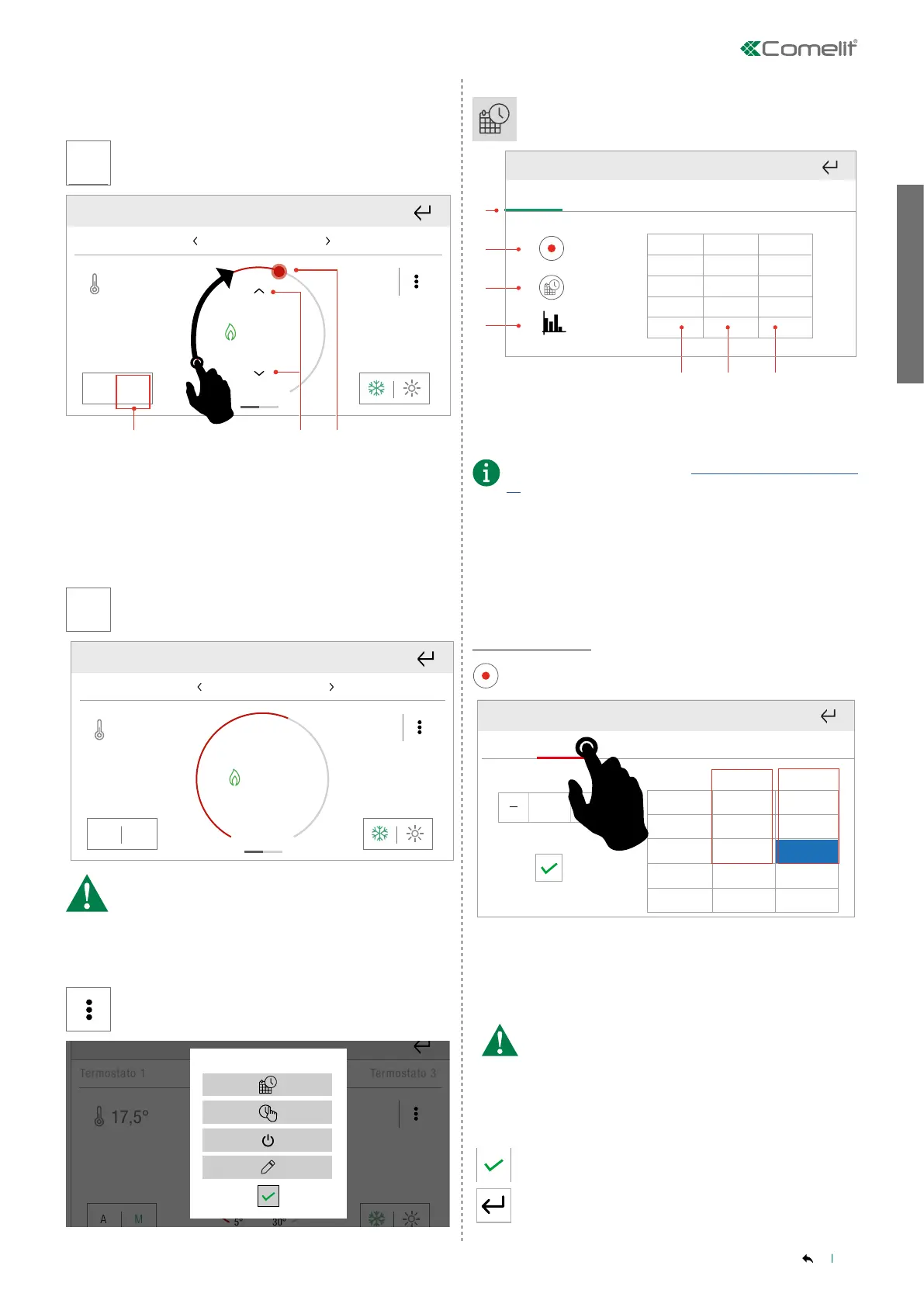
1. Press to enable manual mode
2. Setpoint precision regulation
3. Setpoint quick regulation
______________________________________________________________
AUTOMATIC MODE
Thermostat 2
Thermostat 3Thermostat 1
17,5°
5° 30°
A
In this mode the device automatically executes the set
schedules.
17,5°
5° 30°
A M
20°
Thermostat 2
Thermostat 3Thermostat 1
In automatic mode the commands for manual setpoint
adjustment are disabled.
Scheduling
Thermostat 2
Thermostat 3Thermostat 1
17,5°
5° 30°
A M
20°
1.
2. 3. 4. 7. 8.6.5.
Press the Settings menu
Termostato 2
Termostato 3Termostato 1
17,5°
20°
Press the icon to access the Scheduling menu.
2.
1.
3.
4.
From To °T
24:00 18°
00:00
Mon
Tue Wed Thu
Fri
Sat
Sun
1. Days of the week bar
» Select the day of the week to view saved scheduling
2. Enter programming mode
3. Copy schedule
Further information in paragraph “Copy programming" on page
19 .
4. View graph
Press the icon to access the graph display mode for climate
programming.
5. Schedule start time
6. Schedule end time
7. Temperature/humidity setpoint
New scheduling
Enter programming mode
2.
1.
3.
4.
6. 7.
From To °T
24:00 18°
5.
00:00
Mon
Tue Wed Thu
Fri
Sat
Sun
Mon
Tue Wed Thu
Fri
Sat
Sun
19°
From To °T
07:00
18°00:00
15:00
21°
07:00
24:00 19°15:00
Select the day of the week for which you want to program
scheduling
» The day being programmed is highlighted in red.
Set the schedule end time using - and +
» The cell being programmed is highlighted in blue.
Daily programming should cover a full 24-hour period.
Any hours not programmed by the user will be set by
the system automatically.
Set the desired setpoint using - and +
» The cell being programmed is highlighted in blue.
Confirm
Or exit to cancel



 To Next Page