Text (alphanumeric strings) can be displayed on any screen at a
given location by the CHAR statement. Character data is read
from the Commodore 128 character ROM area. The user
supplies the x and y coordinates of the starting position and the
text string to be displayed. Color source and reverse imaging are
optional.
The string is continued on the next line if it attempts to print past
the right hand edge of the screen. When used in TEXT mode, the
string printed by the CHAR command works just like a PRINT
string, including cursor and color control. These control functions
inside the string do not work when the CHAR command is used
to display text in bit map mode. Upper/Lower case controls
(CHR$ (14) or CHR$ (142)) also operate in bit map mode.
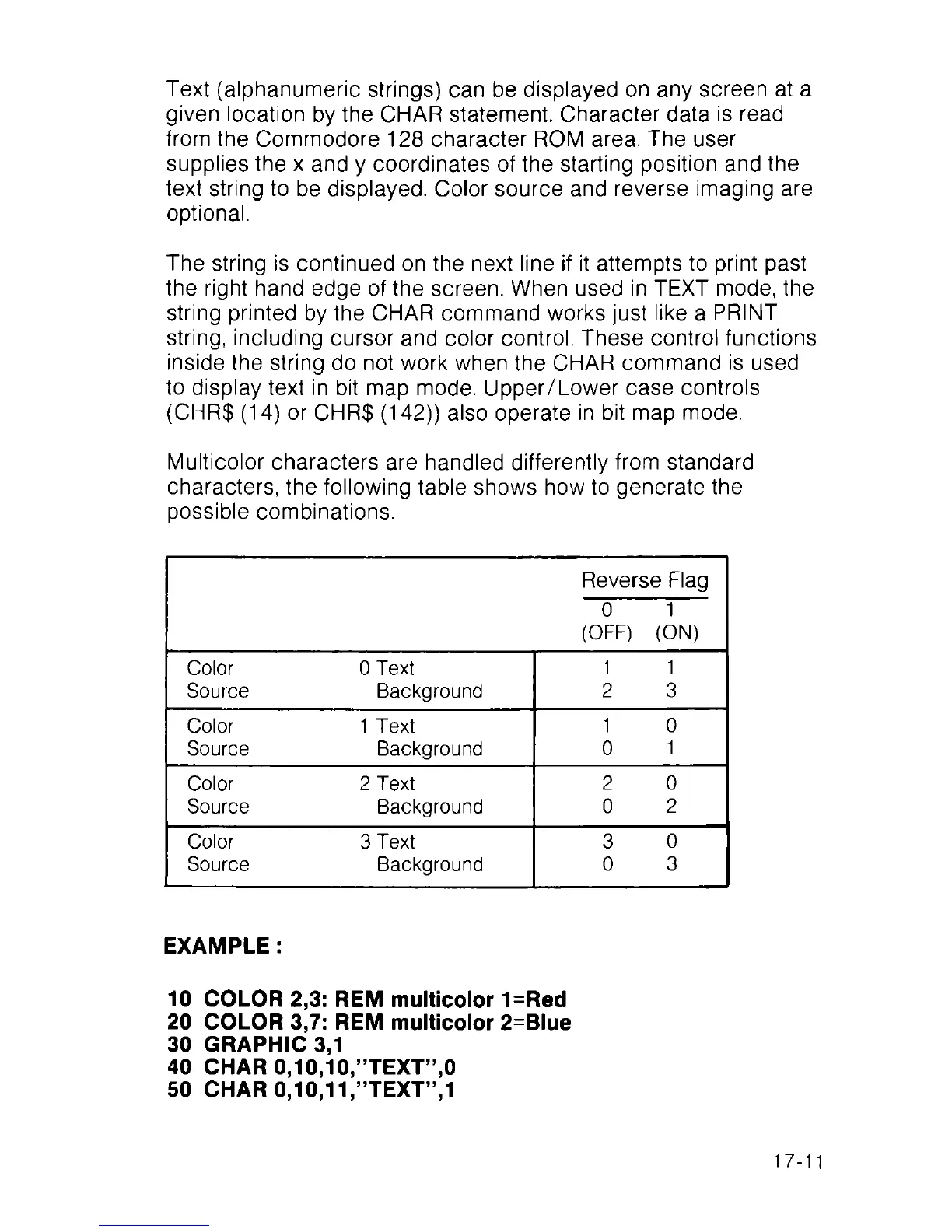
Multicolor characters are handled differently from standard
characters, the following table shows how to generate the
possible combinations.
Reverse Flag
0 1
(OFF) (ON)
Color 0 Text
1
1
Source Background
2 3
Color 1 Text
1 0
Source Background
0
1
Color 2 Text
2 0
Source Background
0
2
Color 3 Text 3
0
Source Background
0 3
EXAMPLE :
10 COLOR 2,3: REM multicolor 1=Red
20 COLOR 3,7: REM multicolor 2=Blue
30 GRAPHIC 3,1
40 CHAR 0,10,10,’’TEXT”,0
50 CHAR 0,10,11,’’TEXT”,1
17-11



 To Next Page