ATC200-LITE-USB Teletilt
®
RET System Section 16–Changing the Beamwidth (Fan)-Single SmartBeam™
Bulletin 639536 • Revision L October 2014 16-3
6. Click the Activate button (Figure 16-2) to apply changes to the boresight (pan) for this antenna.
Alternately, to exit the screen without sending any changes, click on the Close button. Antenna
movement will begin after the Activate button is applied.
A progress indicator bar (located to the left of Current BW/Fan) will continually update for as
long as the move is in progress.
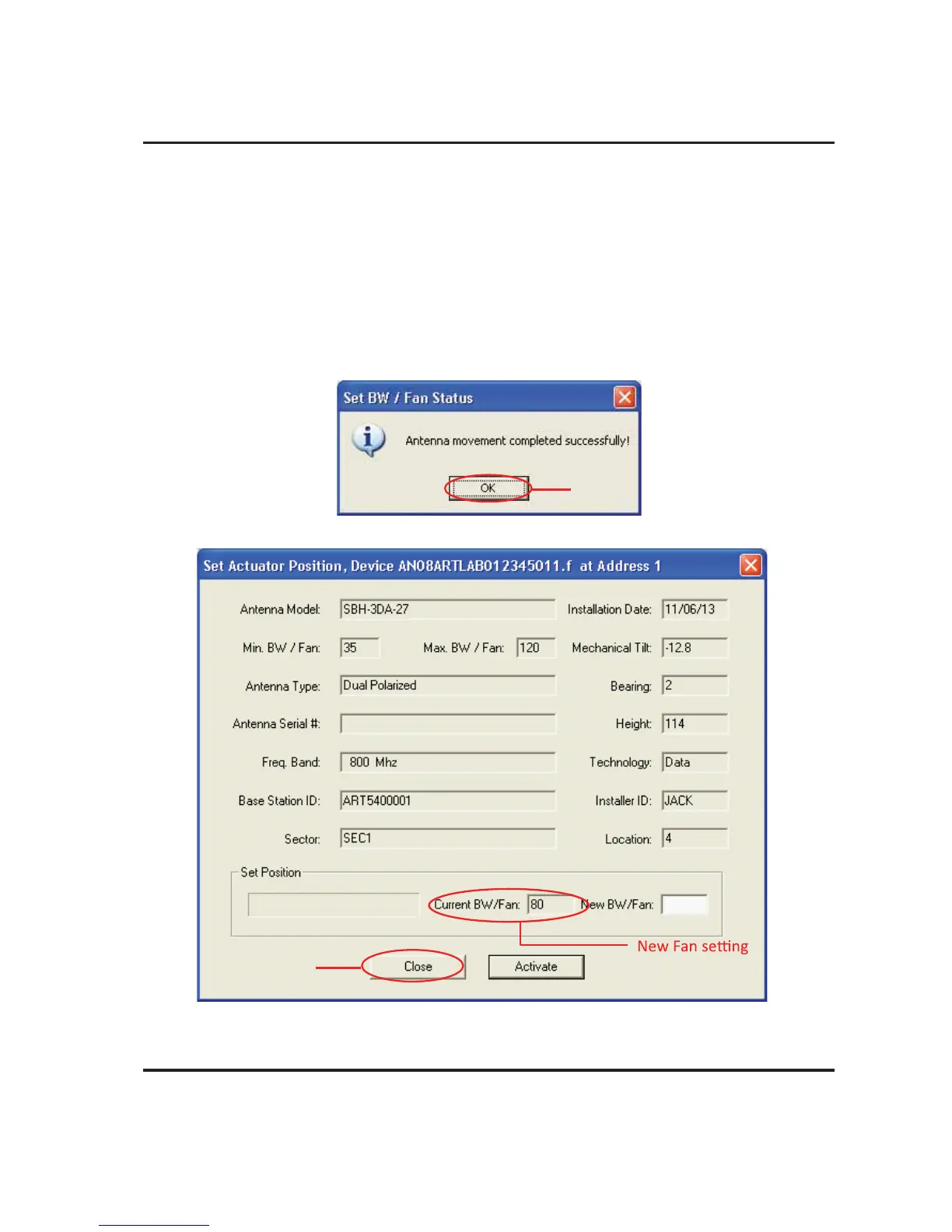
7. You will be notified when movement is complete (Figure 16-3).
If for any reason the move failed to reach the new Beamwidth (Fan) value specified, you will be
notified of the failure.
Figure 16-3. Beamwidth (Fan) Adjustment Complete.
Click OK.
Figure 16-4. New beamwidth(Fan) Displays in Current BW/Fan
becomes current
Fan value.
Click Close.



 To Next Page