ATC200-LITE-USB Teletilt
®
RET System Section 18–Saving Site Report/Configurations
Bulletin 639536 • Revision L October 2014 18-3
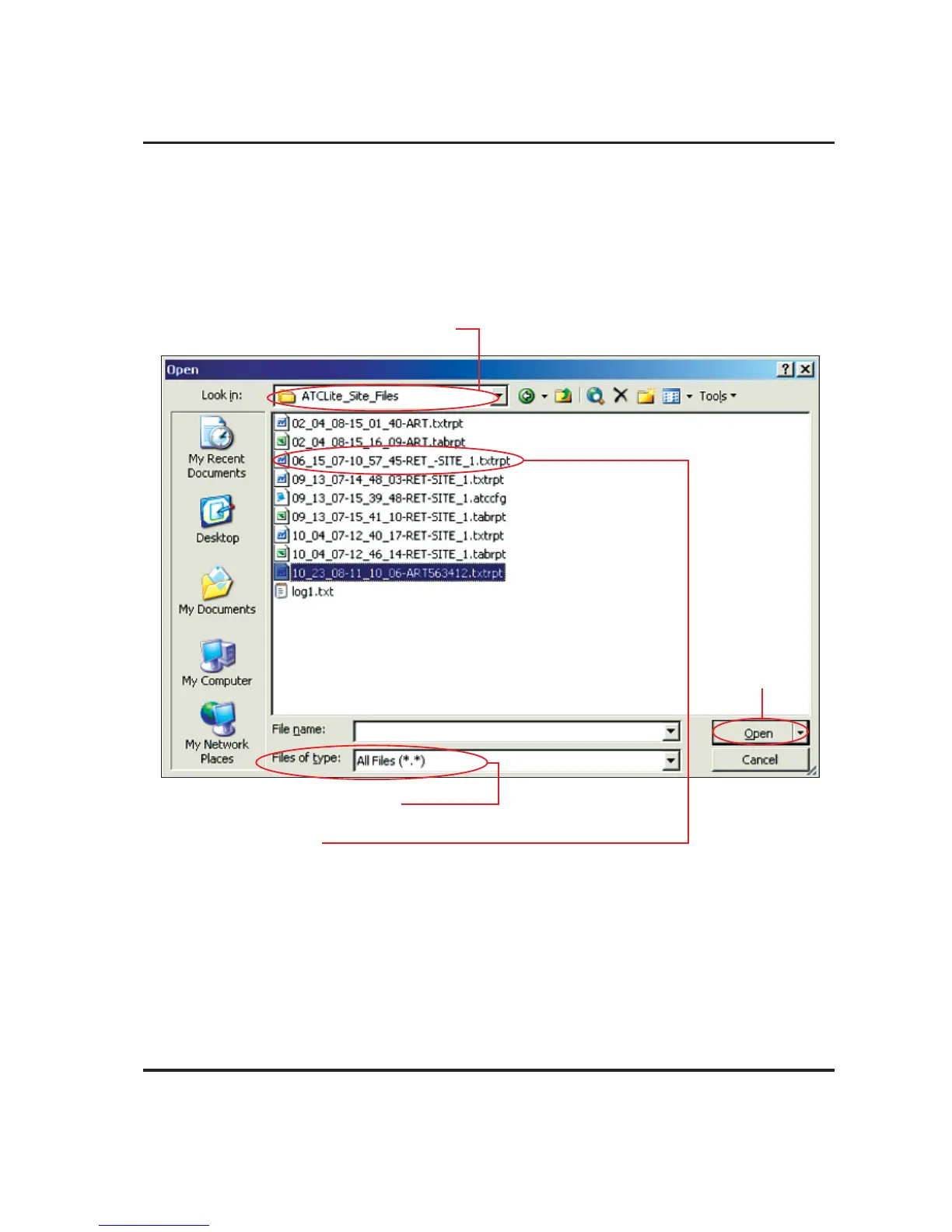
5. To view the saved file, launch Word (or any text editor software, such as Notepad or Wordpad)
and go to File→Open on the main menu. Change the directory to look in C:\ATCLite_Site_
Files, change the file type to All Files, and select the desired ‘txtrpt’ file from the list of files
shown.
Click Open (Figure 18-3).
The configuration settings for each actuator are displayed in the order of their address.
Figure 18-3. Opening the Report in Word.
2. Change file type to All Files (*.*).
This will allow the file saved as a report for Word to be seen for selection.
3. Select the txtrpt file.
1. Go to the ATCLite_Site_Files directory.
This directory is located on the C:\ drive.
4. Click Open.



 To Next Page