DEEP LEARNING PLUS USER MANUAL
26
FALSE ALARM FILTER
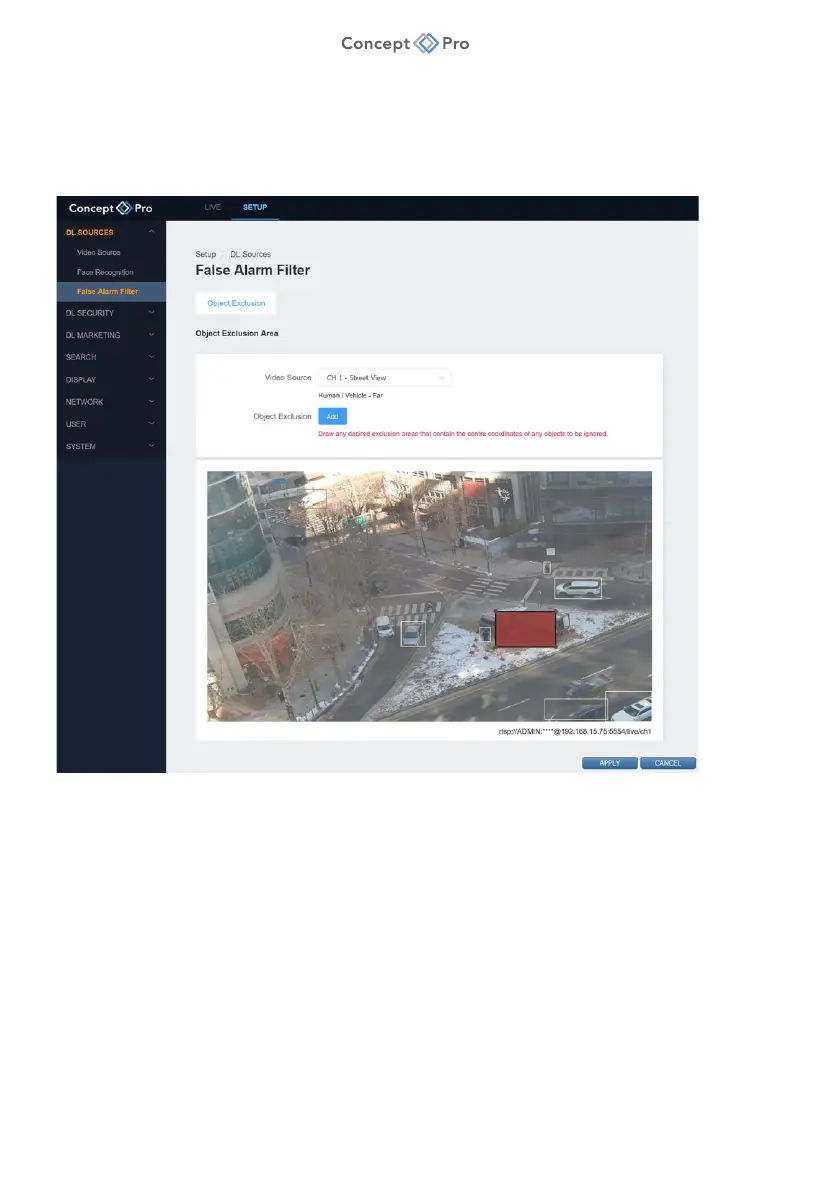
In some circumstances, certain objects within the video source field of view may trigger false
alarms (e.g., a window reflecting clouds, a street sign, etc.). The DL PLUS product can create
custom object exclusion areas that mask such items to reduce false alarms. To create object
exclusion areas, please follow the steps below:
1. From <SETUP> tab, select <DL SOURCES> - <FALSE ALARM FILTER> menu.
2. Under <OBJECT EXCLUSION> tab, select a Video Source from the drop-down menu.
3. Click <ADD> to create a rectangular object exclusion area. Click the grey box and drag
to a desired location. Click the corners to resize the box as required.
a. Note: The object exclusion area should be as small as possible, and the area only
needs to cover the object centre to reduce false alarms (i.e., the entire object does
not need to be masked).



 To Next Page