75
DEEP LEARNING PLUS USER MANUAL
SYSTEM
Configure basic system settings, reset or upgrade the DL PLUS product, manage license keys,
and review the API documentation for DL PLUS integration.
DATE/TIME
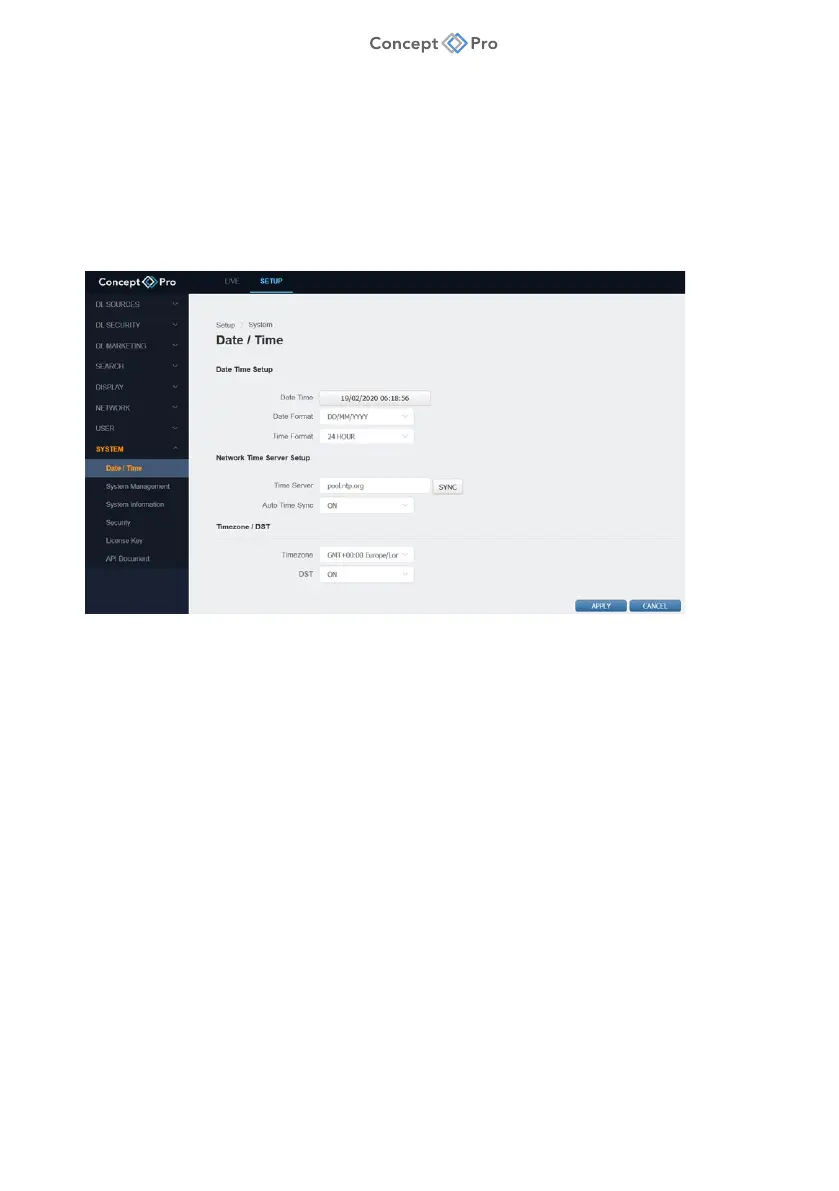
Configure the DL PLUS system date/time, configure automatic NTP sync settings, or change
the time zone. To configure date/time settings, please follow the steps below:
1. From the <SETUP> tab, select <SYSTEM> - <DATE/TIME> menu.
2. Configure the Date/Time settings as below:
a. Date/Time: Click to manually configure the system date/time.
b. Date Format: Click to select a date format.
c. Time Format: Click to select 24 HOUR/12 HOUR time format.
d. Time Server: Enter a custom NTP server address or use the default address. Click
SYNC to manually sync the system date/time.
e. Auto Time Sync: Select whether the system should automatically sync with the NTP
server each day.
f. Time Zone: Select the system time zone.
g. DST: Select whether to apply Daylight Savings Time settings.
3. When finished, click <APPLY> to save these settings.



 To Next Page