59
DEEP LEARNING PLUS USER MANUAL
CREATING A COMPLETE ACTION RULE
Once DL Trigger, System Trigger, Schedule, and Event Action presets have been configured,
an Action Rule must be created that combines all these elements for the DL PLUS product to
begin detecting events.
To create a new Action Rule, please follow the steps below:
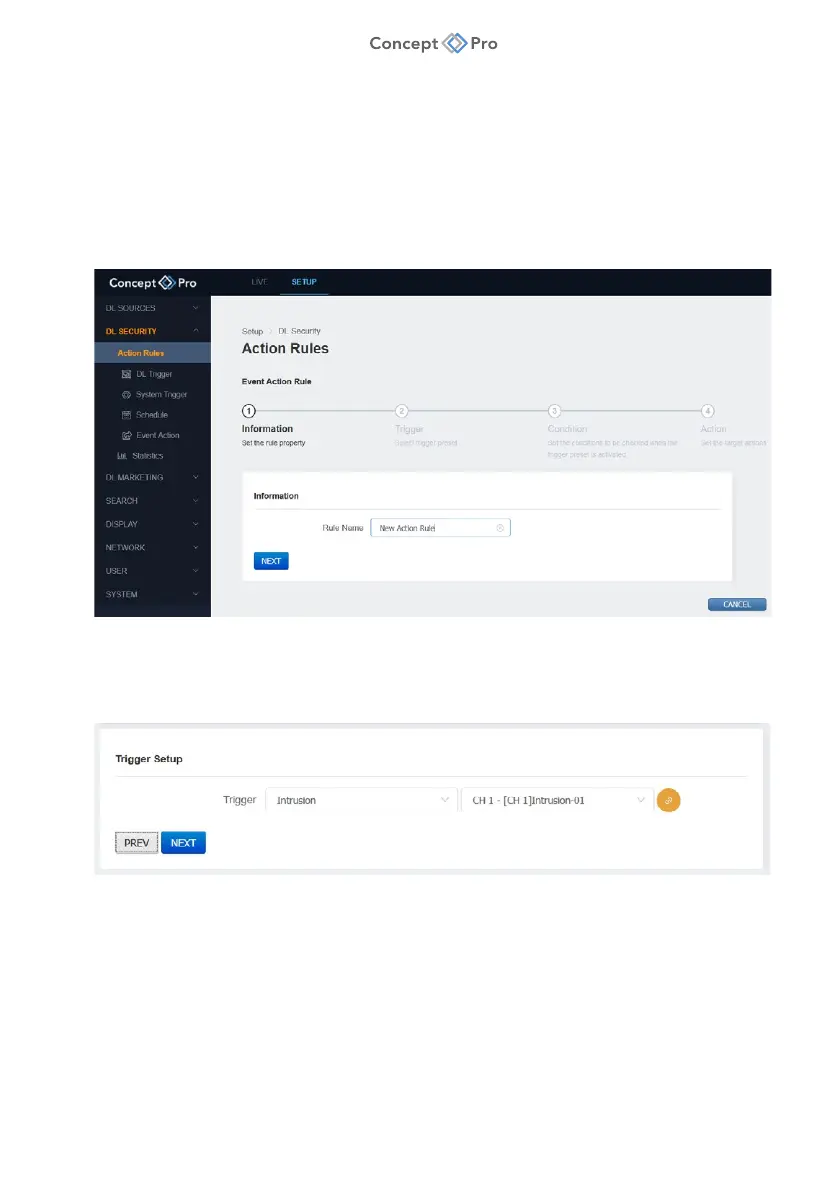
1. From the <SETUP> tab, navigate to <DL SECURITY> - <ACTION RULES> menu.
2. Click <ADD> to begin configuring a new Action Rule.
3. In Step 1 – Information, review and configure the Action Rule parameters shown:
a. Rule Name: Enter a custom name for the Action Rule.
4. When finished, click <NEXT> to proceed to Step 2.
5. In Step 2 – Trigger Setup, review and configure the Action Rule parameters shown:
a. Trigger: Select a DL or System Trigger and video source channel.
b. Link: Click the button to go straight to the DL Trigger menu.
6. When finished, click <NEXT> to proceed to Step 3, or press <PREV> to move back to Step 1.



 To Next Page