15
DEEP LEARNING PLUS USER MANUAL
4. Navigate to the <PROPERTY> tab and select a desired video channel from the
<CHANNEL> drop-down menu. Refer to the top section to the right. Set <ACTIVATION>
to <ON>, select a DL algorithm (e.g., Human/Vehicle Detector), and select <EDIT>
under <RULE ENGINE> to configure the DL rule type, <CALIBRATION> to edit and
calibrate DL rules, and <ENGINE/OSD OPTION> to configure on-screen display options.
When finished, click <APPLY>. Repeat for any other desired channel.
FUNCTIONALITY WITH CONCEPT PRO RECORDER IN COMPANION MODE
When the DL PLUS product is connected to a supported Concept Pro video recorder in
COMPANION MODE, the following functionality can also be utilised:
• Live DL Timeline: Click the DL Timeline button on top of the Live Recording Timeline
located on the right side of the live user interface. This displays a thumbnail of any
detected objects, which can be directly played back.
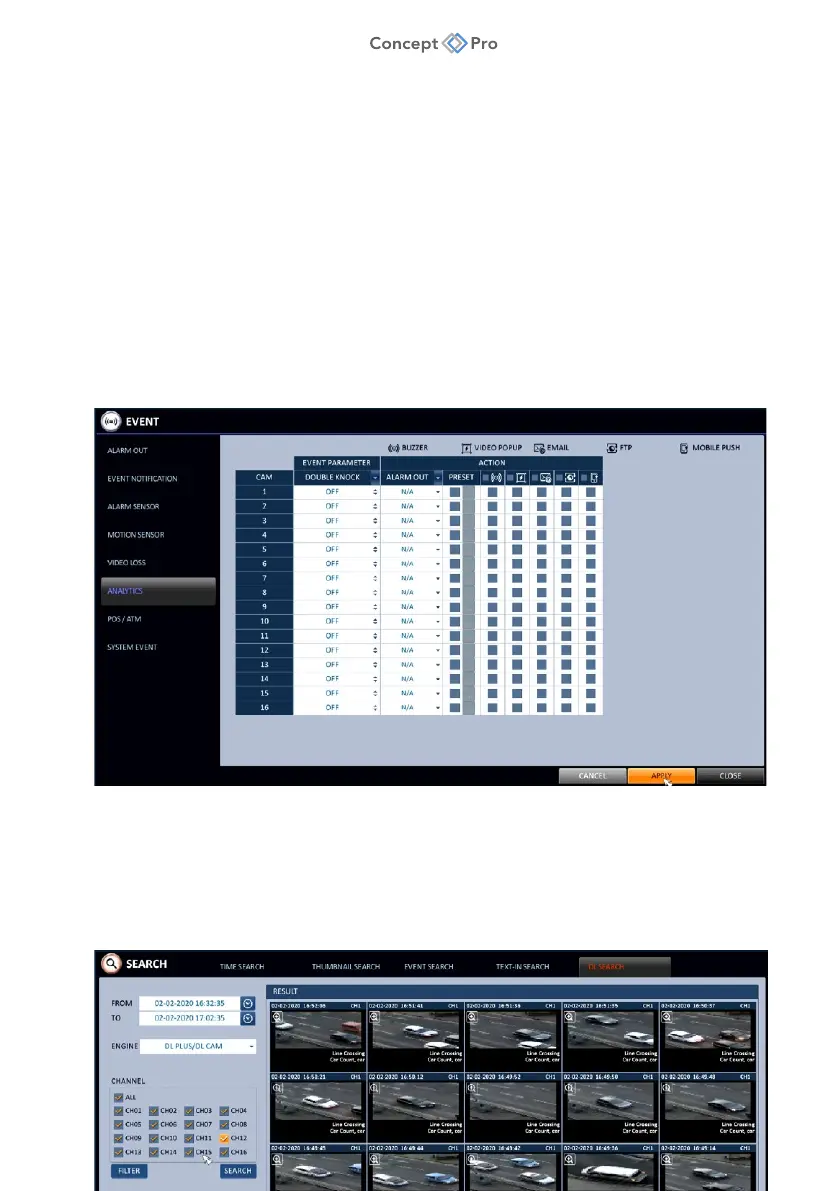
• DL Event Triggers: Navigate to <MENU> - <SYSTEM SETUP> - <EVENT> -
<ANALYTICS> menu to configure any desired action triggers to occur when DL events
are detected. Options include Alarm Output, Call Preset, Buzzer, Video Pop-up, E-mail
Notification, FTP Notification, and Mobile Push Notification. Choose the Double Knock
option to link DL event detection with the simultaneous Alarm Input event detection to
further prevent false alarms.



 To Next Page