41
DEEP LEARNING PLUS USER MANUAL
SYSTEM TRIGGER
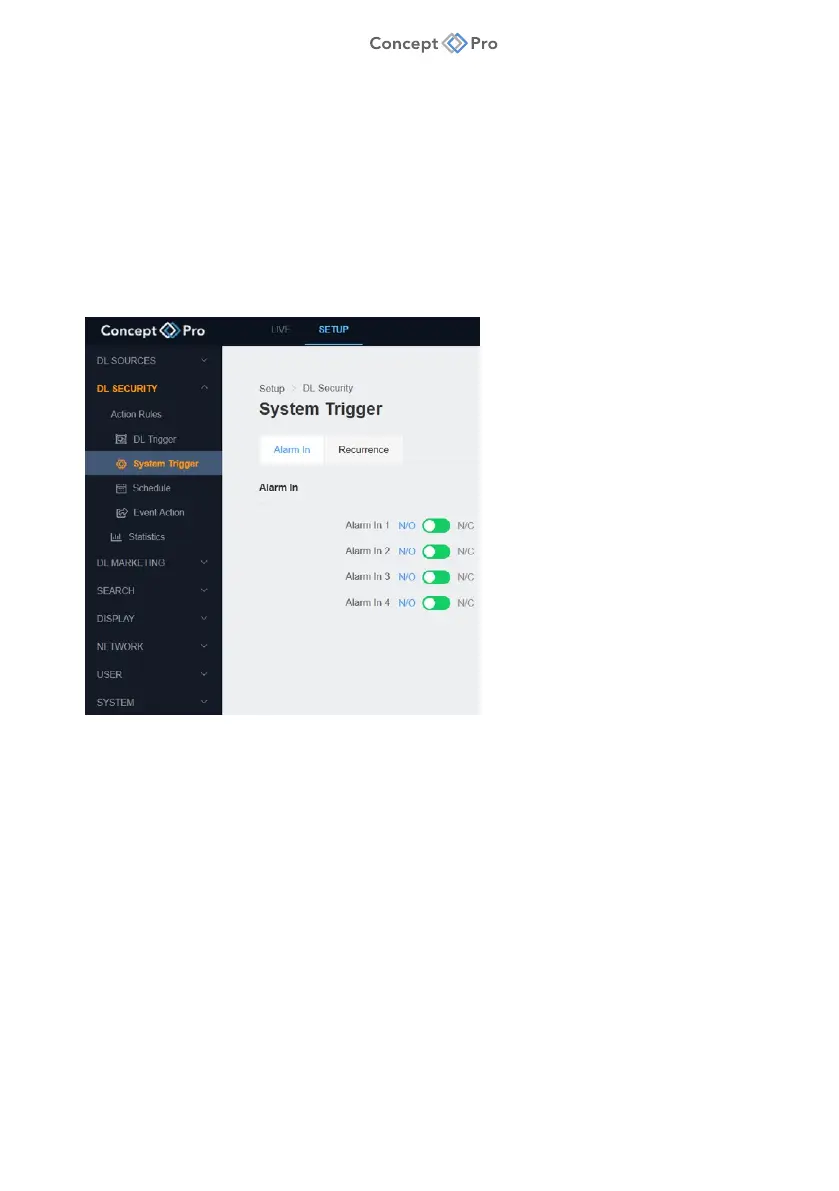
System Triggers can be configured to occur based on conventional input-related events.
ALARM IN
Alarm Input Detection is a function that is triggered whenever an alarm sensor connected to the
DL PLUS alarm input terminal changes state.
For example, one of the DL PLUS Alarm Inputs can be used with a PIR sensor in a ‘Double Knock’
scenario. In this case, a DL Trigger could be combined with an Alarm In System Trigger in an Action
Rule that requires both triggers to be detected in order to trigger specified Event Actions.
To configure an Alarm Input System Trigger, please follow the steps below:
1. From the <SETUP> tab, navigate to <DL SECURITY> - <SYSTEM TRIGGER> menu.
2. Select the <ALARM IN> tab.
3. Configure the alarm sensor state that triggers Alarm Input events
(N/O: Normal Open or N/C: Normal Close).



 To Next Page