DEEP LEARNING PLUS USER MANUAL
72
NETWORK
Configure the DL PLUS network settings for both RJ45 Ethernet outputs. DL PLUS products
support IPv4, IPv6, and link local address systems.
IP SETUP
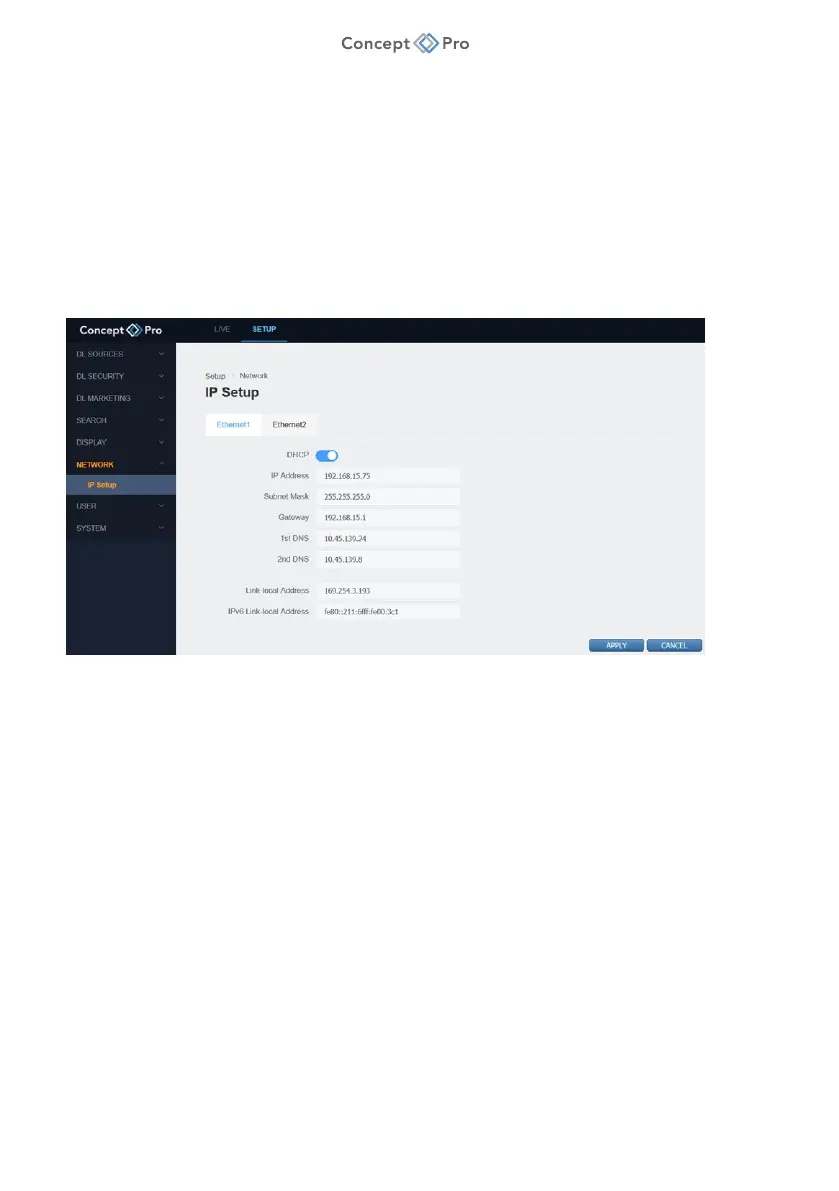
Configure the DL PLUS IP Address or utilise DHCP to automatically assign IP addresses.
ETHERNET1
Ethernet1 is the main RJ45 Ethernet port on the DL PLUS rear panel for connection to the
remote network. To configure Ethernet 1 settings, please follow the steps below:
1. From the <SETUP> tab, select <NETWORK> - <IP SETUP> menu.
2. Select the <ETHERNET1> tab.
3. Configure the network settings as below:
a. DHCP: Select to dynamically and automatically assign key network settings to the
DL PLUS device according to the currently connected network environment. The DL
PLUS product is set to DHCP by default.
b. IP Address: Displays the current IPv4 address.
c. Subnet Mask: Displays the network subnet mask address.
d. Gateway: Displays the network gateway/router address.
e. 1st DNS: Displays the primary DNS address.
f. 2nd DNS: Displays the secondary DNS address.
g. Link Local Address: Displays the IPv4 link local address.
h. IPv6 Link Local Address: Displays the IPv6 link local address.
4. When finished, click <APPLY> to save these settings.



 To Next Page