DEEP LEARNING PLUS USER MANUAL
64
REPORTING
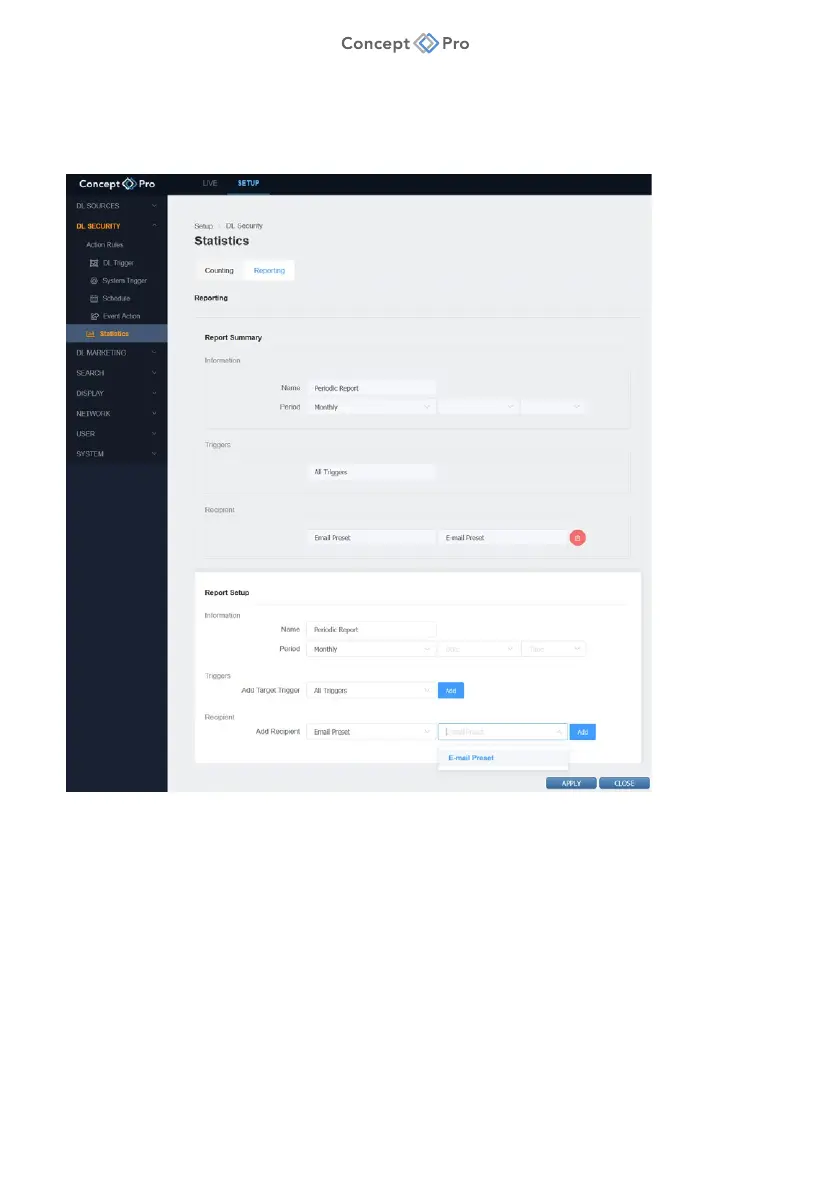
Alternatively, periodic counting data reports can be configured to be sent automatically by
e-mail or FTP. To create a reporting profile, please follow the steps below:
1. From the <SETUP> tab, navigate to <DL SECURITY> - <STATISTICS> menu.
2. Click the <REPORTING> tab then <ADD> to create a new Reporting preset.
3. Configure the Reporting parameters below:
a. Name: Enter a custom name for the Reporting preset.
b. Period: Select the frequency for the counting report (Hourly/Daily/Weekly/Monthly)
and corresponding day/time if applicable.
c. Add Target Triggers: Select individual DL Triggers for counting or select All Triggers.
d. Add Recipient: Select an existing E-mail preset or configure an FTP server
connection.
4. When finished, click <APPLY> to save these settings.



 To Next Page