102 Condair CHR and CHR-NA
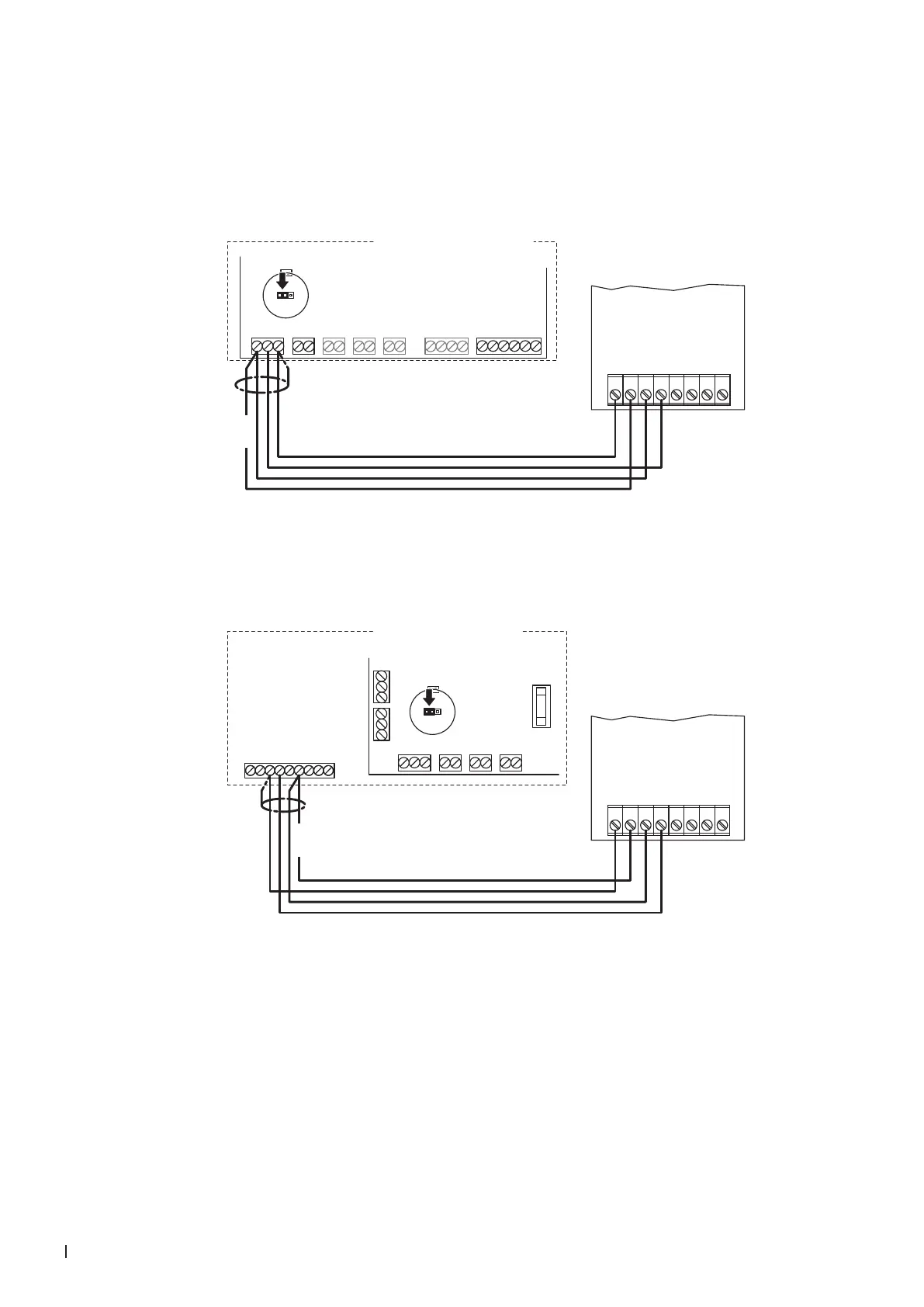
7.8.2 Connecting the CHR or CHR-NA to the Condair EL/EL OC
1. Connect the CHR to the corresponding terminals of the terminal block "X8" on the driver board of
the Condair EL/ELS OC (ROW) according to the following diagram.
Note: The voltage supply of the CHR is established via the terminals "V+" and "GND" of terminal
block "X8" or via an external 24 V AC/DC voltage supply.
MAINS SUPPLY
L N SC1SC2PEPE
MODULE B
24VDCBLOWERLIMIT ENABLECONTROL
V+
X8
X9
X12
X11
X10
X7
X1
INGND IN GND 24V IN24V IN 24V GND
Condair EL/EL OC (ROW)
24V 10V
JP1
JP3
CHR
24 VDC
24V AC/DC
DO1
DO1
DO2
DO2
RT
RT
0V/GND
1 2 3 4 5 6 7 8
Driver board Condair EL/EL OC Module A
Connect the CHR-NA to the appropriate terminals of the terminal block "XE2" of the Condair EL/EL
OC (NA) according to the following diagram.
Note: The voltage supply of the CHR-NA is established via the terminals "24VDC/10VDC" and "GND"
of terminal block "XE2" or via an external 24 V AC/DC voltage supply.
Condair EL/EL OC (NA)
BLOWERLIM. SIGN. ON/OFFCONT. SIGN.
V+
X8
X9
X12
X11
IN GND IN GND 24V IN24V IN
RS485-1 RS485-2
24V 10V
JP1
JP3
GND D–D+ GND D–D+
24VAC
Sec. Loop
GND
CH1
CH2
24VDC/10VDC
GND
BP Sec. Loop
BP Sec. Loop
1 2 3 4 5 6 7 8 9
XE2
24 VDC
CHR-NA
24V AC/DC
DO1
DO1
DO2
DO2
RT
RT
0V/GND
1 2 3 4 5 6 7 8
Driver board
Condair EL/EL OC
Module A
2. Set a jumper on JP1-24V on the driver board of the Condair EL/EL OC.



 To Next Page