88 Condair CHD, CHD-S and CHD-NA
6.7 Connecting the CHD, CHD-NA or CHD-S to Condair units
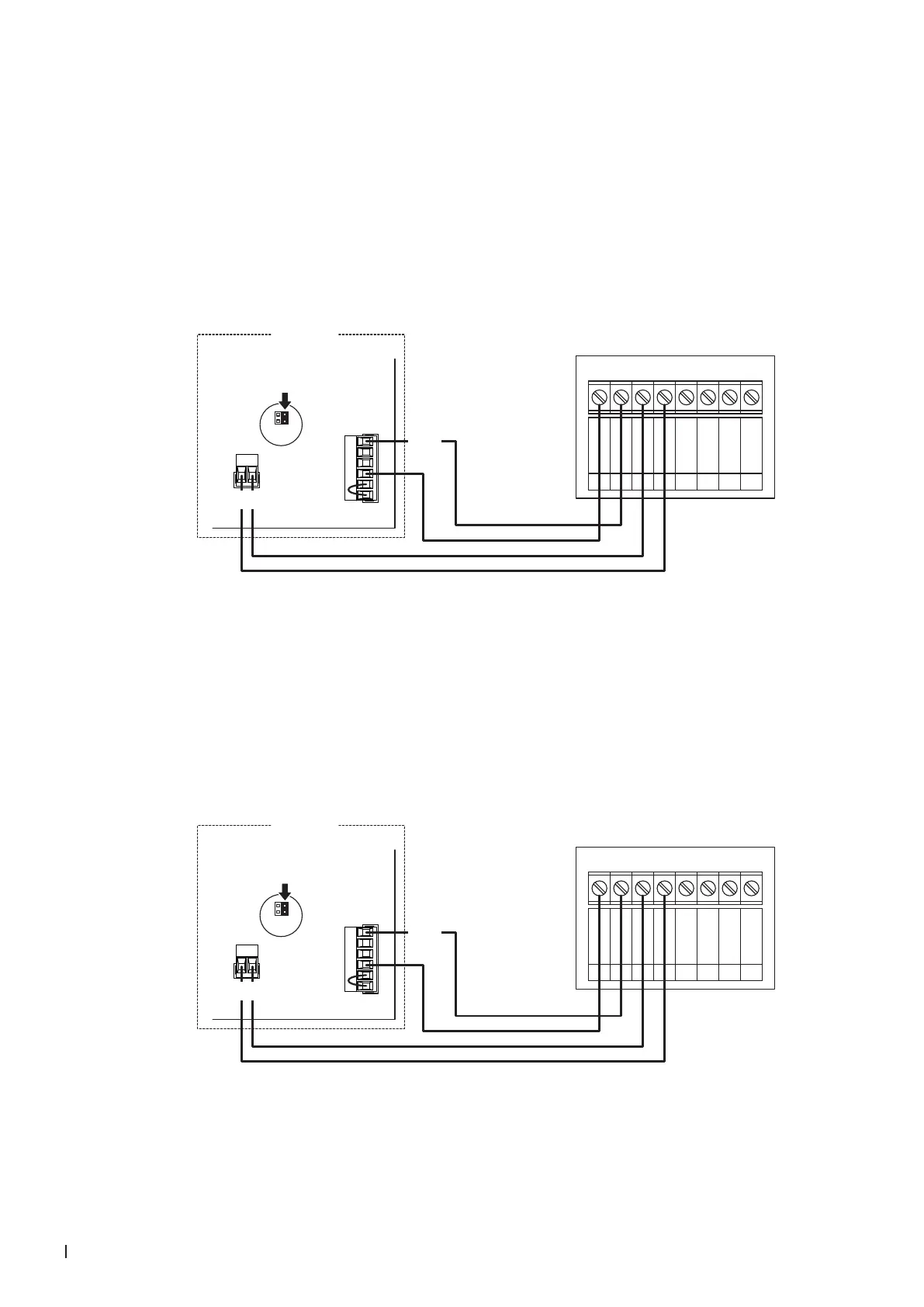
6.7.1 Connecting the CHD or CHD-NA to the Condair DL
1. Connect the Condair CHD or CHD-NA to the corresponding terminals on the driver board of the
Condair DL according to the wiring diagram below.
Note: The voltage supply of the CHD or CHD-NA is established via the terminals "24/10V" and "GND"
of the terminal block "X16" or via an external 24 V AC/DC voltage supply.
2. On the driver board of the Condair DL: set a Jumper on JP4-24V and remove the Jumper on JP5-
10V (if a jumper is set).
X1
X16
JP5: 10V
JP4: 24V
24/10 V
TMP
GND
HUM
24V E
Enable
CHD / CHD-NA
0V / GND
1
24V AC/DC
2
DO1
3
DO1
4
DO2
5
DO2
6
RT
7
RT
8
24 VDC
SC2
SC1
Condair DL
Driver board Condair DL
6.7.2 Connecting the CHD or CHD-NA to the Condair ME
1. Connect the Condair CHD or CHD-NA to the corresponding terminals on the driver board of the
Condair ME according to the wiring diagram below.
Note: The voltage supply of the CHD or CHD-NA is established via the terminals "24/10V" and "GND"
of the terminal block "X16" or via an external 24 V AC/DC voltage supply.
2. On the driver board of the Condair ME: set a Jumper on JP4-24V and remove the Jumper on JP5-
10V (if a jumper is set).
X1
X16
JP5: 10V
JP4: 24V
24/10 V
TMP
GND
HUM
24V E
Enable
CHD / CHD-NA
0V / GND
1
24V AC/DC
2
DO1
3
DO1
4
DO2
5
DO2
6
RT
7
RT
8
24 VDC
SC2
SC1
Condair ME
Driver board Condair ME



 To Next Page