62 Condair DCC and DCC-NA
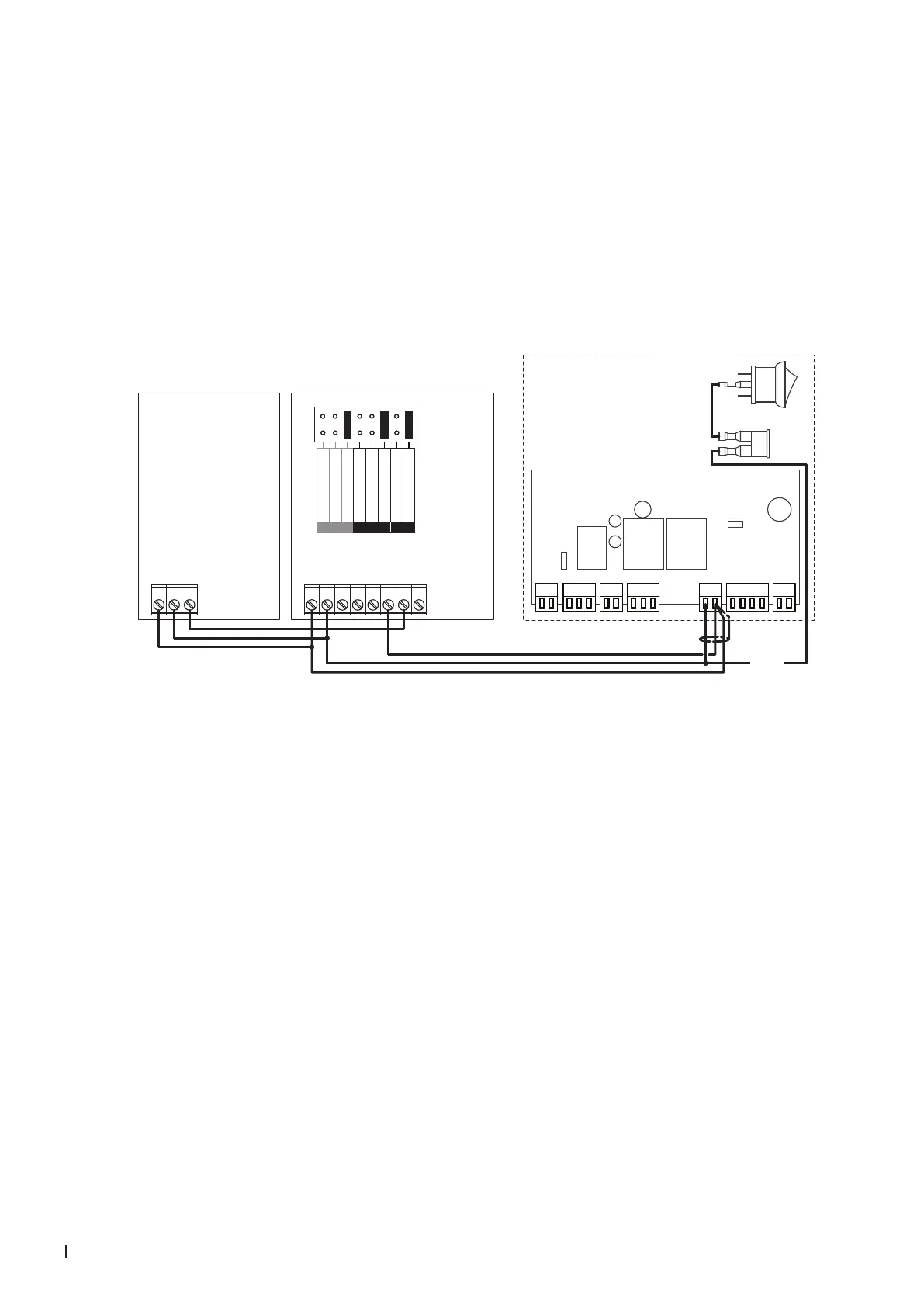
4.8.2 Connecting the DCC-NA to the Condair MES2
1. Connect the Condair DCC-NA controller to the corresponding terminals on the driver board of the
Condair MES2 according to the wiring diagram below.
2. Connect the Condair CDC-NA sensor to the Condair DCC-NA controller according to the wiring
diagram below.
3. Connect the 24 V power supply from the fuse connector of the Condair MES2 to the corresponding
terminals in the CDC-NA sensor and in the DCC-NA controller.
4. Set the input and the output signal of the controller to "0-10V" using the Jumper "AO" and "AI" on
the control board of the Condair DCC-NA.
UI2
UI1
AO1
24 V
0V/GND
1 2 3 4 5 6 7 8
P1 P2 P3 P4 P5 P6 P7
Condair MES2
24V AC/DC
0V/GND
H OUT
1 2 3
24 VDC
**
0...10V
0...20mA
RT or Dry-Contact
UI2
0...10V
0...20mA
0...10V
0...20mA
RT or Dry-Contact
AO
UI1
Driver board
Condair MES2
Fuse
DCC-NA
Controller
CDC-NA
Sensor


 To Next Page