92 Condair CHD, CHD-S and CHD-NA
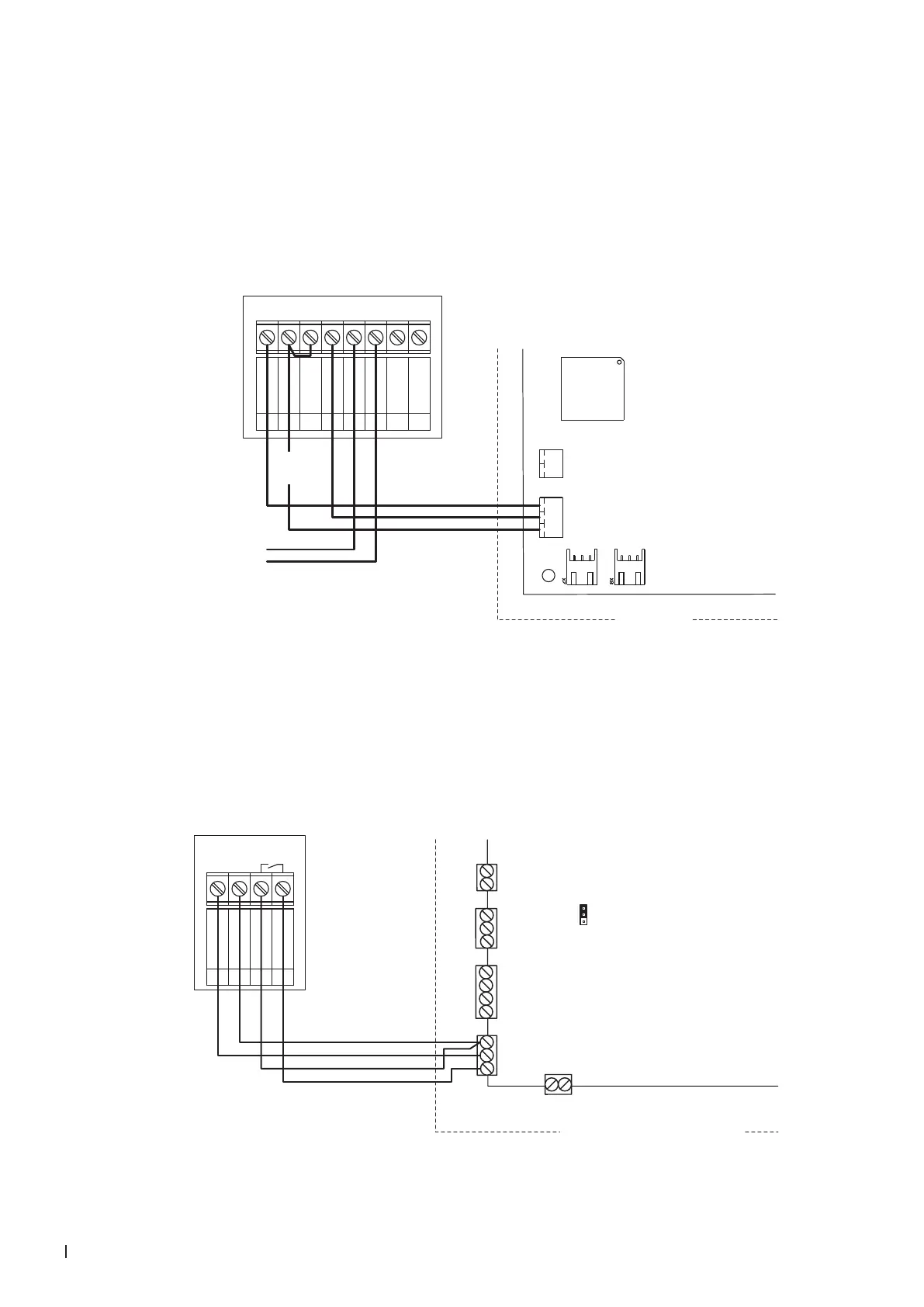
6.7.9 Connecting the CHD-NA with fan control output to the Condair RE
1. Connect the CHD-NA (On/Off humidistat) according to the wiring diagram below to the corresponding
terminals of terminal block "X6" on the driver board of the Condair RE and connect terminals "24V
AC/DC" and "DO1-3" with a wire bridge.
Note: The voltage supply of the CHD-NA is established via the terminals "24 VDC" and "GND" of
terminal block "X6" of the Condair RE or via an external 24V AC/DC voltage source.
2. Connect the cable for the fan control to the terminals "DO2-5" and "DO2-6" of the CHD-NA.
Condair RE
X6
X5
GND
HUM
24VDC
SC
SC
CHD-NA
0V / GND
1
24V AC/DC
2
DO1
3
DO1
4
DO2
5
DO2
6
RT
7
RT
8
24 VDC
Driver board
Condair RE
Furnace Fan
6.7.10 Connecting the CHD-S to the Condair MD
Connect the Condair CHD-S to the terminals "24V+", "GND" and "Hygro" of terminal block "X11" on the
driver board of the Condair MD hydraulic unit according to the wiring diagram below.
Note: The voltage supply of the CHD-S is established via the terminals "24V" and "GND" of terminal
block "X11" or via an external 24 V AC/DC voltage supply.
X11
X10
X12
X13
JP4
X15
Hygro
24V+
Temp
Hum 1
Hum 2
10V/24V+
GND
GND
GND
GND
Leak
24V
24V
Safety
10V24V
CHD-S
0V
1
24V
G0
G
2
DO1
3
DO1
Q13
Q14
4
Driver board Condair MD
Hydraulic unit Condair MD



 To Next Page