Accessing information on the meter using short codes
To access information on the meter, short codes are used. These enable you to extract information
from the meter, without using specialised equipment.
The short codes are a sequence of three numeric digits, bound by two hash commands that you enter
on the meter using the keypad, example #003#.
When you enter a short code you do not need to include the preceding zeros. For example, instead of
entering #041# or #002#, you can use #41# and #2#.
When a short code returns more than a single item of information, you can scroll to view more
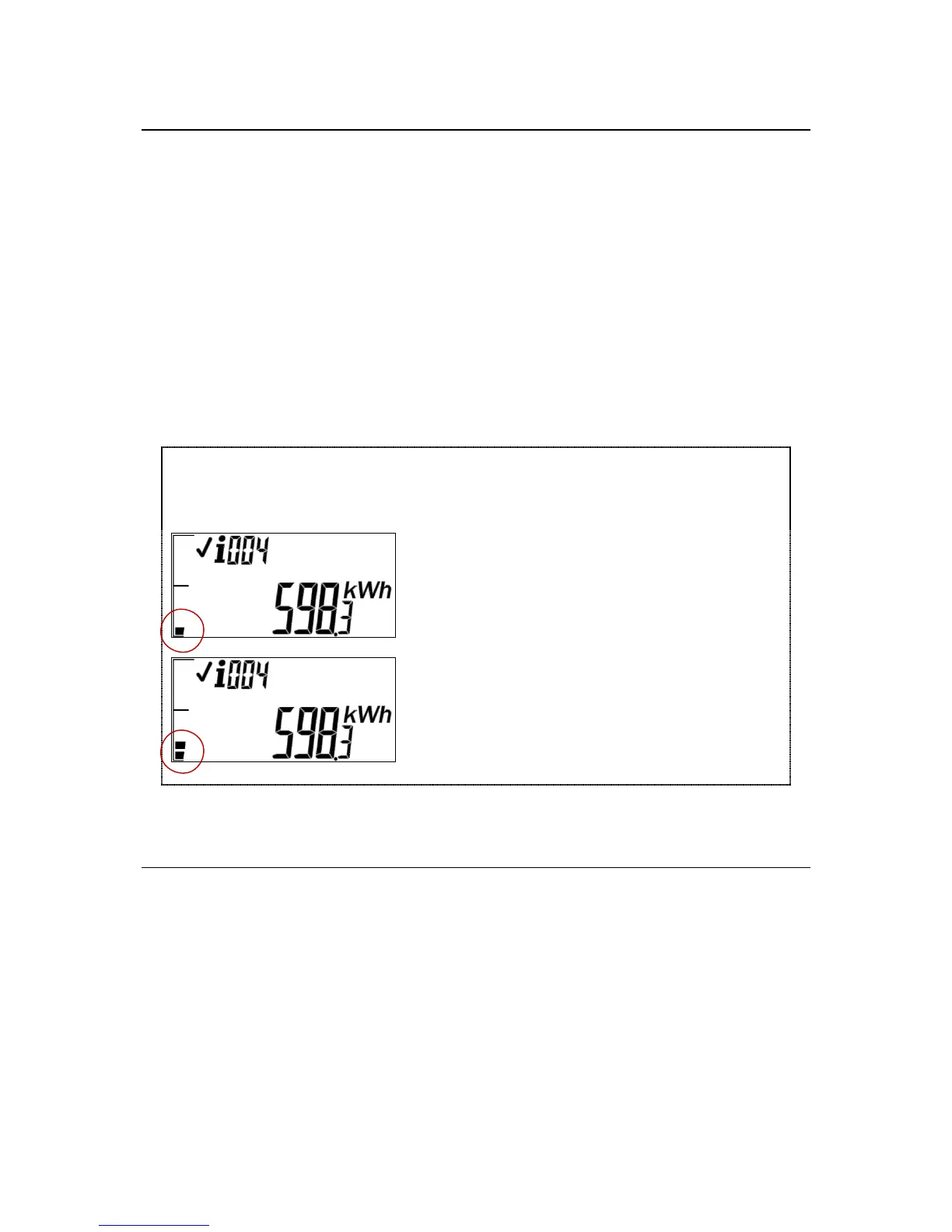
information using the hash (#) key. When you scroll, the segments of the bar indicator represent the
menu item you are viewing. So, one segment in the bar indicates menu item 1, two segments in the
bar indicate menu item 2 and so on.
To return to the default display when you are viewing additional information, press the backspace key.
Menu item 1 displays the meter total to date. As
shown in this image, the bar indicator has one
segment displayed, indicating menu item 1.
Menu item 2 displays the user total to date. As
shown in this image, the bar indicator has two
segments, indicating menu item 2.
For a quick reference of all short codes, see the Short codes index section.
Entering a short code
To enter a short code:
1. Press # on the keypad.
2. Enter the required short code.
3. Press #. The requested information is displayed.
4. Press # to scroll through the information displayed, when a short code returns more than a
single item of information. The segments of the bar indicator represent the menu item you are
viewing.



 To Next Page