5. Each Component Function
User’s Manual
61
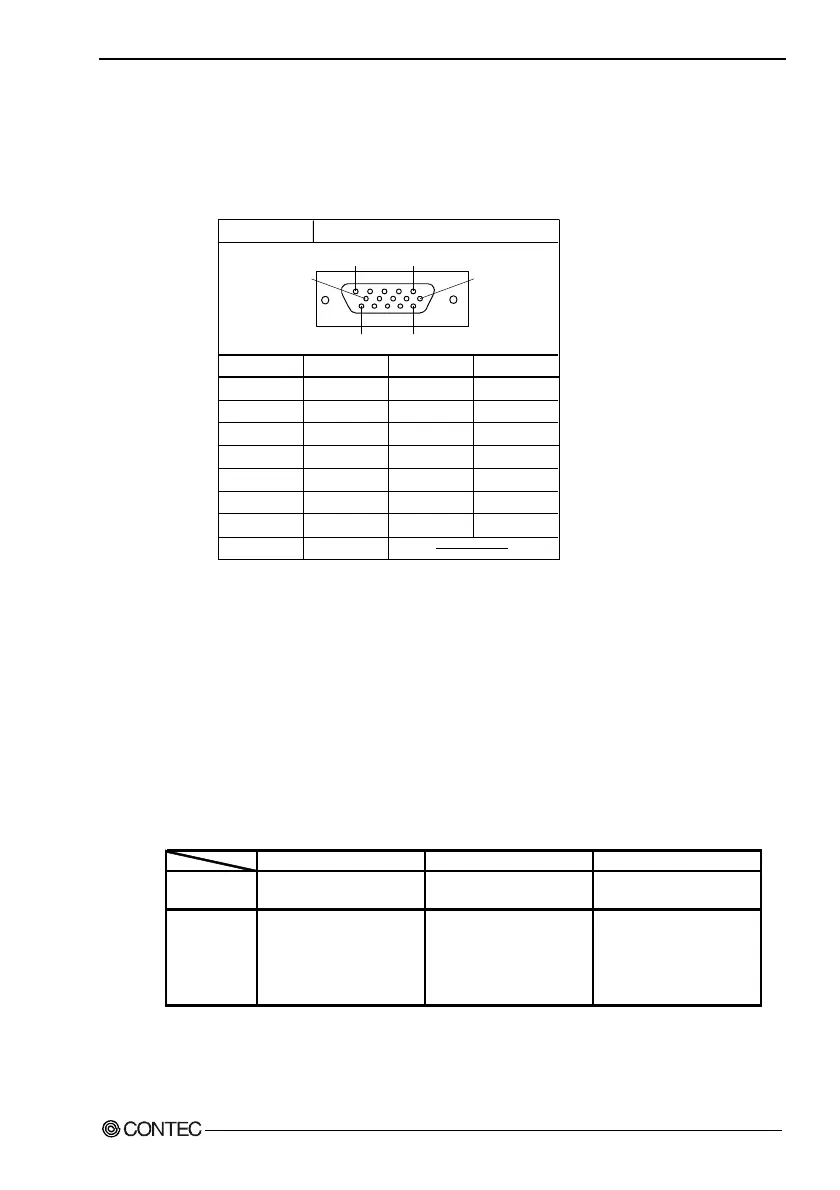
CRT Interface
The BOX-PC is equipped with a CRT connection connector named
VGA (HD-SUB 15P).
Table 5.12. CRT Connector
Connector type
Pin No.
1
2
3
4
5
6
7
8
Pin No.
9
10
11
12
13
14
15
Signal
RED
GREEN
BLUE
N.C.
GND
GND
GND
GND
Signal
N.C.
GND
N.C.
N.C.
HSYNC
VSYNC
N.C.
15pin HD-SUB (FEMALE)
5
1
11
15
10
6
Display Driver
The display driver compatible with each OS is downloadable from
the CONTEC home page or can be purchased separately as an
option.
Set of optional driver software and utility software
: IPC-SLIB-01 (provided on a CD-ROM)
(Windows 98 Second Edition, Windows NT 4.0, Windows 2000
Professional)
Table 5.13. Drivers for Each OS
Display driver Use IPC-SLIB-01 Use IPC-SLIB-01
Use standard Windows
2000 driver
LAN driver
Use standard Windows 98
Second Edition driver
Use IPC-SLIB-01
However, the driver cannot
be installed from the CD-
ROM. Copy the driver to an
FD and install from the FD.
Use standard Windows
2000 driver
Refer to the readme files in IPC-SLIB-01 for details of the driver installation procedure.
OS Windows 2000 ProfessionalWindows NT 4.0Windows 98 Second Edition



 To Next Page