5. Each Component Function
User’s Manual
63
Printer Port Interface
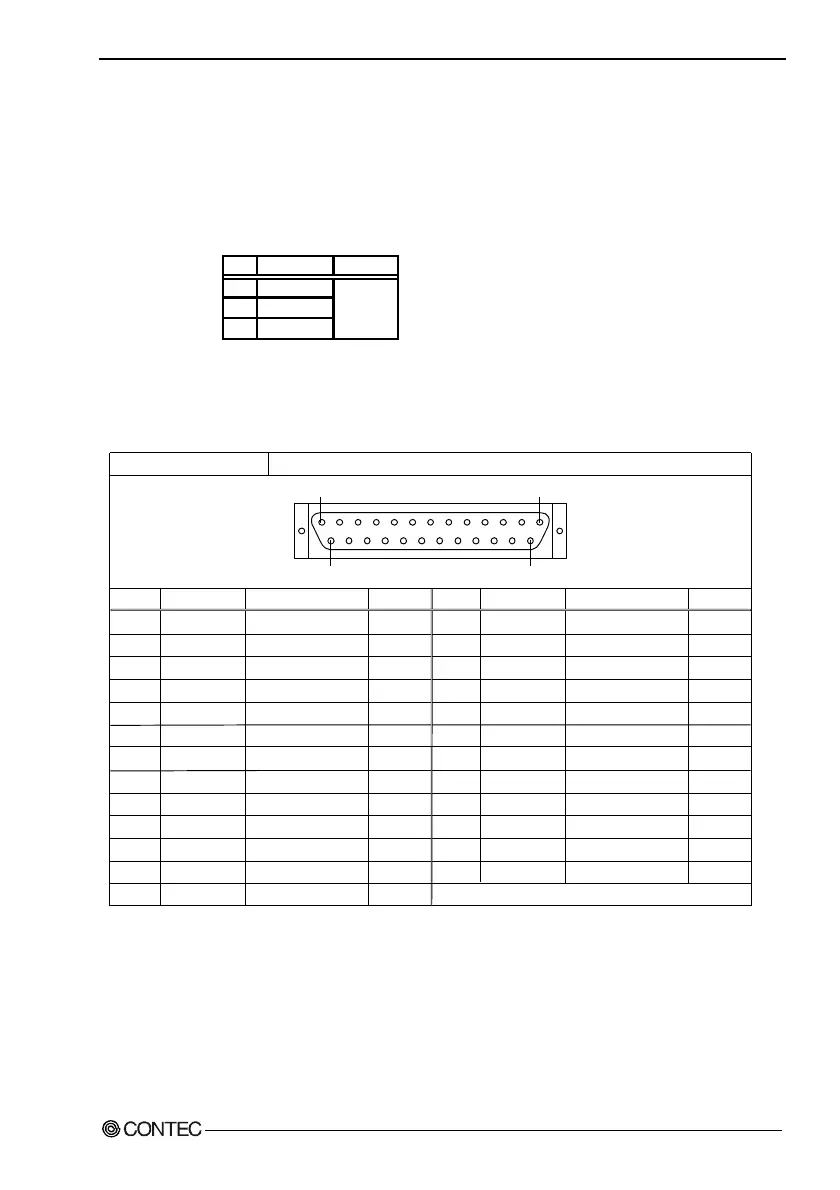
The BOX-PC is equipped with one printer port interface. BIOS
setup (see Chapter 4) allows LPT1-3 and "not in use" to be set.
The connector is named PRINTER.
Table 5.15. Printer Ports and I/O Addresses
LPT I/O address Interrupt
1 3BCh-3BFh
2 378h-37Fh
3 278h-27Fh
IRQ 5
IRQ 7
The BIOS defaults to the following factory settings:
Parallel port : Disable
Table 5.16. Printer Port Connector
Pin No.
1
2
3
4
5
6
7
8
9
10
11
12
13
Connector used on the unit
Signal
-STRB
D 0
D 1
D 2
D 3
D 4
D 5
D 6
D 7
-ACK
BUSY
PE
SELECT
Meaning
Enable data
Data bit 0
Data bit 1
Data bit 2
Data bit 3
Data bit 4
Data bit 5
Data bit 6
Data bit 7
Ready to accept data
Busy
Out of paper
Select state
Direction
Output
Output
Output
Output
Output
Output
Output
Output
Output
Input
Input
Input
Input
25pin D-SUB (FEMALE)
Fastening screw: No. 4-40 UNC inch thread
Pin No.
14
15
16
17
18
19
20
21
22
23
24
25
Signal
-AFEED
-ERROR
-INIT
-SELECT*IN
GND
GND
GND
GND
GND
GND
GND
GND
Meaning
Automatic feed
Not available
Initialize
Input allowed
Ground
Ground
Ground
Ground
Ground
Ground
Ground
Ground
Direction
Output
Input
Output
Output
-----
-----
-----
-----
-----
-----
-----
-----
13
1
1425
-----



 To Next Page