⚫ Manual check: Click Manual Check.
⚫ The system starts checking the new versions. After checking is completed, the check result is displayed.
⚫ If the "It is the latest version" text is displayed, you do not need to upgrade.
⚫ If the text indicating there is a new version, go to the step 3. . Step 3 Click Upgrade now to update the system.
1.10.4.4.3 Uboot Upgrading
⚫ Under the root directory in the USB storage device, there must be "u-boot.bin.img" file and "update.img" file
saved, and the USB storage device must be in FAT32 format.
⚫ Make sure the USB storage device is inserted; otherwise the upgrading cannot be performed.
⚫ When starting the Device, the system automatically checks whether there is a USB storage device
connected and if there is any upgrade file, and if yes and the check result of the upgrade file is correct, the
system will upgrade automatically. The Uboot upgrade can avoid the situation that you have to upgrade
through +TFTP when the Device is halted.
1.19 File Backup
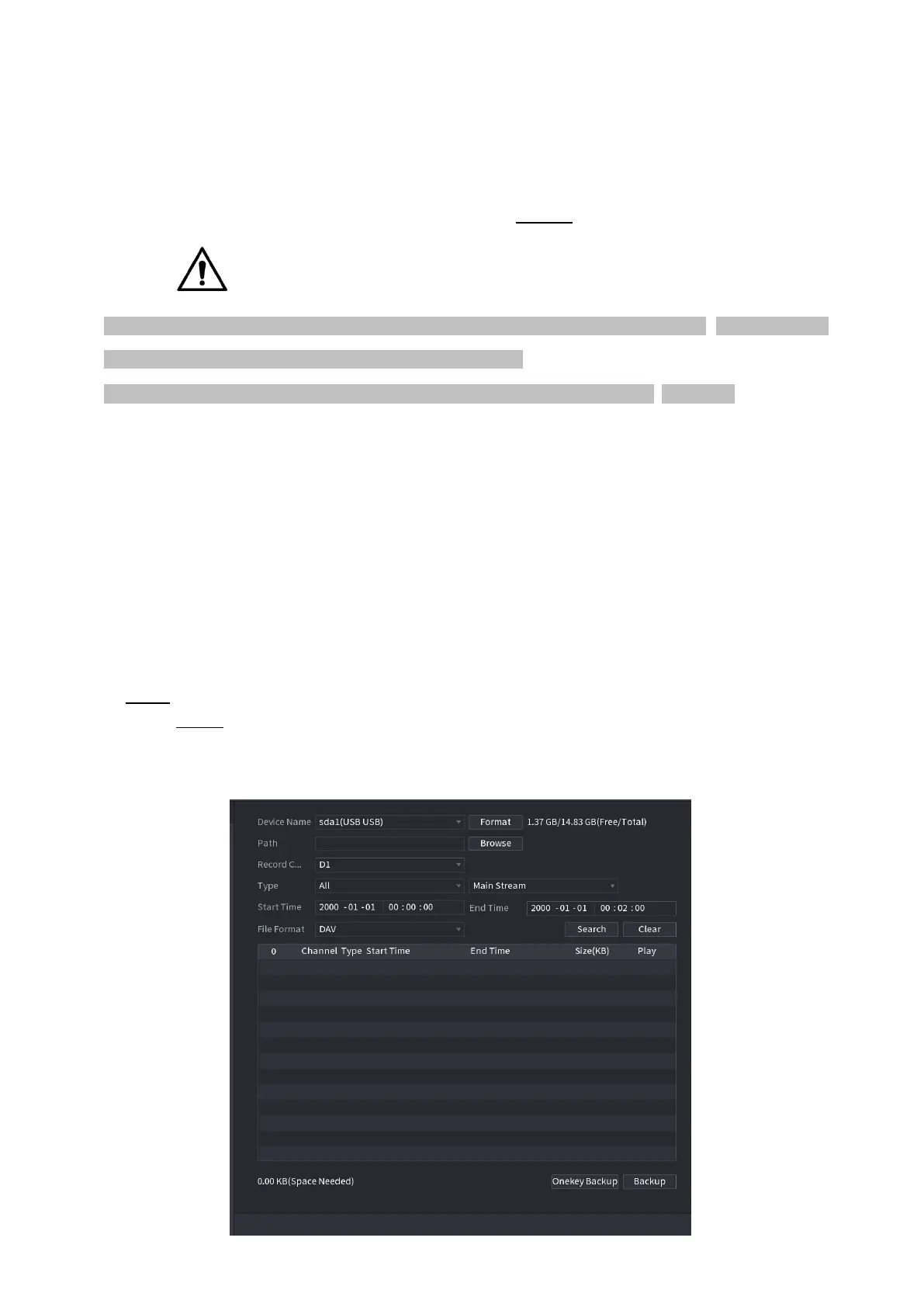
⚫ You can back up the record file to the UBS device.
⚫ Step 1 Connect USB burner, USB device or portable HDD to the device.
Step 2 Select Main menu > BACKUP, the Backup interface is displayed. See Figure 1-201.
⚫ Figure 1-201



 To Next Page