18 • HD-MD4X2-4KZ-E and HD-MD4X1-4KZ-E Web Interface Configuration Guide — Doc. 8907B
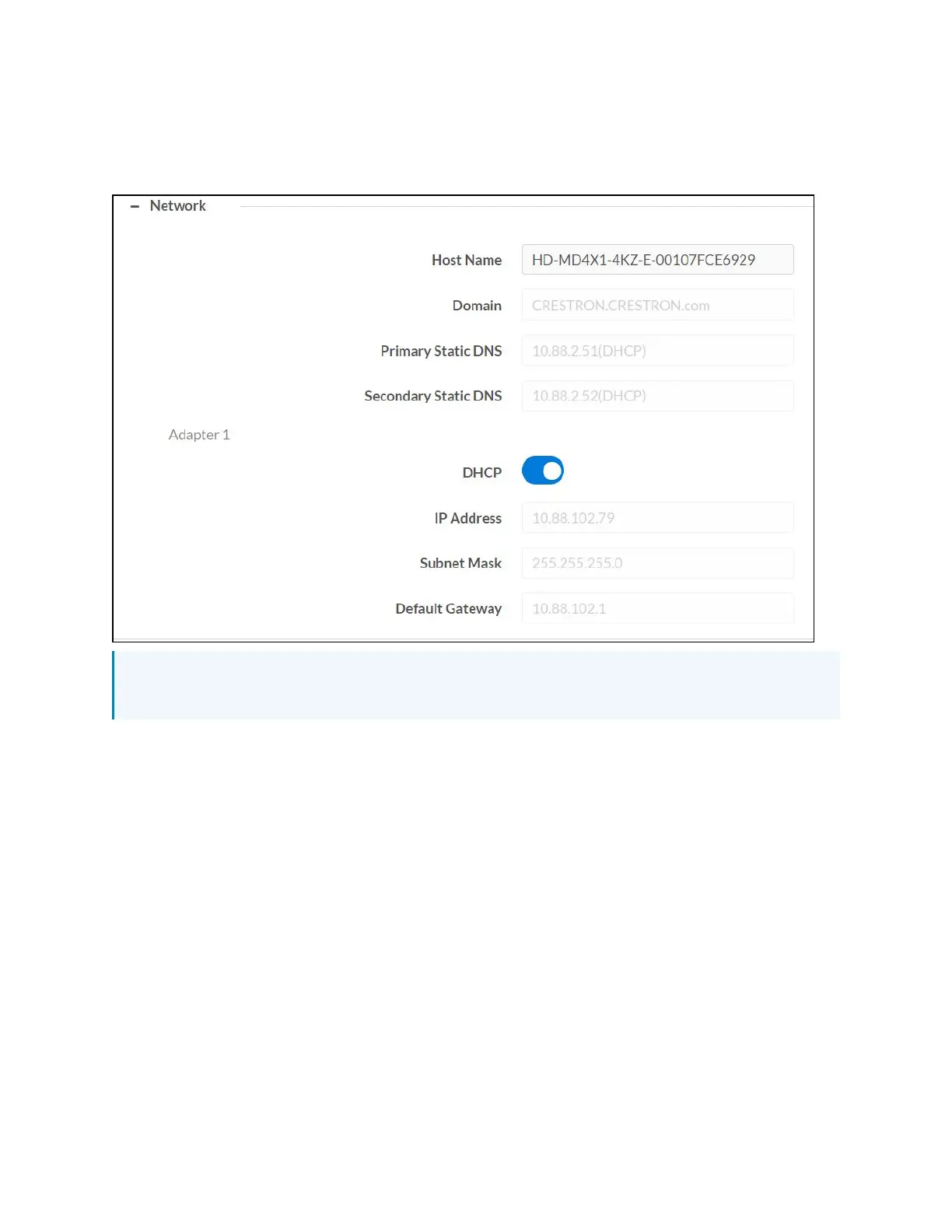
Network
The Network section displays network-related information about the AV switchers, including the
Host Name, Domain, Primary Static DNS, and Secondary Static DNS.
NOTE: By default the host name of the AV switchers consists of the model name followed by
the MAC address of the device. For example, HD-MD4X1-4KZ-E-00107FCE6929.
Adapter 1
Displays DHCP, IP Address, Subnet Mask, and Default Gateway of the AV switchers.
Configure DHCP
Set the DHCP slider to enabled (right) or disabled (left) to specify whether the IP address of the
AV switchers is to be assigned by a DHCP (Dynamic Host Configuration Protocol) server.
l
Enabled:When DHCP is enabled (default setting), the IP address of the AV switchers is
automatically assigned by a DHCP server on the local area network (LAN) for a
predetermined period of time.
l
Disabled:When DHCP is disabled, manually enter information in the following fields:
o
Primary Static DNS: Enter a primary DNS IP address.
o
Secondary Static DNS: Enter a secondary DNSIPaddress.
o
IP Address: Enter a unique IP address for the AV switchers.












 To Next Page