Product Manual — Doc. 7750C TST-902 • 91
RFSetup
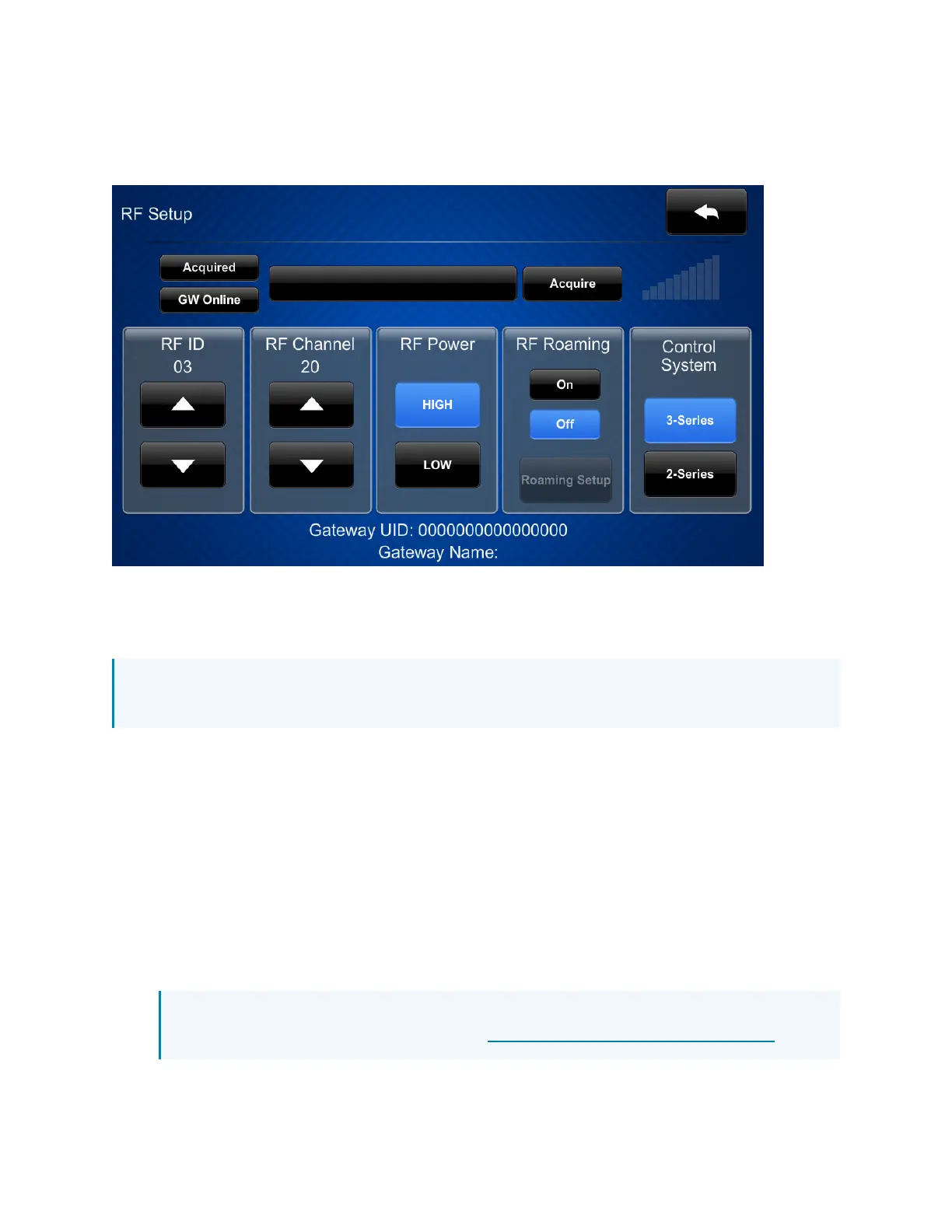
Tap RFSetup on the TST-902 Setup screen to display the RFSetup screen.
The RFSetup screen provides controls that can be used to acquire the TST-902 to a Crestron
Extended Range (ER)wireless gateway (not included). Once the TST-902 has been acquired to a
gateway, the gateway UID, name, and RFsignal strength are displayed.
NOTE:For instructions on acquiring the TST-902 to a Crestron ERwireless gateway, refer to
Set Up an Extended Range RFConnection on page 83.
The following buttons and controls are provided for configuring RFsettings:
l
Tap Acquire to acquire the touch screen to a Crestron ERwireless gateway that has been
placed in Acquire mode. Refer to Set Up an Extended Range RFConnection on page 83 for
more information.
l
Tap the up and down arrow buttons under RFIDto set the RFIDfor the gateway
connection.
l
Tap the up and down arrow buttons under RFChannel to set the RFchannel used for the
gateway connection.
l
Tap HIGHor LOWunder RFPower to use high or low power for the touch screen RFsignal.
l
Tap On or Off under RFRoaming to turn RFroaming on or off.
NOTE:For installations with multiple gateways, the TST-902 can be configured to use
RFroaming.For instructions, refer to the Touch Screen RFRoaming Quick Start.











 To Next Page