42 • TST-902 Product Manual — Doc. 7750C
Install the TST-902-BTP
To install the TST-902-BTPinto the touch screen after the existing battery pack has been
removed:
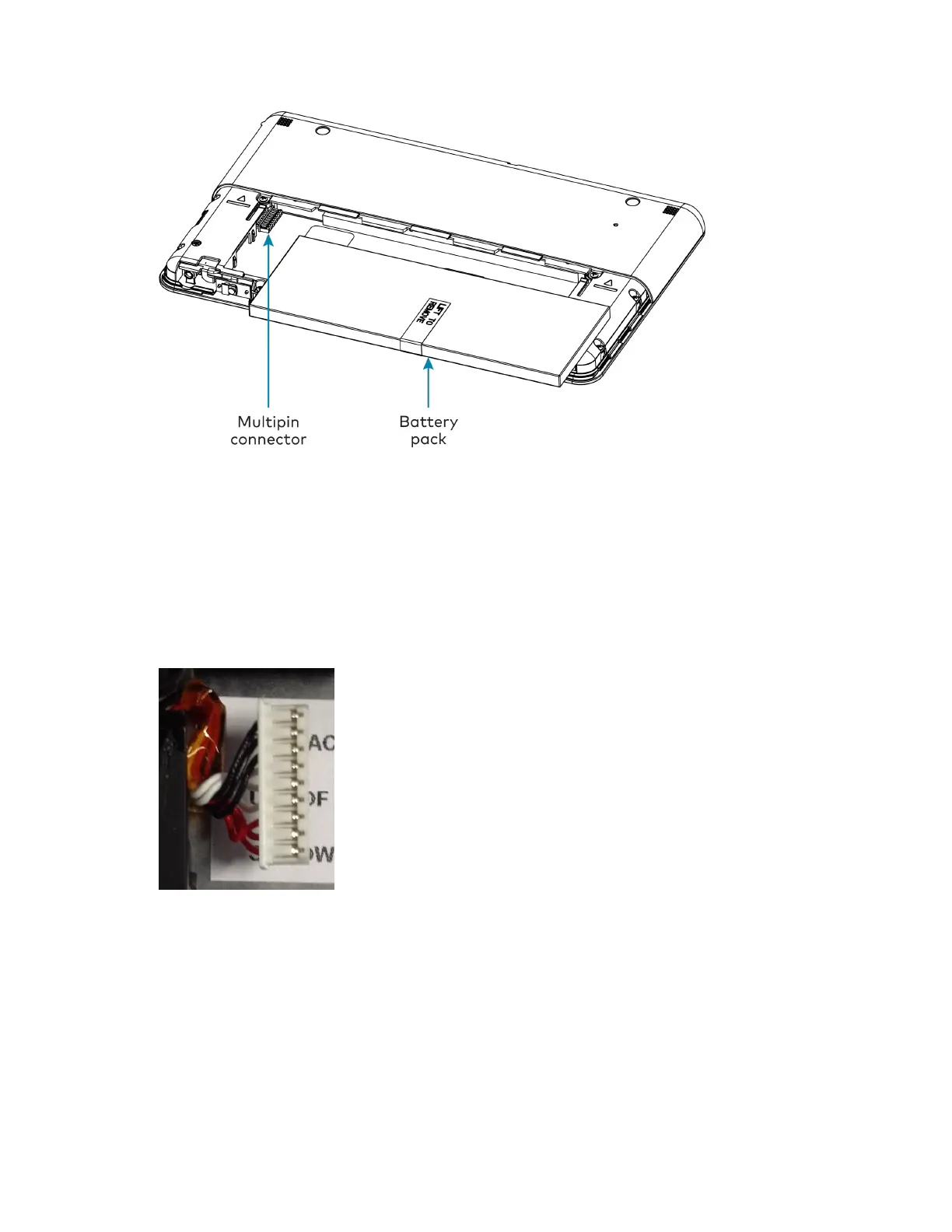
1. Orient the TST-902-BTP so that its "Lift to Remove"tag is visible and the multipin
connector is positioned to its left.
2. Ensure the pin side of the multipin connector on the touch screen is facing upward, and
then connect it to the TST-902-BTPwire harness as shown in the following image.
3. Place the TST-902-BTP gently into the touch screen battery compartment.
4. Reattach the touch screen bottom cover by placing it on the rear of the touch screen
below the cover markings and then sliding it back into place.
Charge the TST-902-BTP
Once the TST-902-BTP has been installed, it can be charged by placing the TST-902 in its
included table dock (TST-902-DS) or the optional wall dock (TST-902-DSW, not included).











 To Next Page