CSL CS468 16-Port EPC CLASS 1 GEN 2 RFID READER
USER'S MANUAL, VERSION 2.0.1
Copyright © Convergence Systems Limited, All Rights Reserved
7.5 Antenna Port and Sequence (C# and Java Demo App)
Antenna Port
User can set the antenna ports of CSL RFID Reader into Active / Inactive state using both C# and
Java Demo App.
User should check the number of antenna ports available in the CSL RFID Reader
according to the specification. Below is example of CS203, CS468 and CS469:
Number of antenna ports available in CS203: 1 => Max 1 active port 0
Number of antenna ports available in CS468: 16 => Max 16 active ports 0 - 15
Number of antenna ports available in CS469: 4 => Max 3 active ports 0 - 3
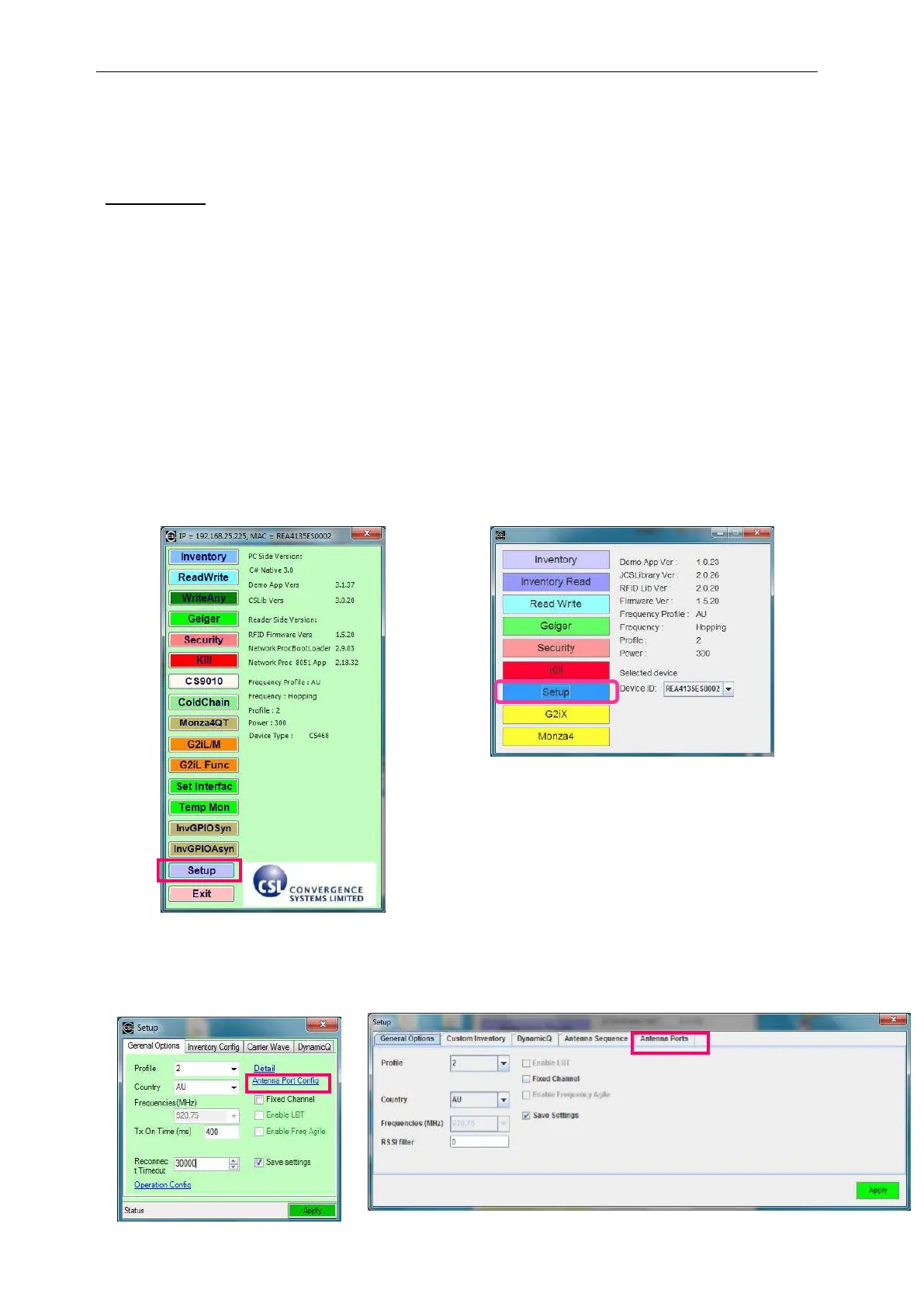
To set the ACTIVE / INACTIVE state of CSL RFID Reader antenna ports, user press “Setup” in
the Demo App.
If user is using C# Demo App, click on “Antenna Port Config”.
If user is using Java Demo App, click on the tab “Antenna Ports”.


 To Next Page