10
GenesisPlus Operator Manual
D1151, R
EV C, 10/16
General System Functions
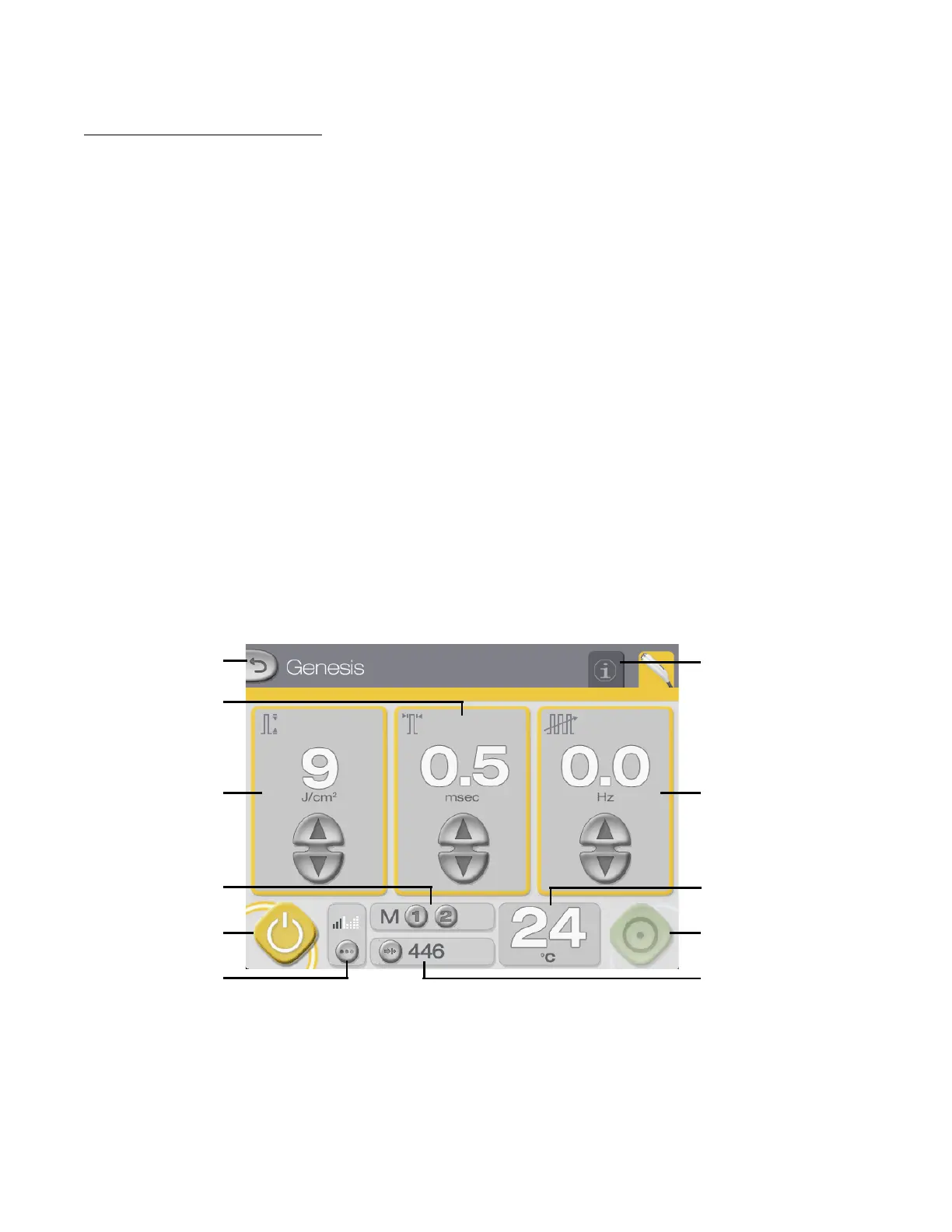
Genesis Control Screen
After the successful completion of the self-test routine at system start-up, the Genesis Control
Screen displays. From the Genesis Control Screen, you can:
• select the fluence, pulse width and repetition rate (refer to the User-selectable
Parameters topic)
• adjust the aiming beam intensity and mode (refer to the Aiming Beam subtopic)
• store and recall frequently used treatment parameters (refer to the Memory Storage
subtopic)
• monitor the measured temperature of the target tissue (refer to the Thermal
Monitoring subtopic)
• select the system status (refer to the System Status: STANDBY and READY Modes
subtopic)
• view and reset the pulse counter (refer to the Displays and Indicators subtopic)
• go to the Warts Control Screen (refer to the Warts Control Screen subtopic)
• go to the Information & Adjustment Screen (refer to Information & Adjustment
Screen subtopic)
Genesis Control Screen (STANDBY mode)
READY button
Target tissue
temperature display
STANDBY button
Aiming beam
adjustment button
Memory storage
and recall buttons
Repetition rate
controls and display
Fluence controls
and display
Pulse width controls
and display
Info & Adjustment
Screen tab
Back button
Pulse counter display
and reset button



 To Next Page