11
GenesisPlus Operator Manual
D1151, R
EV C, 10/16
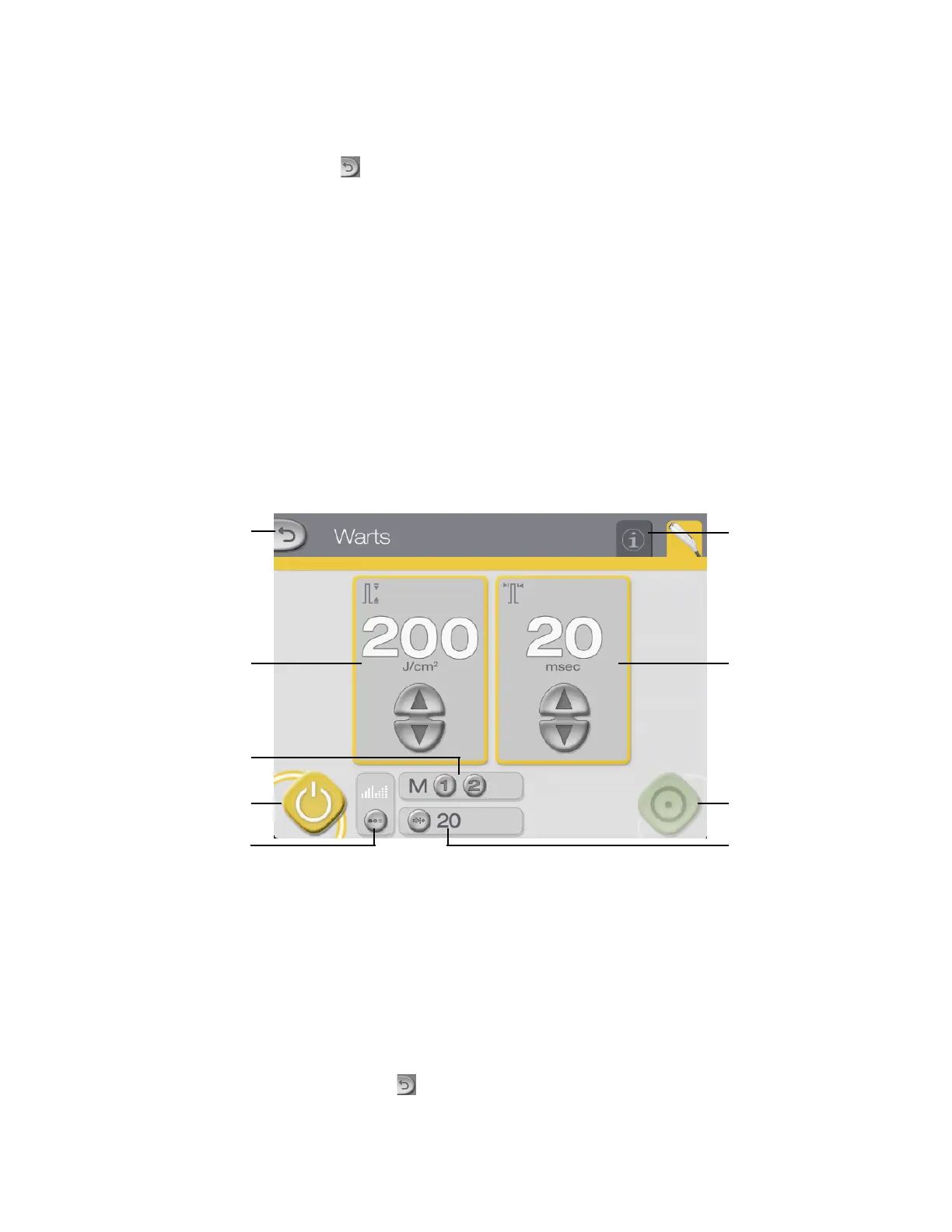
Warts Control Screen
Press the (back) button on the Genesis Control Screen to access the Warts Control Screen.
From the Warts Control Screen, you can:
• select the fluence and pulse width (refer to the User-selectable Parameters subtopic)
• adjust the aiming beam intensity and mode (refer to the Aiming Beam subtopic)
• store and recall frequently used treatment parameters (refer to the Memory Storage
subtopic)
• select the system status (refer to the System Status: STANDBY and READY Modes
subtopic)
• view and reset the pulse counter (refer to the Displays and Indicators subtopic)
• go to the Genesis Control Screen (refer to the Genesis Control Screen subtopic)
• go to the Information & Adjustment Screen (r
efer to Information & Adjustment
Screen subtopic)
Warts Control Screen (STANDBY mode)
READY buttonSTANDBY button
Memory storage
and recall buttons
Pulse width controls
and display
Fluence controls
and display
Info & Adjustment
Screen tab
Back button
Aiming beam
adjustment button
Pulse counter display
and reset button
CAUTION
Do not treat any indications other than warts from the Warts Con-
trol Screen.
NOTE
Press the (back) button to return to the Genesis Control Screen.



 To Next Page