11D-Link M30 AX3000 Dual-Band Wi-Fi 6 Router User Manual
Section 2 - Installation
Hardware Setup
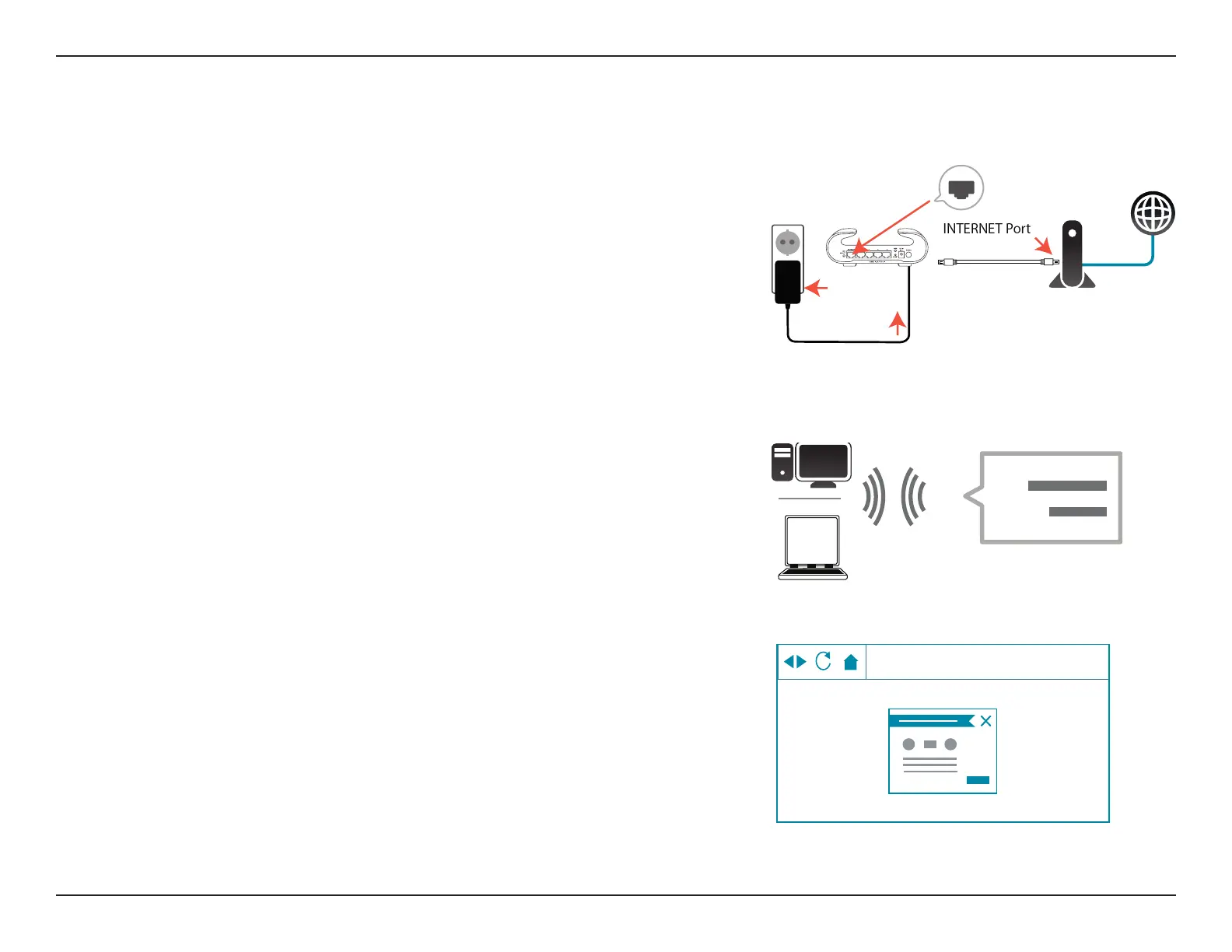
Step 1
Position M30 close to your Internet-connected modem. Turn o and unplug
the power to your cable or DSL broadband modem. This is required. In some
cases, you may need to turn it o for up to ve minutes. Connect an Ethernet
cable to the modem and to the Internet port of M30. Next, connect the
power adapter and plug M30 into a power outlet.
Step 2
Wait for M30 to boot up. When the router's LED light starts breathing orange,
wirelessly connect your computer to the Wi-Fi name (SSID) printed on the
device label.
Step 3
Type http://xxxx.devicesetup.net/ into a web browser and follow the
on-screen instructions to complete the setup.
(xxxx represents the last 4 characters of the MAC address)
Wi-Fi
Wi-Fi
SSID:
Password:
MODEM
Wi-Fi
http://xxxx.devicesetup.net/











 To Next Page