Si-95 Test Operation
Test Operation Inverter K Series 61
1.10 Indoor Field Setting
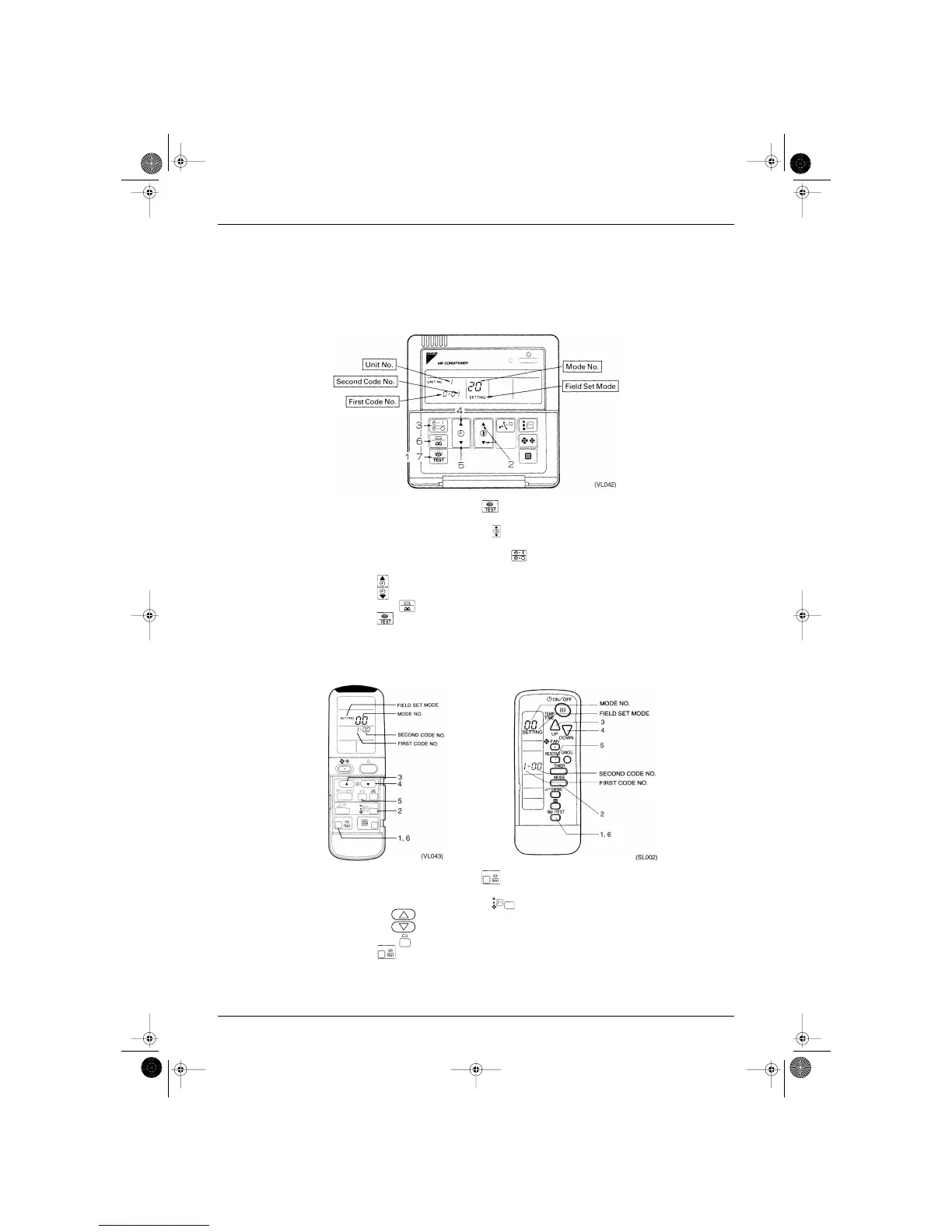
Making a field setting
Field settings must be made by remote controller if optional accessories have been installed on the indoor
unit, or if the indoor unit or HRV unit’s individual functions have been modified.
1.10.1 Wired Remote Controller
1. When in the normal mode, push the button for 4 seconds or more, and operation then enters
the “field set mode.”
2. Select the desired “mode No.” with the button.
3. During group control and you want to set by each individual indoor unit (when mode No. 20, 21, 22, 23,
25 has been selected), push the time mode button and select the “indoor unit No.” to be set.
Note: This operation is not required when setting as a group.
4. Push the button and select the first code No.
5. Push the button and select the second code No.
6. Push the timer button one time and “define” the currently set contents.
7. Push the button to return to the normal mode.
1.10.2 Wireless Remote Controller
1. When in the normal mode, push the button for 4 seconds or more, and operation then enters
the “field set mode.”
2. Select the desired “mode No.” with the button.
3. Pushing the button, select the first code No.
4. Pushing the button, select the second code No.
5. Push the timer button and check the settings.
6. Push the button to return to the normal mode.
SI-95.BOOK Page 61 Friday, March 31, 2000 10:59 AM




 To Next Page