Test Operation Si-95
72 Test Operation Inverter K Series
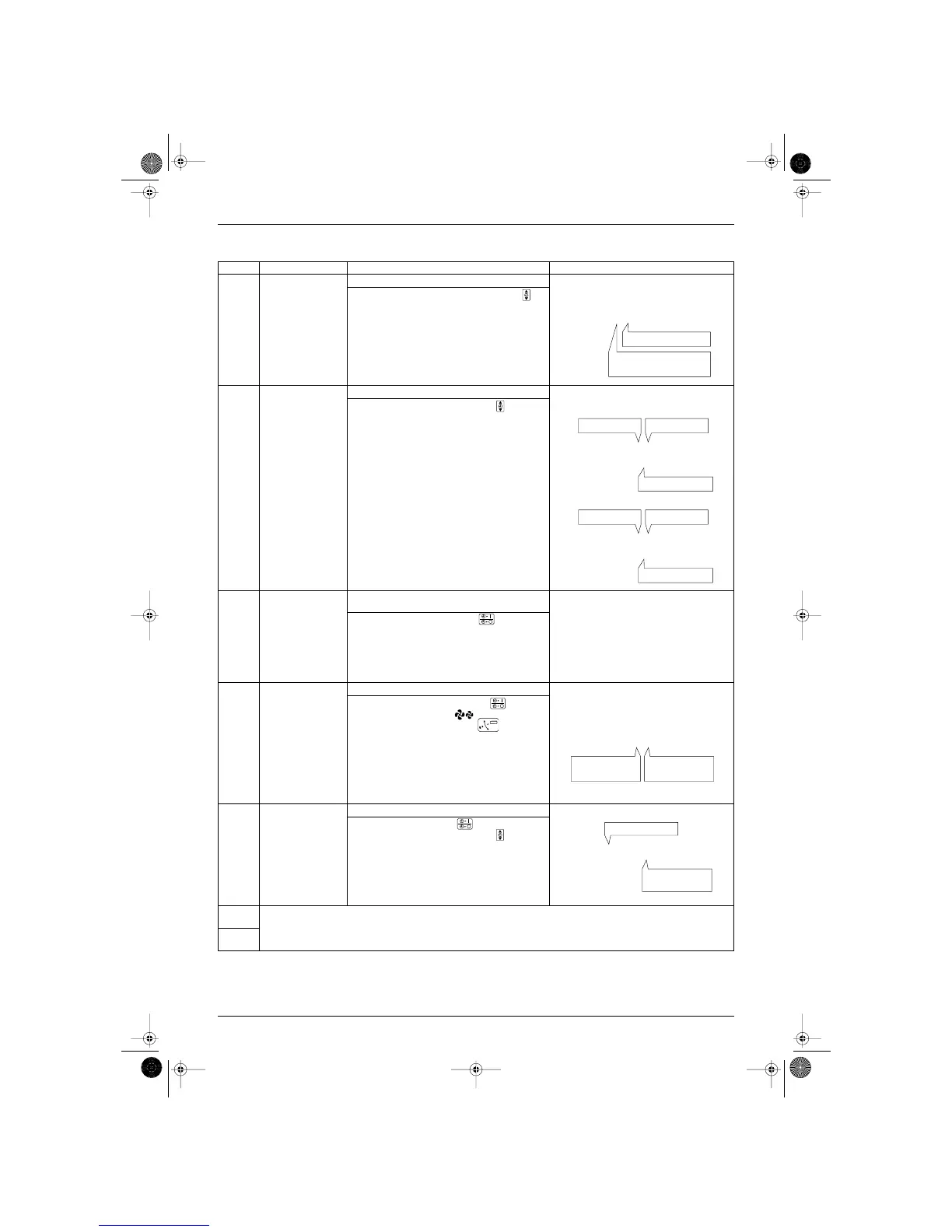
Mode No Function Contents and operation method Remote controller display example
44
44
00
00
Malfunction hysteresis
display
Display malfunction hysteresis.
The hysteresis No. can be changed with the
button.
44
44
11
11
Display of sensor and
address data
Display various types of data.
Select the data to be displayed with the button.
Sensor data
0: Thermostat sensor in remote controller.
1: Suction
2: Liquid pipe
3: Gas pipe
Address data
4: Indoor unit address
5: Outdoor unit address
6: BS unit address
7: Zone control address
8: Cool/heat group address
9: Demand / low noise address
44
44
33
33
Forced fan ON Manually turn the fan ON by each unit. (When you
want to search for the unit No.)
By selecting the unit No. with the button, you
can turn the fan of each indoor unit on (forced ON)
individually.
44
44
44
44
Individual setting Set the fan speed and air flow direction by each unit
Select the unit No. with the time mode button.
Set the fan speed with the button
Set the air flow direction with the button.
44
44
55
55
Unit No. transfer Transfer unit No.
Select the unit No. with the button.
Set the unit No. after transfer with the button.
44
44
66
66
This function is not used by VRV System Inverter K Series.
44
44
77
77




 To Next Page