AP20 Installation and Operating Guide Page 73
AP20 Installation & Operating Guide Document # 9301H39200 Ver. 1.25
4.3.6.3 NonSync Level and Routing
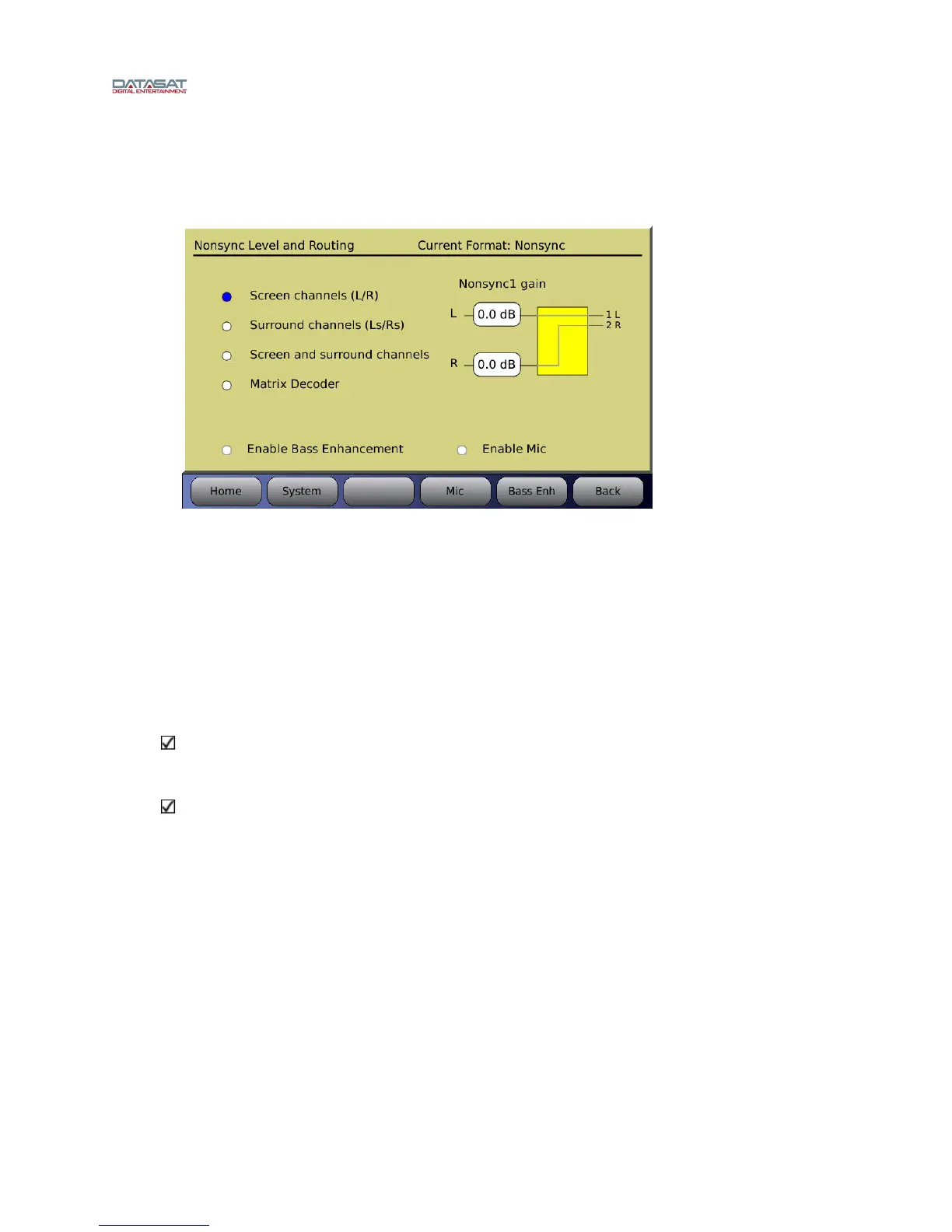
This screen is available for Nonsync 1 or 2 input sources only.
Menu (System) > Formats > Format Options > NonSync Level and Routing
Figure 48. Nonsync Level & Routing
Adjust the input levels of Nonsync1 and Nonsync2 by selecting the box under L or R and turning the
fader knob.
Inputs can be sent to:
The Left and Right outputs
The Left Surround and Right Surround outputs
Left and Left Surround, plus Right and Right Surround
Matrix Decoder
Note when Enable Mic is selected both Microphone and non-sync will be on at the same time.
Microphone audio is not mixed with the nonsync audio but must be routed to different
speakers.
The microphone audio is added to the hearing impaired audio when using the nonsync input
with the microphone playing on the surround channels.
4.3.6.3.1. Bass Enhancement
Item
s needed: RTA with Microphone.
Select the Enable Bass Enhancement button to turn on Bass Enhancement.
To setup the Bass Enhancement, select the Bass Enh button. The following screen will
appear.



 To Next Page