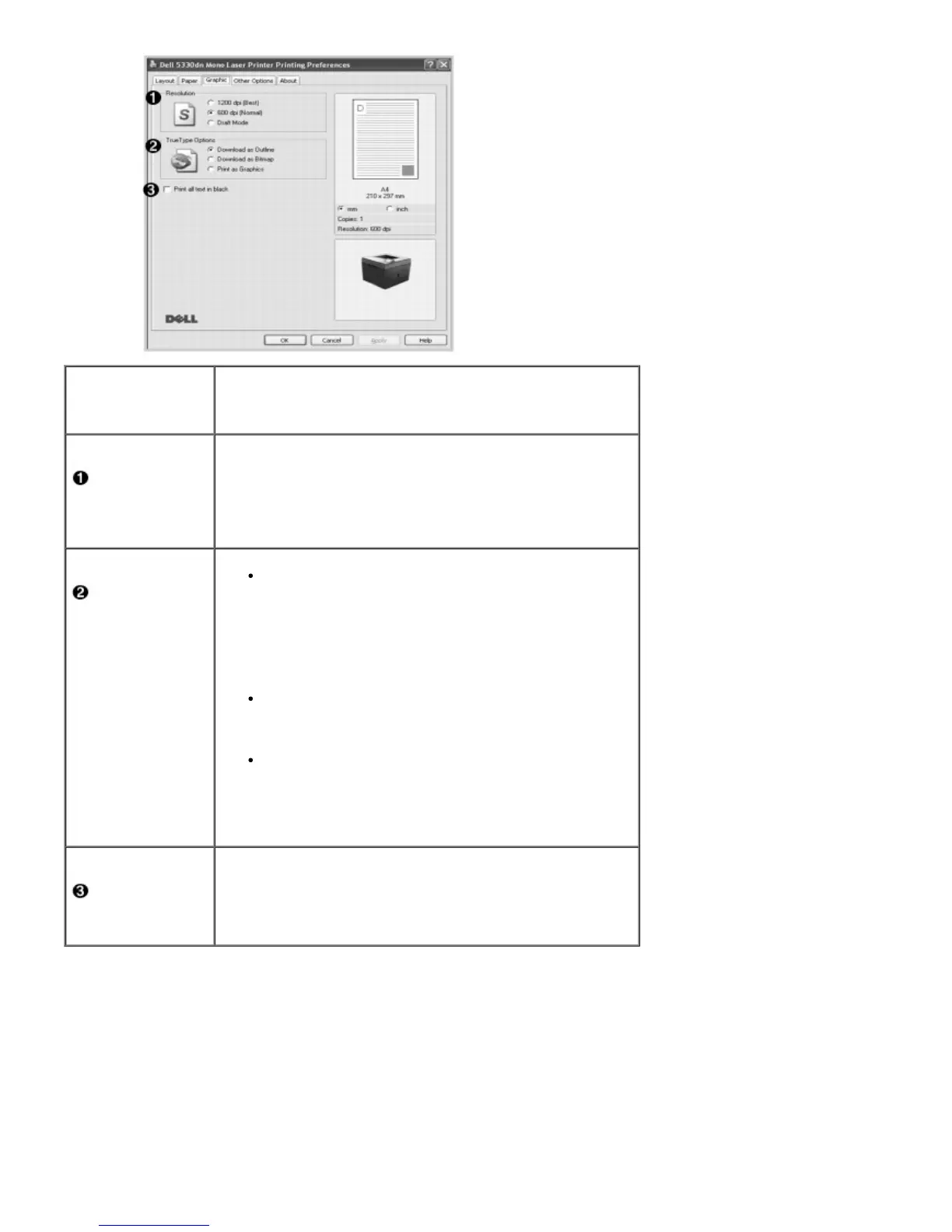
Property Description
Resolution
Select the printing resolution by choosing 1200 dpi (Best),
600 dpi (Normal) or Draft Mode. The higher the setting,
the sharper the clarity of the printed characters and graphics.
Higher settings may increase the time it takes to print a
document.
TrueType
Options
Download as Outline: When this option is selected,
the driver will download any TrueType fonts used in
your document but not already stored(resident) on
your printer. If, after printing a document, you find
that the fonts did not print correctly, choose
Download ad Bitmap and resubmit your print job.
The Download as Bitmap setting is often useful
when printing Adobe.
Download as Bitmap: When this option is selected,
the driver downloads the font data as bitmap images.
Documents with complicated fonts, such as Korean or
Chinese, print faster in this setting.
Print as Graphics: When this option is selected, the
driver downloads any fonts as graphics. When printing
documents with high graphic content and relatively
few TrueType fonts, printing performance (speed) may
be enhanced in this setting.
Print all text
in black
When the Print All Text To Black option is checked, all text
in the document prints solid black, regardless of the color it
appears on the screen. When it is not checked, colored text
prints in shades of gray.
Other OptionsTab
Click the Other Options tab to access the following features:













 To Next Page