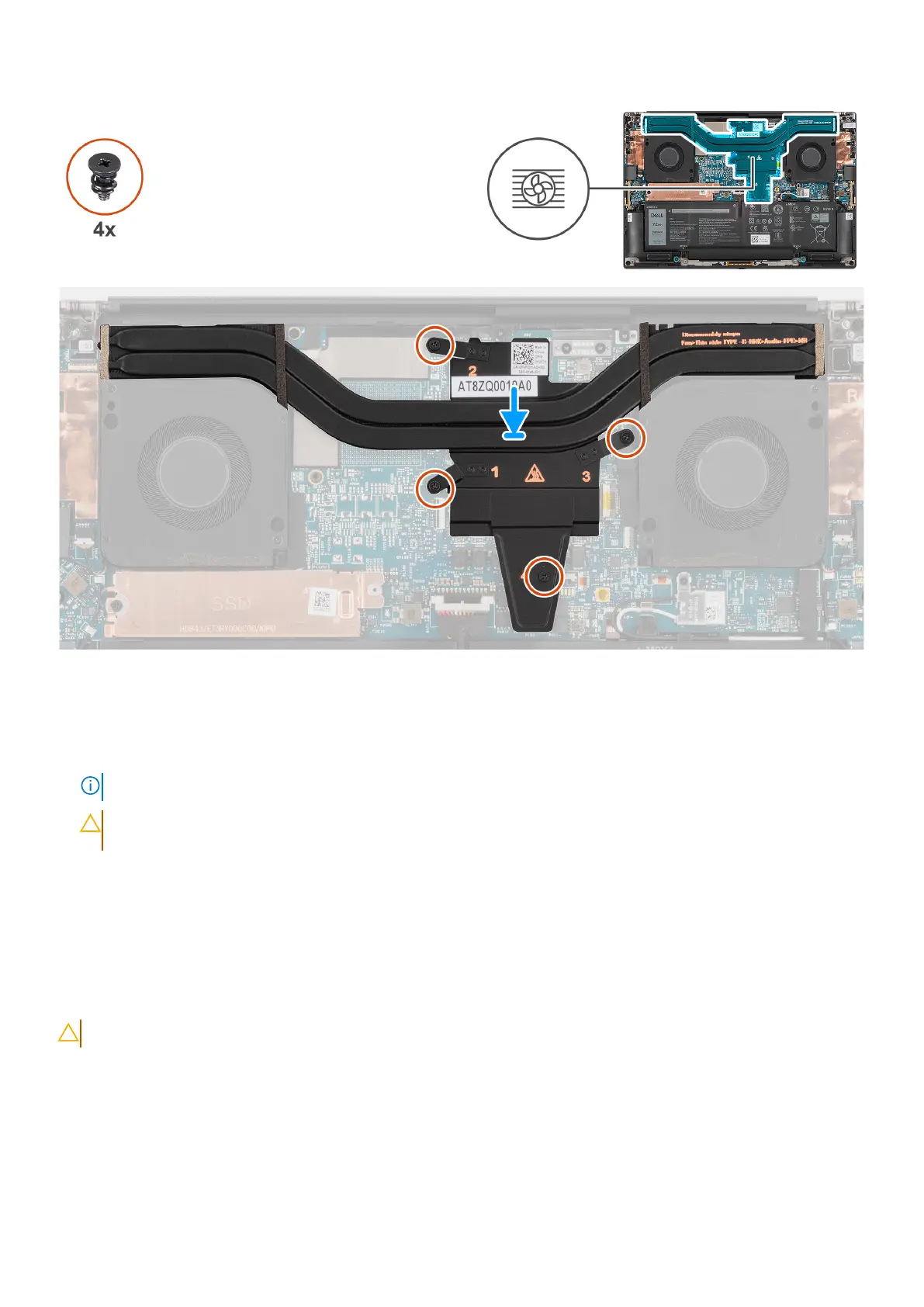
Figure 45. Installing the heat sink for integrated graphics
Steps
1. Align and insert the heat sink into its slot on the system board.
2. Tighten the four captive screws that secure the heat sink to the system board.
NOTE: Tighten the captive screws in the order that is marked on the heat sink next to the screws [1 > 2 > 3 > 4].
CAUTION: Do not over-torque the screws for the heat sink. Install the screws to a point where they are
firmly secured. Overtorquing the screws can flex and damage the system board.
Next steps
1. Install the base cover.
2. Follow the procedure in After working inside your computer.
Removing the heat sink for discrete graphics
CAUTION: The information in this removal section is intended for authorized service technicians only.
Prerequisites
1. Follow the procedure in Before working inside your computer.
2. Remove the base cover.
Removing and installing Field Replaceable Units (FRUs)
63












 To Next Page