Steps
1 Slide the ports on the system board into the slots on the palm-rest and keyboard assembly and align the screw holes on the system
board with the screw holes on the palm-rest and keyboard assembly.
2 Replace the six screws (M2x4) that secure the system board to the palm-rest and keyboard assembly.
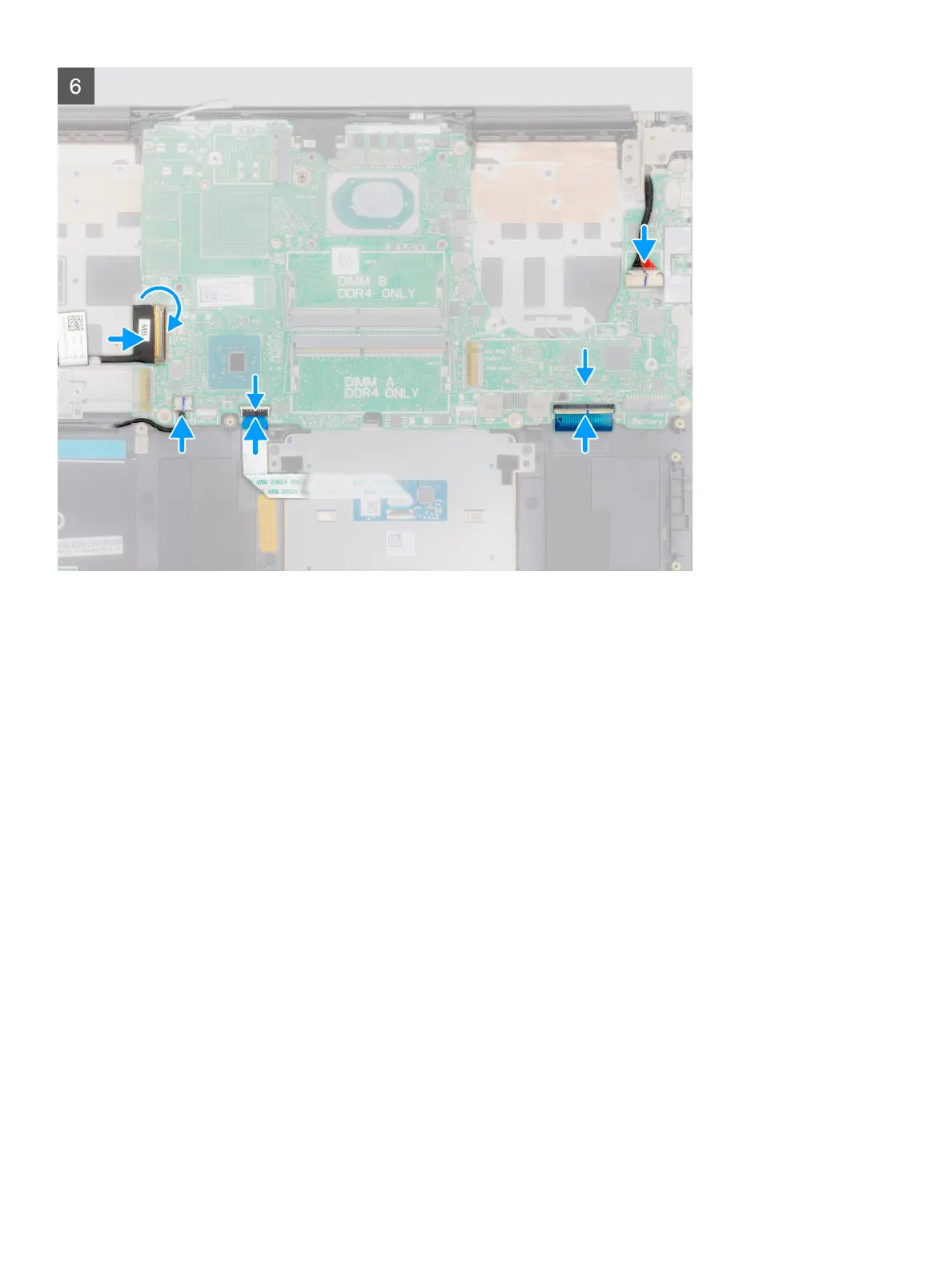
3 Connect the display cable on to the connector on the system board.
4 Adhere the tape that secures the display cable to the system board.
5 Replace the two screws (M2x5) that secure the USB Type-C port bracket to the system board.
6 Connect the keyboard-backlight cable to the system board and close the latch to secure the cable.
7 Connect the touchpad cable to the system board and close the latch to secure the cable.
8 Connect the speaker cable to the system board.
9 Connect the power-adapter cable to the system board.
10 Connect the I/O-board cable to the system board and close the latch to secure the cable.
Next step
1 Install the display assembly.
2 Install the memory module.
3 Install the heat sink.
4 Install the left-side fan.
5 Install the right-side fan.
6 Install the WLAN card.
7 Install the M.2 2230 solid-state drive.
8 Install the M.2 2280 solid-state drive.
9 Install the battery.
10 Install the base cover.
66
Disassembly and reassembly



 To Next Page