75
7 Installation
Connecting the communication card
Installation and Operation Manual M50A_260 RPI503M260000 Product version L and M EU V1.3 EN 2023-08-14
7.7.7 Connecting a PC via RS485 (optional)
Note that you must disconnect the PC from the
inverter again after commissioning!
Accessories Description
Standard USB/RS485 adapter
For connecting the PC to the
inverter.
Delta Service Software (DSS)
For changing the inverter set-
tings.
To select a suitable USB/RS485 adapter, please contact Delta
Customer Service.
You can download the DSS at https://solarsolutions.delta-emea.
com.
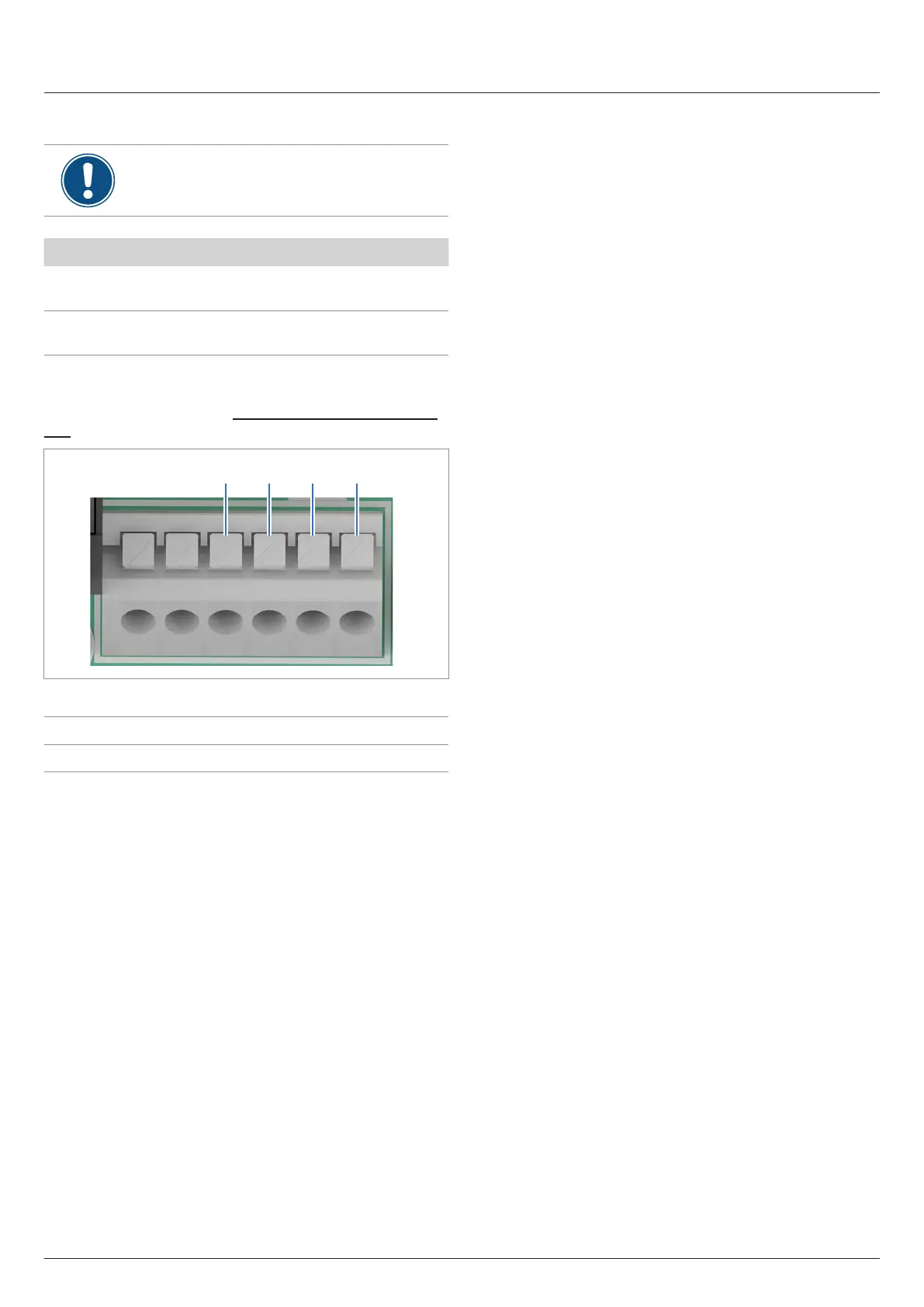
3 + +4 5 6
You can use terminal pairs 3+4 or 5+6 to connect the PC.
DATA+ Terminal 3 or 5
DATA– Terminal 4 or 6
Cable requirements
Bell wire. Both ends open.


 To Next Page