EasyManua.ls Logo

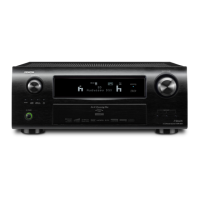
Denon AVR-4810CI - User Manual

Denon AVR-4810CI
145 pages
Print Icon
To Next Page IconTo Next Page
Loading...
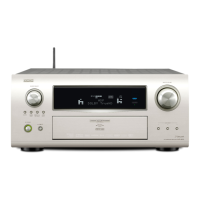
AV SURROUND RECEIVER
AVR-4810CI
Owner’s Manual
GraphicalUserInterface
Use this manual in combination with the
operating guide displayed on the GUI screen.
GUI Menu Operation (vpage 30)
GUI Menu Map (vpage 29)
Language (vpage 57)
Remote Control Unit Operations (vpage 108)

Table of Contents

Other manuals for Denon AVR-4810CI

Questions and Answers

  • V
    vpruittAug 20, 2025
    What to do if no sound is produced from Denon Stereo Receiver speakers?
    • J
      Jennifer WalkerAug 20, 2025
      If no sound is coming from your Denon Stereo Receiver speakers, check the following: * Verify connections to the input and playback devices and speaker cable connections. * Select the appropriate input source. * Adjust the master volume to a suitable level. * Cancel mute mode. * Disconnect headphones. * Select an input source with a digital input setting. * Match the terminal assigned to the digital input with the input mode.
  • J
    Julie HoffmanAug 22, 2025
    How to fix no HDMI audio from Denon Stereo Receiver speakers?
    • T
      taylorthomasAug 22, 2025
      To get HDMI audio from your Denon Stereo Receiver speakers, set "HDMI Audio Out" to "AMP".
  • C
    Connie RosalesAug 25, 2025
    What to do if my Denon Stereo Receiver has no picture with HDMI?
    • K
      Kathleen DiazAug 25, 2025
      If you're experiencing no picture with HDMI connections on your Denon Stereo Receiver: * Check the HDMI connector connections. * Select the input source assigned to the HDMI terminal at "HDMI". * Connect a monitor that is compatible with copyright protection (HDCP). * Ensure the output format of the connected player matches the TV’s compatible input formats. * If the display is incorrect when set to "Auto (Dual)", try setting it to "Monitor 1" or "Monitor 2".
  • A
    Austin GregoryAug 26, 2025
    Why does my Denon Stereo Receiver power switch off suddenly?
    • D
      Dennis CaldwellAug 26, 2025
      The protection circuit in your Denon Stereo Receiver may be activated due to a temperature rise in the internal parts. Switch off the power immediately and re-apply it after the unit's body temperature has sufficiently decreased. Also, ensure the receiver is installed in a location with good ventilation.
  • W
    williamskevinAug 28, 2025
    What to do if my Denon Stereo Receiver remote control doesn't work?
    • E
      Eric HaleAug 28, 2025
      If your Denon Stereo Receiver isn't responding to the remote control, try these steps: * Replace the batteries with new ones. * Ensure you're within 7 meters and a 30° angle of the receiver. * Remove any obstacles between the remote and the receiver. * Check the battery direction (+/-). * Move the unit away from strong light sources. * Verify the remote control IDs of the main unit and remote match. * Set the remote control unit’s function button properly.
  • C
    Caleb ManningAug 29, 2025
    How to fix a Denon Stereo Receiver when the display is off?
    • U
      umillerAug 30, 2025
      If the display on your Denon Stereo Receiver is off, check the following: * Set the "Dimmer" setting to something other than "OFF". * Cancel the PURE DIRECT mode, as the display turns off in this mode.
  • J
    jerryjonesAug 31, 2025
    Why does my Denon Stereo Receiver power switch off with red light flashing?
    • J
      johnsonjenniferSep 1, 2025
      The sudden power off of your Denon Stereo Receiver with a flashing red light (0.5-second intervals) indicates that you should use speakers with the specified impedance. Unplug the power cord, twist the core wires together tightly, or effect termination treatments, and then reconnect.
  • G
    Gary JohnsonSep 2, 2025
    What to do if no picture appears on my Denon Stereo Receiver?
    • M
      mbenitezSep 2, 2025
      If you're not getting a picture from your Denon Stereo Receiver, please check: * The connections of the video output terminals on the receiver and the input terminals on your TV. * The input setting for the input terminals of the TV connected to the receiver. * Cancel the PURE DIRECT mode. * If using high definition or progressive video signals, set the player to interlace signals (480i/576i). * Check the "Video Select" setting.
  • R
    robynwallaceSep 4, 2025
    Why won't my iPod play on my Denon Stereo Receiver?
    • K
      Katrina JonesSep 4, 2025
      If your iPod isn't playing on your Denon Stereo Receiver: * Connect to the terminal assigned to "iPod dock" and switch the input source. * Check the iPod connections. * Ensure the iPod's AC adapter is plugged into a power outlet.
  • J
    Jason MooreSep 6, 2025
    How to fix Denon Stereo Receiver when it does not operate properly?
    • M
      Michael MooreSep 6, 2025
      To fix a Denon Stereo Receiver that isn't operating properly, reset the microprocessor.

Denon AVR-4810CI Specifications

General IconGeneral
Channels9.2
Total Harmonic Distortion (THD)0.05%
Frequency Response10 Hz - 100 kHz
HDMI Inputs6
HDMI Outputs2
Response Bandwidth10 Hz - 100 kHz
Signal-To-Noise Ratio102 dB
Input Impedance47 kOhm
Input Sensitivity200 mV
HD RadioYes
HDMI SwitchingYes
Video UpconversionYes
Network ConnectivityYes
BluetoothNo
AirPlayNo
DLNA CertifiedYes
Radio TunerAM/FM
Audio Formats SupportedDolby TrueHD, DTS-HD Master Audio
Audio D/A Converter192kHz/24-bit
Video UpscalingYes
Supported Video Formats1080p
Dimensions (W x H x D)17.1 inches
Power Output (8 ohms)140 Watts

Related product manuals