EN-64 Original User Guide | Pedelec Impulse Evo / Impulse Evo Next Version 4
6.4.3.12 Impulse Evo (Smart) display: Navigation
indicator sound
Path: Settings | Device settings | Display | Navigation indicator sound
Proceed as follows if you want to be made aware of turns by an audible
sound:
1. Navigate to “Navigation indicator sound” as described in 6.4.1
Configuring settings in the main menu Page EN-54.
You can choose between:
Normal Quiet Quiet, short O
2. Use the
/ buttons to select the desired option. The selection is
highlighted. An audible sound is emitted at the same time - which
makes you aware of turns in the future too.
3. Conrmingtheaudiblesoundwith
returns you to sub-level 2.
6.4.3.13 Wheel circumference
Path: Settings | Device settings | Drive | Wheel circumference
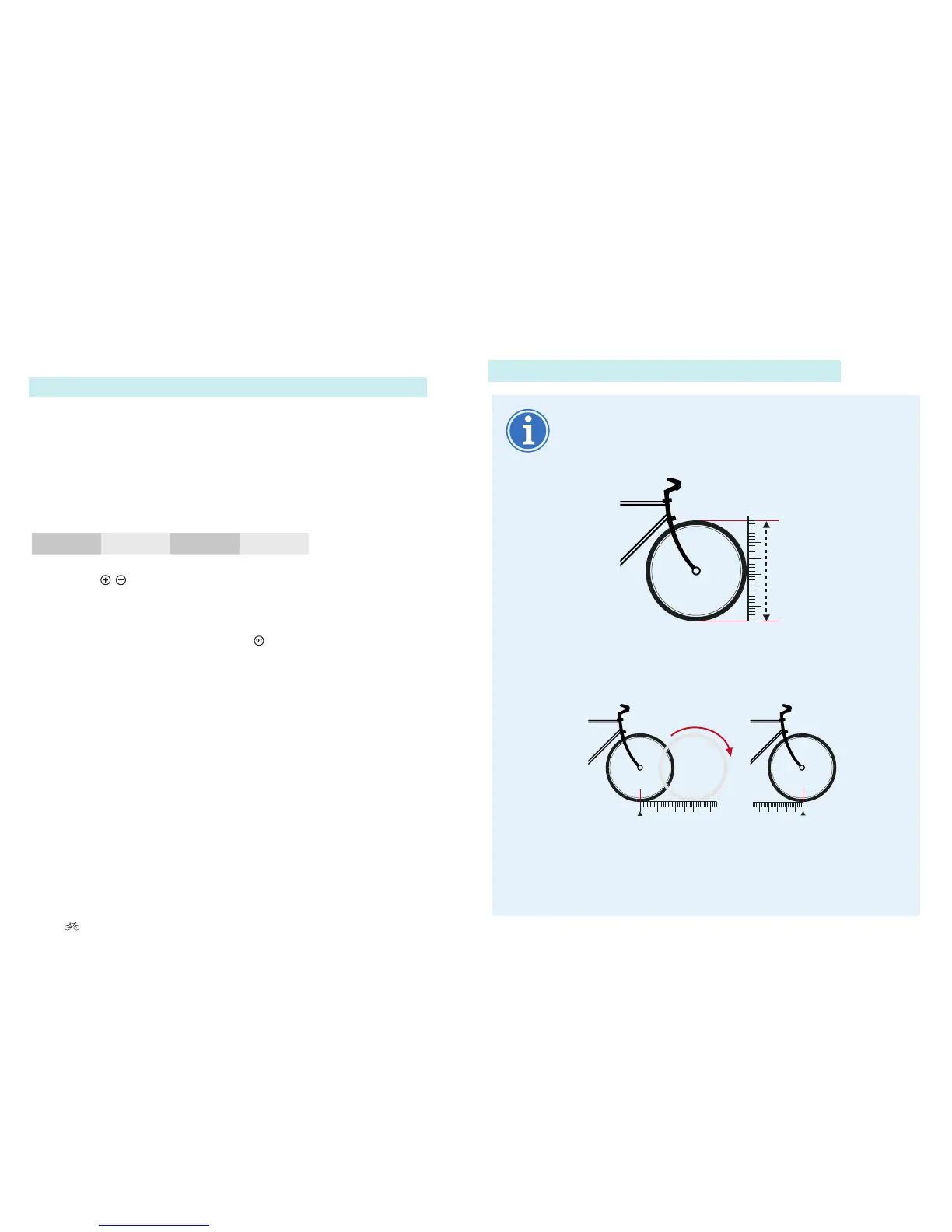
Ask your cycle dealer for the wheel circumference.
Alternatively, you can measure it yourself:
1. Wheel diameter in mm x 3.14 = wheel circumference in
mm.
mm x 3,14
2. Push the bike for one complete revolution of the wheel
and measure the distance travelled on the ground in
mm.
1x
Calculation
Tyre height x 2 + rim diameter x 3.14 mm = wheel
circumference
e.g.[(42x2)+622]x3.14mm=2,037mm











 To Next Page