TellerScan
®
TS240 User Manual
Rev 122013
Page | 22
Replacing the SADR Discrimination Roller
Note: The ‘SADR Discrimination’ roller is user replaceable. Typically only needed for scanners that have been
in service for longer periods of time or higher volume remote deposit or teller windows. (PN: 151161-01 -
available at www.digitalcheck.com)
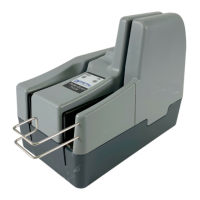
SADR Roller – Part Number 151161-01
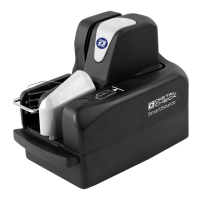
Step 1: Remove the ‘Center’ and ‘Outer’ scanner covers to provide access to the ‘SADR Discrimination’ roller.
See the ‘Accessing the TellerScan TS240’ section for additional information on how to open up and access the
scanner.
Step 2: Lift or pull up on the ‘SADR Discrimination’ roller to remove. There are no tools required for removal.
Step 3: Replace the worn ‘SADR Discrimination’ roller with a new roller. The roller has a ‘D’ shape to it and will
fit on the metal shaft in only one direction. Orient the roller to the correct position and push down on the roller
until it comes to a stop.


 To Next Page