The Recalibrate Touch Screen button does not appear when you are
using the Remote Control Application.
3. A touch screen target (calibration point) appears in the upper-left
corner of the screen.
4. Place and hold your pointing device as close to the center of the
target as possible.
5. When the word “Release” appears, then lift up your pointing
device and move to the next calibration point to appear.
6. Repeat this process for all of the calibration points to appear.
7. Move you finger around the screen to verify the mouse cursor
tracks your finger movement, then select “Apply”.
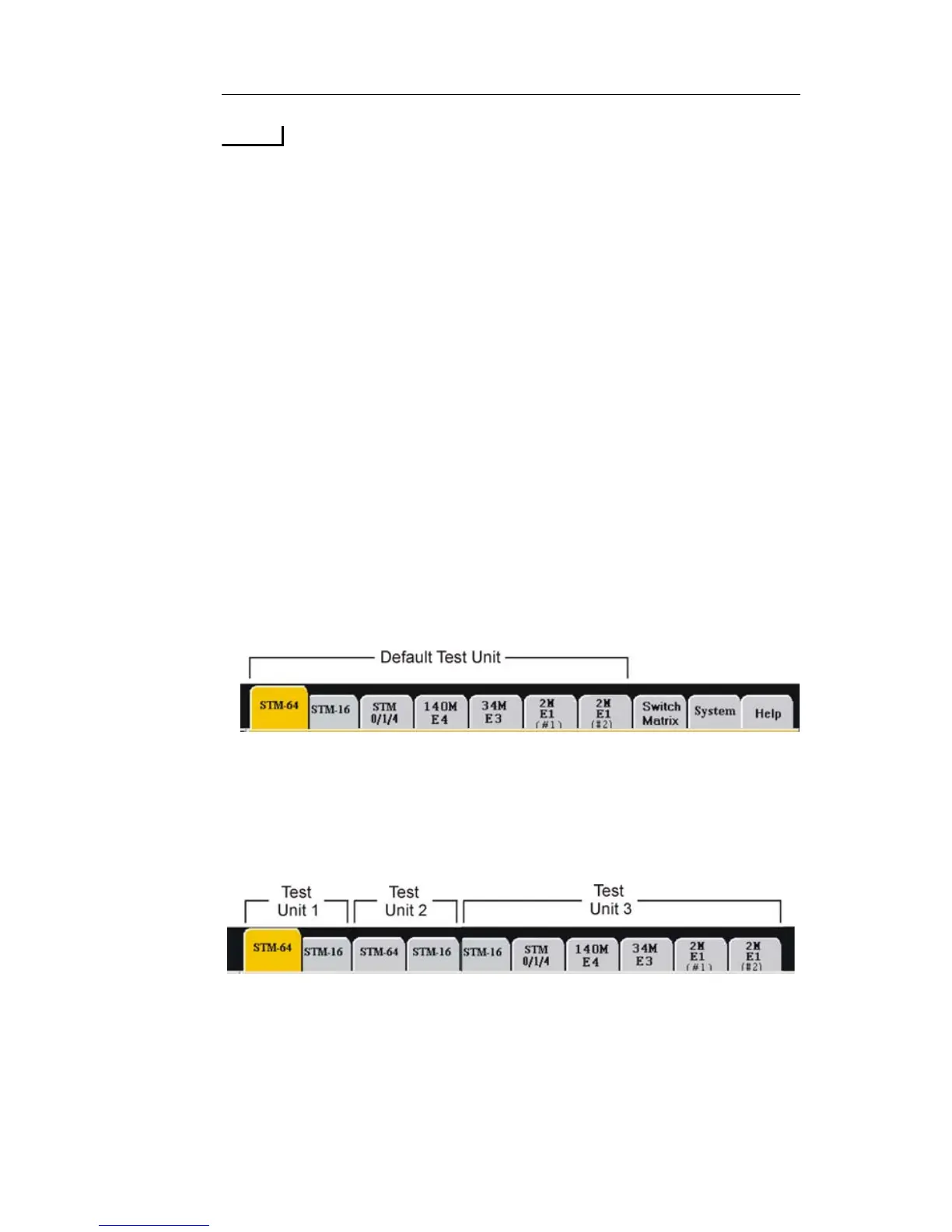
Understanding Test Units
A Test Unit is a series of adjacent Circuit Packs and/or Protocol
Processors, installed in one NIC chassis, which can perform an Add/
Drop Mapping configuration. The Test Unit is based on a Circuit Pack's
internal addressing and provides Add/Drop Mapping functionality
between higher speed and lower speed Protocol Processors.
A NIC chassis may contain multiple tabs ranging from 40G down to
1.5M. When this type of configuration occurs, the Test Unit begins at
the left with higher speed processor, and each lower speed processor
drops down to the right.
When a second instance of a higher speed circuit pack is encountered, it
is considered the beginning of a second Test Unit. The image displayed
above shows a NIC that has 10 protocol tabs, representing 3 individual
Test Units.



 To Next Page