NIC Quick Reference Guide
31
Using the Touch Screen
To use the touch screen, place your finger directly onto the screen to
select tabs and buttons associated with a specific function.
A blunt pointing device such as a stylus can also be used to select touch
screen functions. However, avoid using sharp instruments, such as pen
tips, pencil tips, keys, and paper clips. These objects may scratch and
mark the touch screen.
The use of a USB mouse is also permitted to move the cursor and
objects on the screen can be selected by the left (or default) mouse but-
ton.
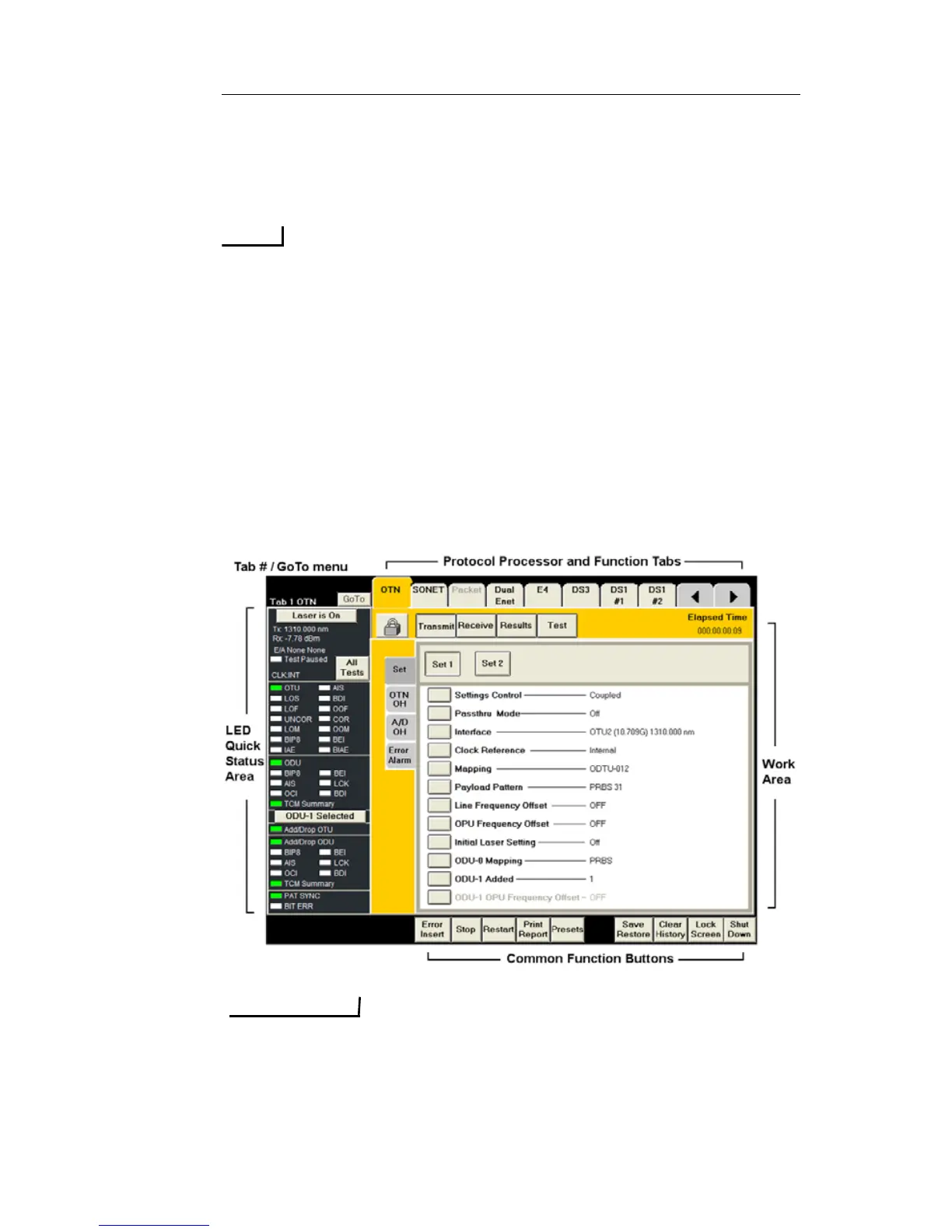
Touch Screen Components
The touch screen is the user interface to the unit. The following is an
example of the NIC Plus Graphical User Interface (GUI).
The illustrations that appear in this document are used as examples to assist
you through a procedure. Because of product enhancements, these images
may not show all items that appear on your touch screen.


 To Next Page
 Loading...