Digitize Inc. System Programming
700271-0001 Rev. G 05/13 19
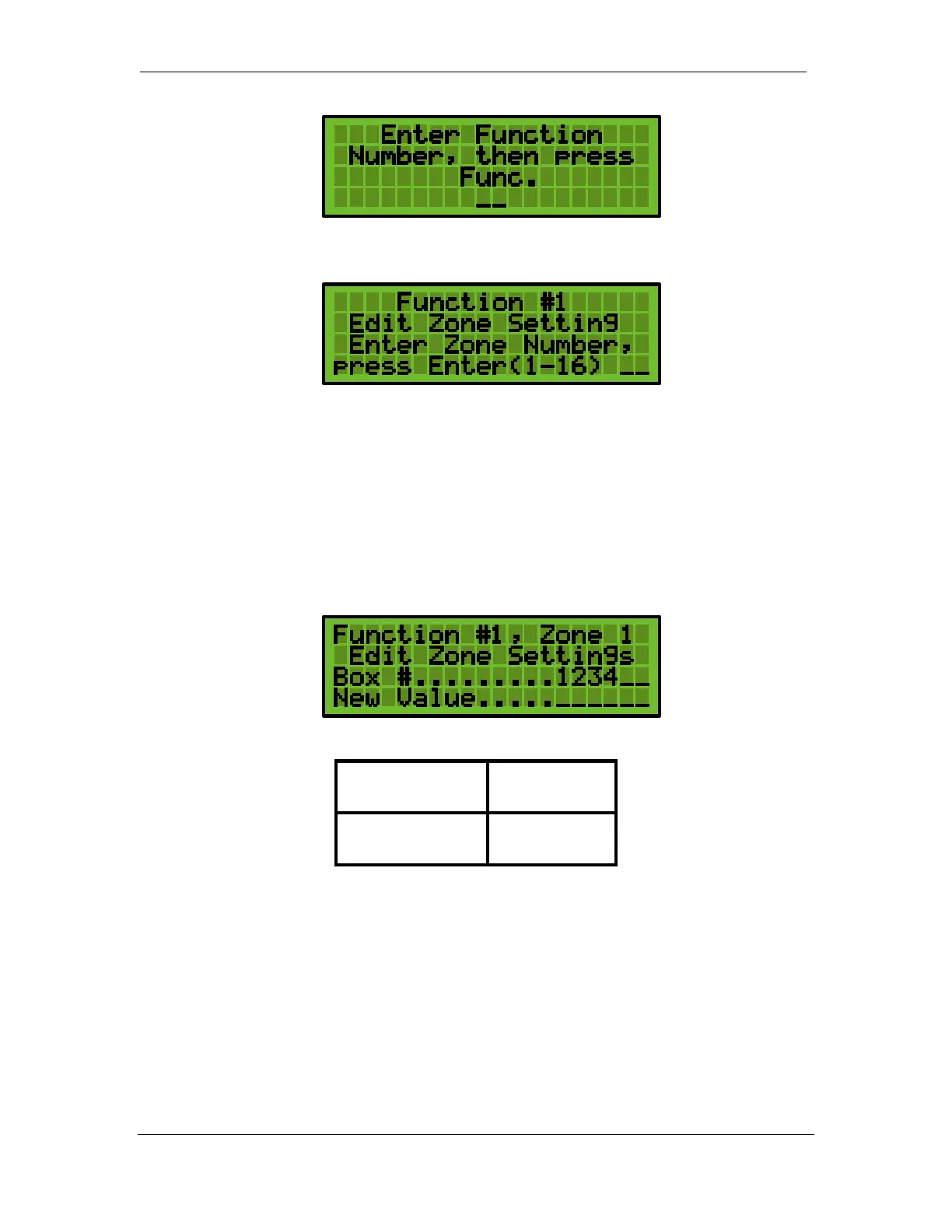
3. Enter the Zone Number. For the example, the zone number is 1. Press one (1), then
ENTER.
4. Use the Up Arrow to sequence through each of the 20 settings.
5. Press CLR to exit. The display will also automatically clear if no entry is made within 60
seconds.
5.4.1 Setting 1 Zone Box Number
Each zone of the DET-16 panel can be programmed with a completely independent box
number or all the same box number. The box number can be up to 8 digits long. For
example: Zone 1 can be programmed with box number 2222 while Zone 7 can be
programmed with 44567.
Default Settings are:
Zones 1 – 8 123
Zones 9 – 16 124
5.4.2 Setting 2 Zone Alarm Code
Each zone of the DET-16 panel can be programmed with a completely independent Alarm
Code. The Zone Alarm Code can be set from 0 – 9. When a zone is tripped into Alarm, the
DET-16 will first transmit the box number followed by the Zone Alarm Code. For example:
Zone 1 is placed in Alarm, the panel would send 22221. The “1” is the alarm code.


 To Next Page