Det-16 Programming Utility Digitize Inc
38 700271-0001 Rev. G 05/13
Box Settings – opens a new window for editing various settings common to the entire Det-
16 panel, such as AC Power Fail and Low Battery.
6.3.6 Zone Settings Window
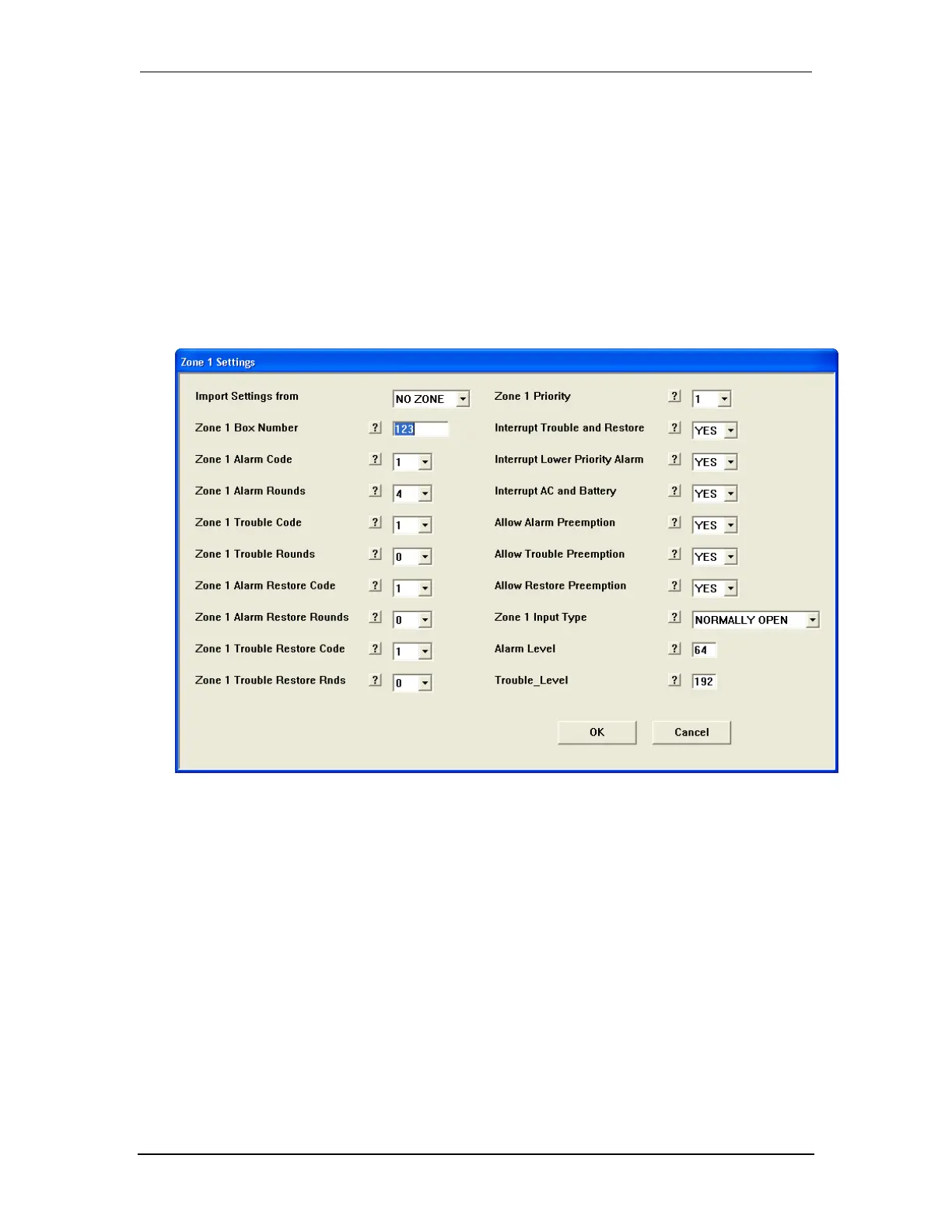
The Zone Settings Window permits editing settings specific for each of the sixteen zones.
The upper left corner displays which zone is being edited. Help information for each of the
settings is available by clicking the “?” button. Entries for each of the zone settings are
limited to appropriate values. Press OK to accept the new settings or Cancel to exit the
window with the settings unchanged.
6.3.7 Box Settings Window
The Box Settings Window permits editing settings common for the entire Det-16 panel. The
upper left corner displays “Box Settings”. Help information for each of the settings is
available by clicking the “?” button. Entries for each of the settings are limited to appropriate
values. Press OK to accept the new settings or Cancel to exit the window with the settings
unchanged.


 To Next Page